ZBrushCentral

Smart Re-Sym

Hi guys, I’ve been sculpting a character recently. I’ve just finished working on the arm which I had masked so I couldn’t see the rest of the figure.

The problem is at some stage without me noticing I had moved the position of the arm probably using the move (shortcut W) tool by accident.

Well I ended up having to smooth the edges out as it had obviously moved forward a little.

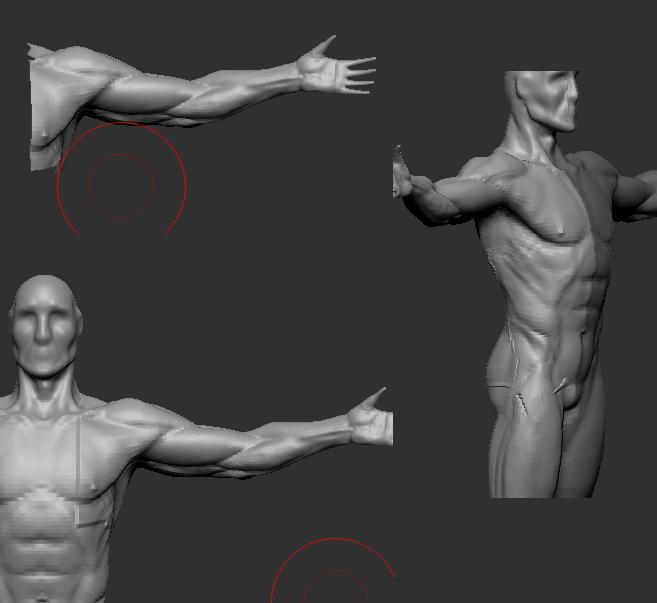
Now when I try to Smart Re-Sym, the other arm gets the detail the mesh goes all weird with faces being distorted and such.

Does anyone know how to fix this? And if i just smooth out the edges will there be problems when I export the figure back onto Maya?
What happens if you use Smart ReSym at level 1 and then work your way up one level at a time?

I still get the errors.

Also what I was talking about is called transpose. (Now I know).

Smart re-syming up each level I get horrible lines, and in some places the mesh is distorted and stretched. I just need to figure out if theres an option to delete info on what was moved. Like setting it back to its default.

This is what I mean. From sculpting, to then showing the full model realizing I have transposed it. Then after smoothing out the edges (as I don’t know any other way to solve the problem) then I smart re-symed it, and I get these horrible results.

Any idea how to solve it?

Attachments

Transpose problem 1.JPG

Okay I think iv fixed it, but im not sure how the model will react when I add it back into Maya as points in the arm were moved marginally. (Or does it not matter?) - Just checked and it doesn’t seem to matter. (I’m new to Zbrush :rolleyes:)

I ended up smoothing the bad edge to blend in then rather than just using the smart re-sym. I had to start from 1st SubDiv working way up re-syming then smart re-syming.

I went a few stages back and noticed my smart resyming was acting weird anyway.

p.s. Aurick cheers for helping man.