ZBrushCentral

Slice Curve Brush/ Dynamesh Problem

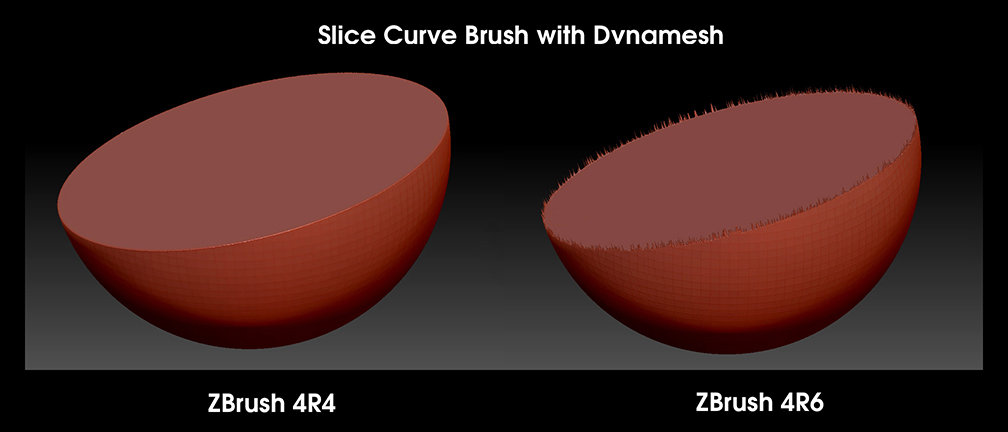
Is anyone else having problems getting clean results when using the SLICE CURVE BRUSH on a DYNAMESH in any version of ZBrush above 4R4?
When I slice a dynamesh in 4R4, it looks great every time. When I try it in 4R5, or 4R6, I get jagged edges, and even weird distortions on the mesh. I’ve done some research on the subject, tried 2 of the suggested solutions with very little success. One was to turn on polypaint before re-dynameshing. The other was to turn off the project button. Maybe there is a fix I’m not aware of. Anybody else having this problem?

(NOTE: I’m on a Mac. Not using Mavericks yet.)

Attachments
Slice Curve Brush & Dynamesh.jpg

Took me a while to figure that one out myself … switch off “project” in the Dynamesh menu :wink:

ooops didn’t read the whole post … well what I did before I knew about project and Polypaint was to Dynamesh 2 times. That kinda solved the prob.

alas … There’s is one more thing you could try. ZB 4 R6 creates in this case two more “mini” Polygroups around the cut. (No clue as to WHY they have changed that) Go to Polygroups, raise the Maximum angle slider to 90 and click on group by normals. HTH

INHO slice curve and dynamesh in general has been a pain since 4R6. I hope they fix it soon :slight_smile:

Hmmm just checked it again … polypaint on, groups on, project off - before you redynamesh and the cut is good. Not as good as in R4 tho … but nothing like you have there. Sure you don’t have any internal geo or shells?

I appreciate all your input, guys. I’ve been trying to do hard surface work. I’ve been experimenting with all kinds of geometry, dsoellbuster. I’ve tried simple shapes, more complex shapes. Tried it with turning on polypaint, and turning off project. I get unpredictable results in 4R6 every time I use it. Sometimes it works, other times, my geometry gets all messed up. I have to agree with Gordon. 4R4 is so much more reliable, and gives much cleaner results. I’ve found that to be true with the layer brush, too. It isn’t as smooth as it was in previous versions. So, I made my own edited version. For me it works better anyway.

I have always had consistent results in 4R6.

new-4.JPG

I have to go do something right now. I will try your suggestions later this evening, zber2. I’ll let you know how it works out.

I tried your method, zber 2. It worked perfectly on just a plain old sphere. Everything else, not so much. All kinds of weird redraw issues, and jaggies. I much prefer 4R4 for slicing dynameshes. I don’t have to go through all those extra steps in 4R4, and I get clean, predictable results when I slice into dynameshes. Something funky is going on in 4R6 as far as dynamesh and slice curve is concerned.

Hard Surface.jpg

Successful curve slice test done in 4R4.