ZBrushCentral

size presure in 3.5

Hi,

In zb3.1 we had under preferences, the option to set the size presure to whatever value, meaning 0 won’t affect the size of the brush, and 1 the size of the brush will be totally affected by the presure of the wacom.
In 3.5 however, this doesn’t happen, I have to go to the brush menu, tablet presure, and change it there, for each of the brushes im using, and doing it every time i start zb3.5…is there any way to either store those changes of make the presure work like in 3.1?

cheers
I’m not sure if this is what your after or not , but, got to Preferences / Tablet and you can change size sensitivity there from 0 to 1, but you have to then go to Preferences / Config and click “Store Config” button to keep settings so they are there every time you start Zbrush. Hope this was what you were after.

HEY ZBER2, THANKS For the reply, that is the way i used to do it in zb3.1, but in 3.5 doesn´t work like that anymore, you have the preferences as you said, but it does nothing changing the value…any help? cheers

I just tried it and I see what you mean. When you set it in Preferences, it doesn’t matter if it’s at 0 or 1 Size sensitivity, it still does the same thing. I presume you are using a Wacom. Have you tried making adjustments in the “Wacom Tablet Properties” to see if that gets the settings were you want them ? If you want different settings with each brush then I really don’t know if there is a way to do that and save the setting for each brush. Sorry I couldn’t be more help. Maybe support will chime in on this and give a solution.

I have been trying to find a setting for this as well. No luck. If you do not mind relying on a script for setting the tablet settings of each brush, I might have one ready in a little while. Let me know if there are any other brush settings you want to set globally. Right now I am just adding the Tablet Pressure curves.

Mark

can’t you just change the settings in the brush palette and then overwrite the original brush like we all had to do with the smooth brush in 3.1?

I also prefer the 3.1 for size pressure,having to change it for every brush is a bit boring

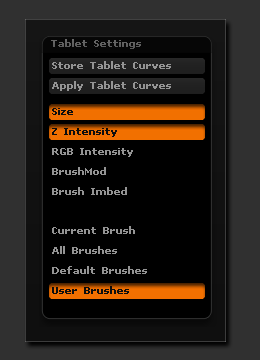
I wrote the following plugin mainly to test various Tablet Pressure curves with various brushes and became a little tired of loading the curves for each brush. It is not intended as a global tablet property adjustment, like the old 3.1 Tablet settings under preferences. But maybe someone here finds it useful.

[attach=158498]ZBC_TabletSettingsPalette.gif[/attach] Installation: Unzip the .zip file with folders intact into the ../ZStartup/Zplugs folder of your ZBrush 3.5R2 installation. The plugin will be available under Zplugin > Tablet Settings the next time you start ZBrush. Usage: Select a brush that has Tablet Pressure curves you want to use and press Store Tablet Curves. The switches determine which curves are stored (Size / Z Intensity / RGB Intensity / Brushmod / Brush Imbed). Select which group of brushes to affect (Current / All / Default / User) and press Apply Tablet Curves. The switches determine which curves are applied (Size / Z Intensity / RGB Intensity / Brushmod / Brush Imbed). Notes: User brushes are considered to be brush number 97 and up. The reason for this is that there are 97 brush presets in the ZData/BrushPresets folder (the brush number is 0 based). The curves and switches are stored from session to session. With a polymesh tool selected the modeling brushes are affected. With a Zsphere selected the zsketch brushes are affected. irregardless of current tool the smoothing brushes are not affected. As I said the plugin is not really intended for day to day usage but just for my own testing. Going further with this could possibly be a waste of time if we get 3.5 R3 next week (pretty please :)).

Edit: Don’t be alarmed when your ZBrush UI goes ballistic. I could not hide the actions as it messed up the curve display (not updating properly).

Attachments

ZBC_TabletSettingsPalette.gif