ZBrushCentral

Size of map while polypainting

Hello,

Is there a way to increase resolution while polypainting? I have divided my model to level 6, and I still get pixelated results while painting on it.

The map size is set to 1024x1024, and this may pose a problem, and I cant seem to find a way to set initial size larger than 1024x1024. However, after painting on 1024x1024, i can convert ti to higher resolution, but ofcourse, it still stays pixelated.

Thanks in advance!

:wink:

Hi there.
When you polypaint you are just assigning color to the polygons. It doesn’t matter what map res are you using. If you want more resolution for polypaint
because it is too ‘pixelated’ and your computer can’t handle more subdivs it’s
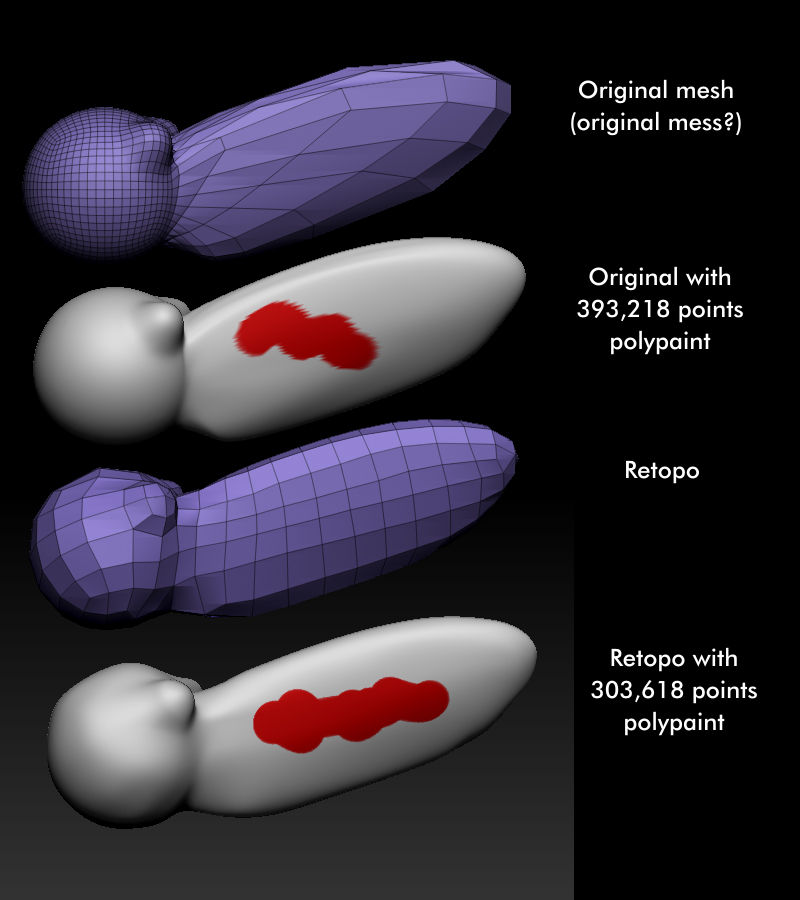
because you stretched the mesh too much. I think you should retopo your
model adding more polygons where is needed.
The image map size defines the size of the map created when you do a
NEW FROM POLYPAINT map and zbrush dumps the polypaint information into
a new image bitmap. below polypaint menu you will find UV MAP menu and there you can set the size of the map that will be created.

See this example, i hope it helps:

Attachments

example (00000).jpg

Thank you! This was really helpfull! :smiley:

glad to help :wink: