ZBrushCentral

Simon's Sketchbook

I got to start somewhere!

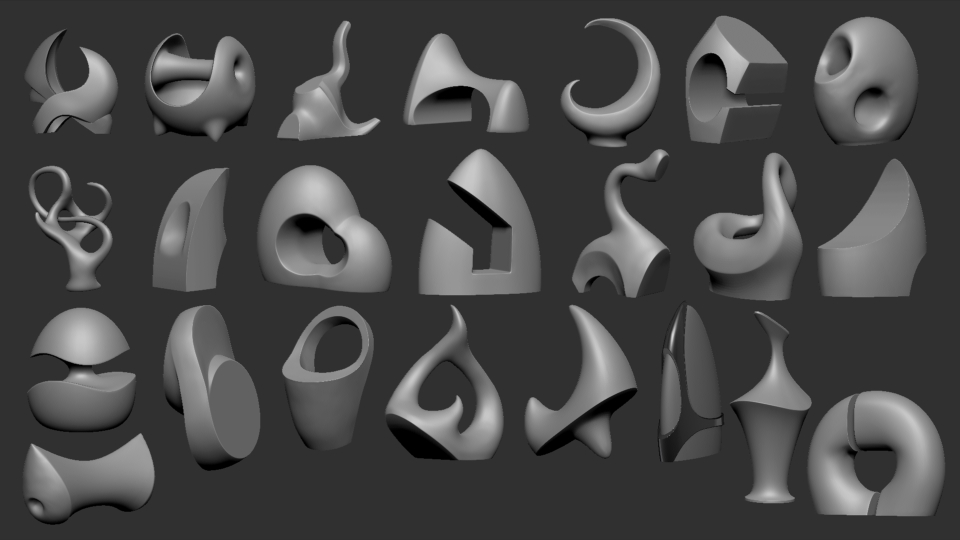
Hi guys, I’ll start off with these sculptures I have been working on when I can’t think of what to work on :confused:. Some are experiments with different techniques or workflows while others are random inspirations from my sketchbooks or frustration.

Keyshot renders can be found on my ArtStation page https://www.artstation.com/artwork/YJ4EY

Turntables can be found on my YouTube channel [youtubehd]OZubBoypnGs[/youtubehd]

Attachments

ZBrush Sculptures Aug 2016.jpg

There cool to look at. Fun stuff! Kudos.

very abstract, do you have any workflow tips?

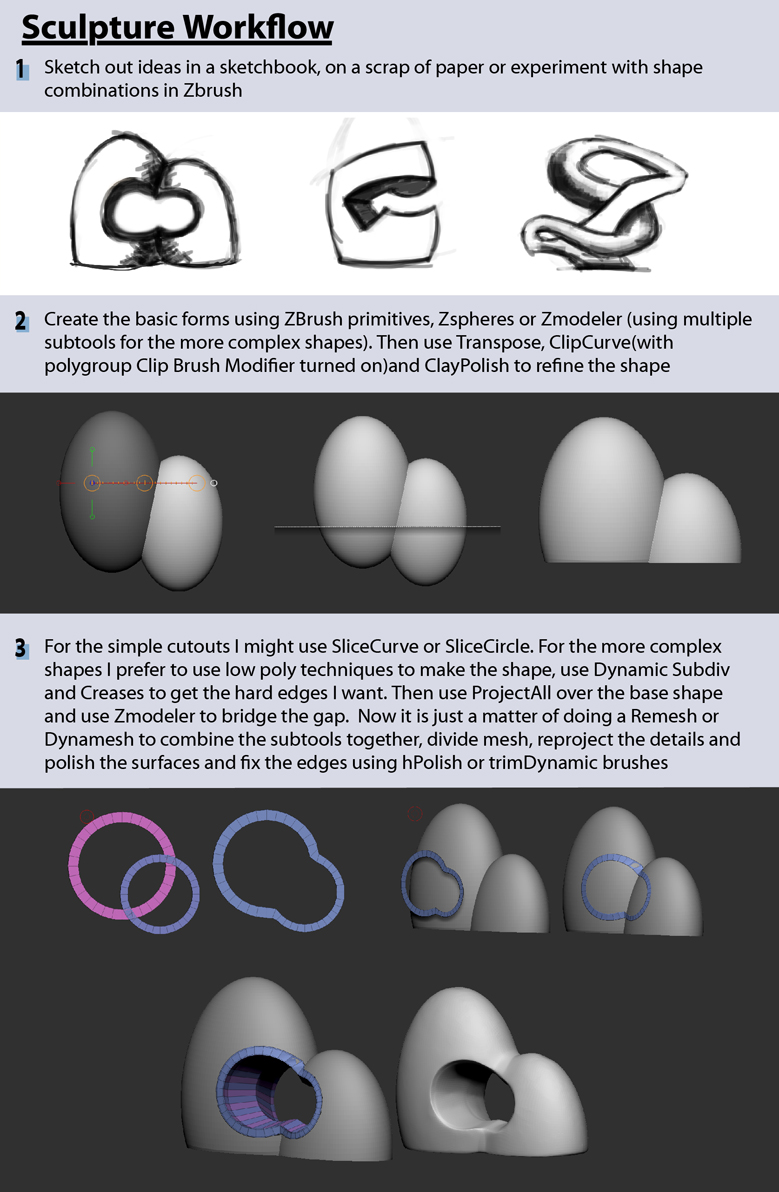
SculptureWorkflow01.jpg

Attachments

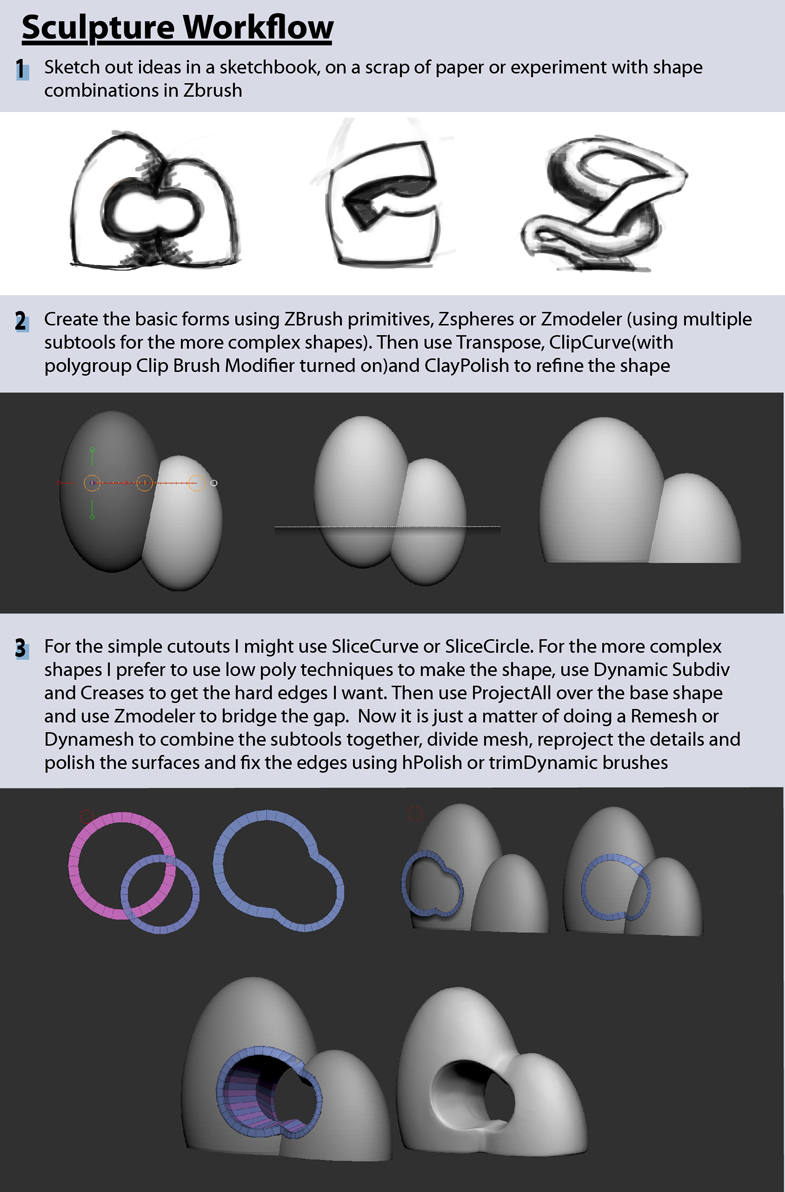
SculptureWorkflow01.jpg

thank you! very much appreciated, I will post my results :wink:

then use projectall over the base shapr and use zmodeler to bridge the gap

i can’t understand how to do this?

Yeah, sorry about that. I just read it again and the explanation is pretty lazy.

So after I made the hole shape using the top poly loops of two cylinders, deleting the overlapping sections and joining the two pieces together using Zmodeler bridge two edges. I would position this subtool over the two spheres I made earlier and when I am happy with the position I use Subtool>Project>ProjectAll on the Tool pallet to make this shape follow the surface of the spheres (making any adjustments needed and re projecting).

If I want the hole to go through to the other side of the spheres I need to duplicate the hole and project it on the opposite side using the same method. Now I have two sets of poly loops with the same number of polygons which makes using Zmodeler>Edges>Bridge>Two Holes to create the inner surface of the hole.

After that I used Masking and Polygroups to hide the polygons that cover the hole on the two spheres (a lot of back and forth between hiding/unhiding of polygons while holding CTRL+SHIFT using SelectRectangle). Now I can Del Hidden and Merge my subtools so I can either Dynamesh or Remesh to combine these individual pieces into one single mesh.

Hope that makes more sense

I’m just curious. What was the most dificult one? Awesome job, thanks!

sculpture Turn around.jpg
Probably this one, getting the two pieces of the sphere to merge into each other with the hard edges and flat surfaces I wanted was pretty tricky. I used Zsphere>Topology to make low poly surfaces to make it easy to manipulate into the curves I wanted.

HelmetSketch.jpg
Working on a helmet design to practice hard surface techniques. I need to keep refining the top of the helmet and experiment with adding different details.

HelmetSketch2.jpg
Refining the structure of the helmet by appending a Sphere, projecting on the basic structure, dividing, smoothing and sculpting out some new ideas.

MarioHeadWIP01.jpg


A bit of Mario Maker fan art. The plan is to add some accessories like a pow block or koopa shell, maybe swap out the hat for a shell helmet, etc. I just wanted to get a quick Mario done to get started.

Usopp from One Piece after the 2 year split. Did this as a warm up but I will probably come back later and finish him off.

ZbrushPottery.jpg
Experimenting with mimicking pottery techniques in Zbrush using radial symmetry with a combination of brushes and Dynamesh/Zremesh.

Still experimenting with this technique. I tried using Extract to create the wall thickness, which turns out to be a quick and easy method. Trying to get a workflow down so I can create these faster.
ZbrushPottery2.jpg

FriedRiceFullcolour.jpg

Fried rice anyone? I had to fill the bowls with something. So why not fill it with Nanomesh :smiley:

https://www.artstation.com/artwork/oz5ww

ZBrush Sculptures Sep 2016.jpg
Still playing around with these sculptures and uploading keyshot renders on my ArtStation page https://www.artstation.com/artwork/YJ4EY

I really like your sculptures. They do seem like stuff you could see in a park or something.

I also really appreciate your tutorial. I had never thought of doing hole geometry that way.

I look forward to more Usopp fan art as you get around to it.

Thanks for your Sculpts.

Thanks CapnTRJ, Ussop still needs a lot of work. I tried posing him our roughly (real rough trying different techniques) to work out what pose I want for the final piece before I spend too much time detailing him. Not sure what type of pose I’ll go for but I do know that I want to include items that his younger self (slingshot, Sogeking mask, googles etc) used as details for the base.
Usopp02.jpgUsopp03.jpg

Dodger.jpg
Threw this together last night after watching way too much of the Co Optional Podcast Animated on Youtube. I am bit of a fan of little web animations like that one. :stuck_out_tongue: