ZBrushCentral

Shortcut key to offset canvas in MAC? [Answered]

I have learned from Pixologic website that the shortcut key to offset canvas is a tilde key.

However I’m using a mac with Japanese keyboard layout and pressing the tilde key does not work.
I have tried everything using US, Finnish and Japanese language setting.

Is it possible to remap this feature to other key than tilde?

Please help.
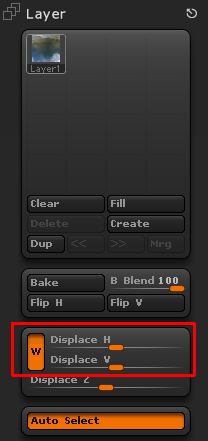
It’s not possible to remap the function, and I’m afraid I can’t help you on suggesting which key for your keyboard will work. (Someone else may though…)

However, although a little less convenient, you can get the same result by using the Displace H and Displace V sliders in the Layer palette. Make sure you have the W button (Wrap mode) turned on.

Attachments

WrapMode.jpg

Thanks! That’s very useful!