Creating a mesh in shadow box with masking tools. Was going well but now if I add any large shape as shown in the picture below it takes away geo from the side. Not sure what’s going on here?
Attachments
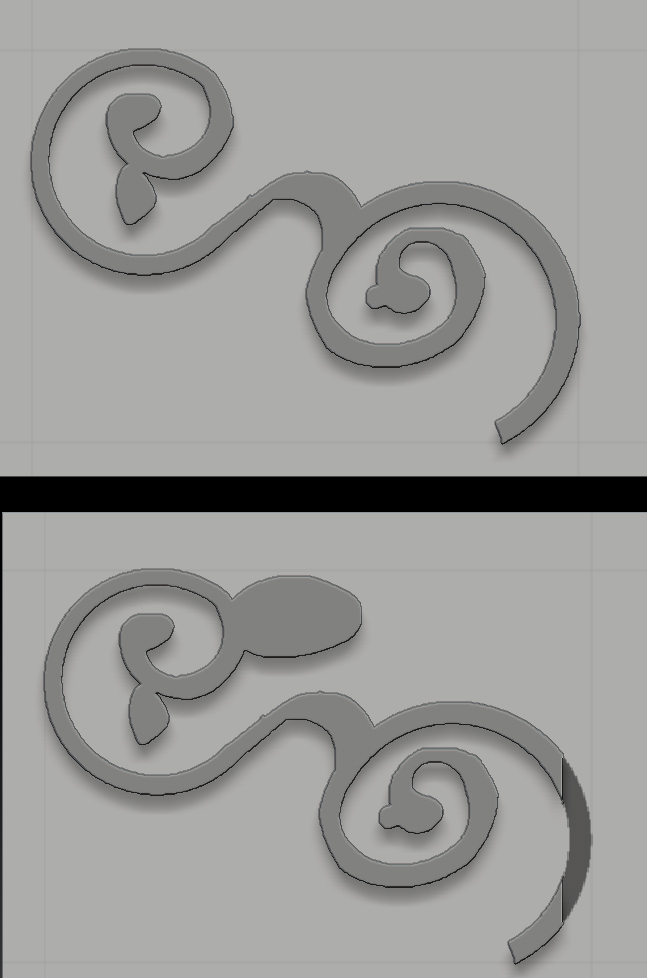
Creating a mesh in shadow box with masking tools. Was going well but now if I add any large shape as shown in the picture below it takes away geo from the side. Not sure what’s going on here?
what do your other 2 masks look like? are you cutting that off in one of the views?
Looks highly probable 
Hmmmm, I’m confused (new to shadowbox). I do have 3 planes but am only modeling on one side with no references. My other 2 masks?
You have to have something masked on at least 2 views, the masking on the bottom? may not extend far enough.
http://docs.pixologic.com/user-guide/3d-modeling/modeling-basics/creating-meshes/shadowbox/
Yep, I forgot to add the texture that shows which plane you’re facing. I can’t seem to fix this now. If I’ve already masked out a shape but in the wrong axis is there a way to turn the mesh around so I face the back plate without breaking anything? or will I have to start again?
You are facing the design. Mask a straight line across the bottom to your desired thickness and you should be okay.
Ah I see, so it being a a thick shape was causing the problem. Instead of trimming it into a thin shape at the end you should do it earlier on. Ok, thanks again Beta 