ZBrushCentral

Several Questions related to bad mesh, Hair and general advice

Dearest Zbrush Community,

I have had several questions that I’ve wanted to get answered but klept in the back of my mid, thinking that time would resolve them.

Firstly:

  1. I have the mesh that has these bad problems:
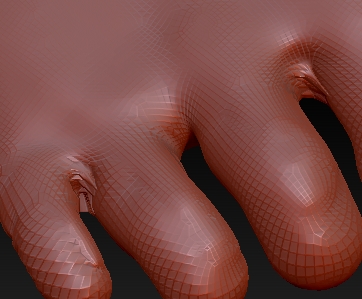
    Capture1.jpeg

  2. Thirdly, I need to reduce as much file size of my models as possible. So I’ll definately use the decimation master plugin. However, I’d also like to know that if I merge all the subtools together, will that reduce the file size of the model? Are there any more ways to reduce model file size?

  3. On the topic of reducing memory size, will creating hair using Zbrush result in a lower model data size, versus using blender hair particles, etc?

  4. Any general advice on reducing model file size would be really apreciated.

kind regards,
Ash

Attachments
Capture2.jpeg

Capture3.jpeg

bumping with funny picture
ko.jpg

Let me draw your attention to one of your other posts here. People tried to help you in that post, but couldn’t find a solution. You resolved the issue yourself then wrote in red capital letters “ISSUE RESOLVED” and deleted the images that you had posted. Even after two people asked you how you resolved the issue, you still didn’t respond. Other people doing a search for a solution to the same problem could have benefited from your solution, but you refused to post it. Now you expect people to help you again? Will you do the same with this post?

Apologies. I have now explained how I resolved the issue in the previous post. Again apologies and I’m gonna try an start a new slate.

As regards for this issue, I’ve spent quite a long time trying to sort out.
Again any help much appreciated.

tool>“r” near the top will clean out your palette.

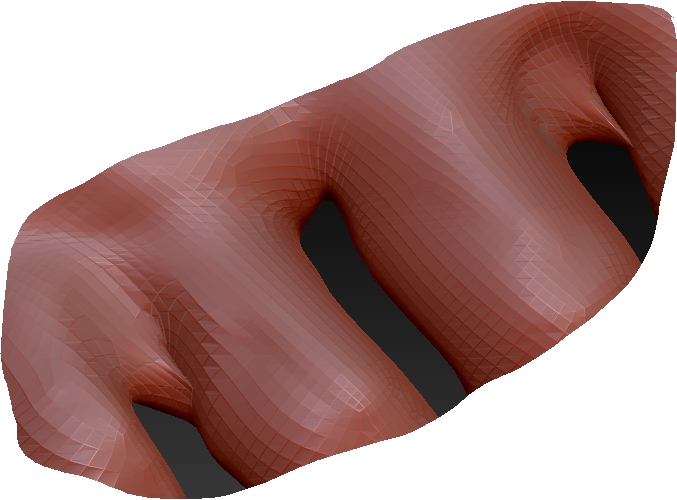
as to the dirty geo that you’ve sculpted, you’re going to have to smooth out those areas to fix the problem. You may also have to do some masking as well.

T.hanks so much guys its worked. Btw what do you make of sorted out file sizes?

Also when you work with such forms, details or …
Switch ON the backface masking from Brush palette!

About the file size. What do you mean ? File size of exported mesh, final mesh, to other appz, or file size of the ZTL file you work on ?

If the file size on the ZTL, before save swtich all sub tool to the lowest subD level. This reduces the file size a little…

When I mean file size I refer to the final model size. I ask because for rendering I’ll need to reduce the memory size of the model.

Also, how do I install new matcaps that have been downloaded from Zbrush Downloads area?