Dynamesh…
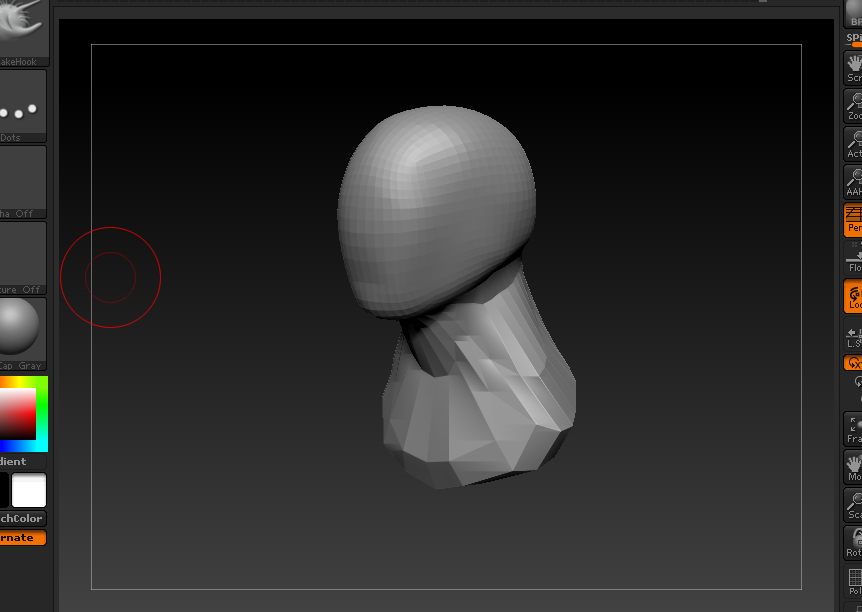
If you are not in Dynamesh mode at this point you should be able to just push the dynamesh button which can be found in the Geometry tab. 128 resolution will work for now, but generally I start at 64 while creating the initial form like you have in the image. Leaving Dynamesh active enables you to sculpt and pull out sections of the mesh. It will stretch like the neck and shoulders are in the image, but when you hold ctrl, drag in the space outside of the mesh and release it will re-Dynamesh the geo you have adding more resolution to the model. This allows you to continue with your process until you are ready for detail. You can repeat this process until you are happy with the results as a base form or you can continue by upping the resolution in Dynamesh. It can be tricky at times because when you would normally drag a mask outside of the mesh or drag to clear a mask you can accidentally re-Dynamesh which can get frustrating. Luckily there is a history slider per subtool…
I like to work a concept piece through in Dynamesh and save frequently. If I am going to take it to another level with increased detail and have multiple subtools I will disable Dynamesh and duplicate that subtool, then use Zeremesher on the lower subtool which will generate a low poly version of what I have made so far. Since I have duplicated the subtool and have one on top of the other I will use Project All with only the duplicate subtools visible. The upper subtool will still have the detail and the lower will be the zeremeshed version. When you have the lower subtool selected and the the upper visible Project All will add those details to the low res version every time you use it. Starting from the low res, Subdivide, Project All, Subdivide, Project All, and so forth… Until you have reached a comparable point count. From there you can clean up what you wish and continue to form out small details. You can delete the upper version as you won’t be using it. Once you are happy you can subdivide again to make finer details and so forth…
hope that helps…
RM