ZBrushCentral

Serious help w/ Textures and Displacement.

Hello all, been playing w/ ZBrush trying to figure out some things. Ive asked in some other graphics communities, sorry if youre seeing “too much of me” =D But here and ZBC is a good place to ask for sure…

Ive been through most (alot of?!?) of the tutorials here, went thru the pdfs and plenty of video tutorials, but I think Im doing something very wrong, or maybe theres something off between version 2 and 3 (alot of the functions referenced to in 2 dont have conterparts, or just dont give the same results as in 3), not to mention my total lack of “experience” w/ the program. Im only on day 4 of the trial, but feel Ive made great progress adapting to this awesome program…

Anyways, Im having trouble getting ZBrush to export my textures. Im trying to paint on my models, and export the textures to apply in other 3d programs. At this point, Im not really concerned w/ the “model” or my paintjob, its the method into having it export Im after… To my understanding, ZBrush will automatically export out your texture w/ the object file, but all Im getting is one of the reference textures being saved over to the same location as the obj file…

For instance, if I paint my model like so:

Attachments
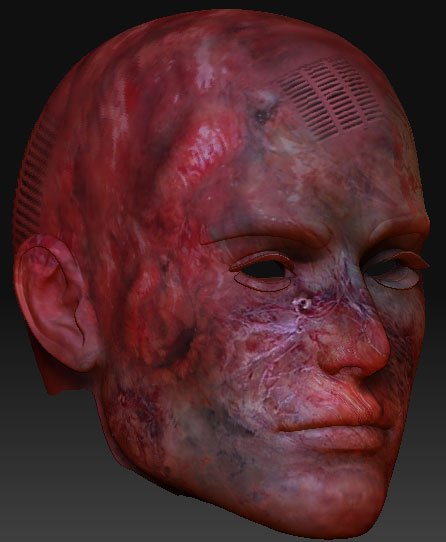
zbc1.jpg

It sounds like you haven’t applied UVs to your ZTool. Once you’ve done that, you can convert your polypainting to a texture and save it out.

-Dustin

Thats EXACTLY what the problem was… The grouping of materials in M3 needed to be reworked… This solves BOTH my texture and displacement map issue…

I “think” I got it for now, but if I need help, youre an excellent victim…

I mean person to ask for help =)

Thanks… GREATLY appreciated…

I think I am having the same trouble as you. I painted on my model, and now I’m trying to create the displacement maps and export it out. When I use MD3, I go through the steps for MD2 and click create all, and an error message comes up and says it is aborting the displacement map creation. Any idaes? How did you get yours to work/ what are the steps to apply UVs to the ZTool?

Well, what my problem was was the material grouping causing me to do the wrong things (combine that plus Ive only been using the program for 5 days =B)…

The base mesh I was/am using are the Millenium Characters from Daz3D, and they require some special grouping “tricks” be performed before importing into ZBrush… I suppose the same holds true for any model/mesh that has 2 or more UVMapping textures…

MD2, MD3, sorry, I dont know what that is?!?

its a displacement map exporter, you can fnd it in your Zplugs drop menu, if you’re using z3.1, helps to generate multiple Maps if you have multiple UV Regions.