ZBrushCentral

Selecting entire polygroup edges?

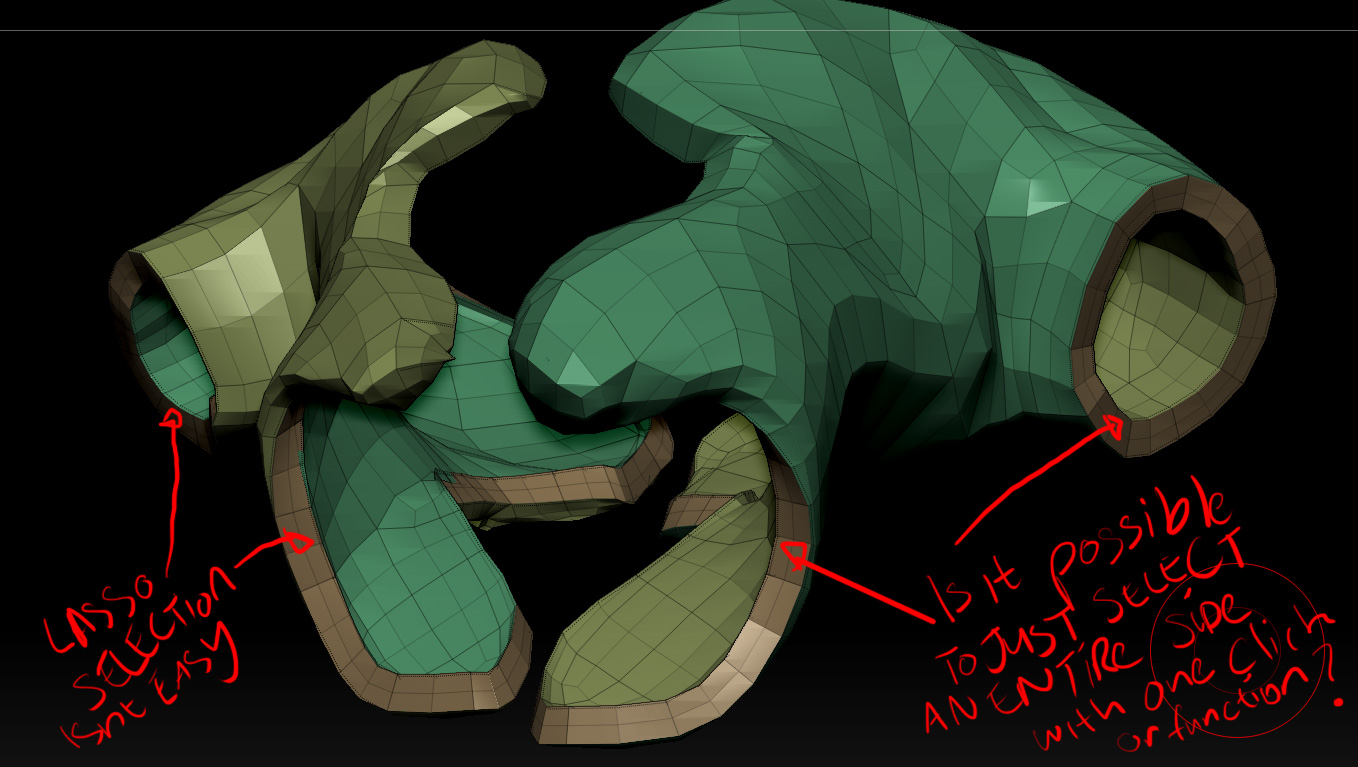
Hello, I would like to know what the best method is to selecting entire polygroup edges?
It get’s tricking selecting faces with the lasso selection when I encounter curvature.

Also another issue is with my adaptive skin, when I apply thickness, the thickness is not symmetrical. I’ve checked the options but nothing of value to fix this, I doubled checked if it could be my zsphere not being centered but is centered?

Regards
Hasty

Attachments
png.jpg


  • Show Only One Group


  1. Press CTRL+SHIFT and click on the mesh where that group is.


  • Show All Groups


  1. Press CTRL+SHIFT and click outside of the mesh.


  • Invert Your Current Group Selection


  1. Press CTRL+SHIFT then click and drag outside of the mesh.


  • Select More Than One Group


  1. Press CTRL+SHIFT and click on the mesh where one group is
  2. Invert that selection: press CTRL+SHIFT then click and drag outside of the mesh
  3. Press CTRL+SHIFT and click on the other groups you want to select
  4. Invert this selection: press CTRL+SHIFT then click and drag outside the model

You can always use ‘Mirror and Weld’ in the ‘Geometry>Modify Topology’ subpalette after you make it a skin to get perfect symmetry.

Also, when making selections, the following might be helpful.

edge loop selection.JPG

Thanks a lot for the help zber2

No problem! :+1:small_orange_diamond:)