ZBrushCentral

Seam appears when using Surface function in 3.5 r3

I’m using the latest version I know of for ZBrush making some rock masses for a project, I love the new noise function, but I keep running into this visible seam. Anyone know how to get rid of it?

PC Win7 64bit 16gigs Ram, 1gb Nvidia 8800GTS

(sample image attached)

I searched the forums figuring someone else must have run up against this but could find nothing. Thanks for any help.

Attachments
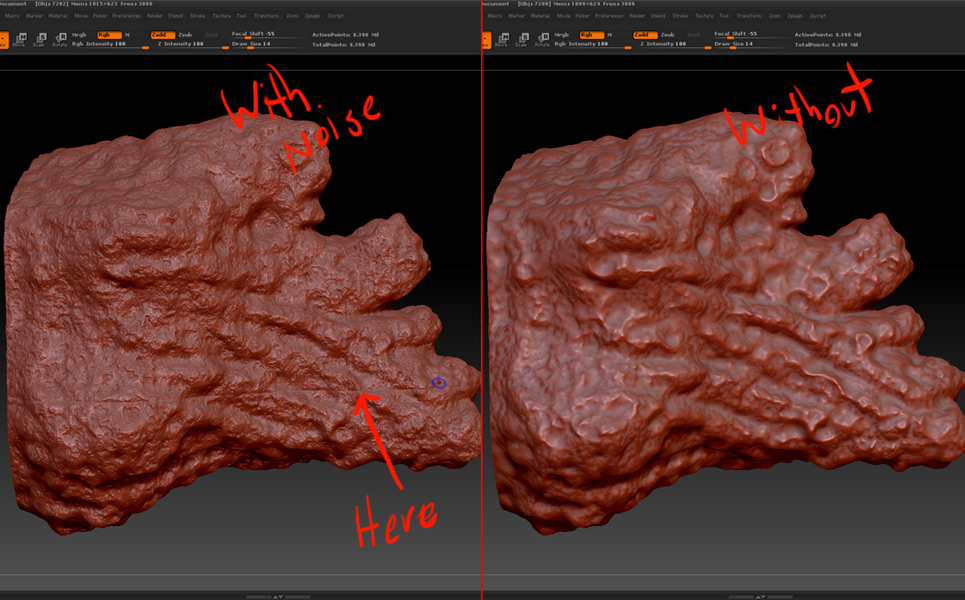
ZBrushSeamError.jpg

no one else has ever come across this issue?

I am seeing the same problem on my model.

Sorry, but I don’t have a solution

I eventually worked around the issue by using the offset command, I moved my geometry, ‘baked in’ the noise to a layer and then using offset, moved my geometry back. That let me make my displacement maps without too much fuss. Still, it’s a rather annoying bug I hit on several occasions on that project.