ZBrushCentral

Sculpting problem in ZB4R2b

Hi,

Since the new release I’ve been experiencing some problems when sculpting.

I’ve had several experiences that brushes behave as if LazyMouse is on when it is not.
In other words : sculpting seems to be lagging in 4R2b.

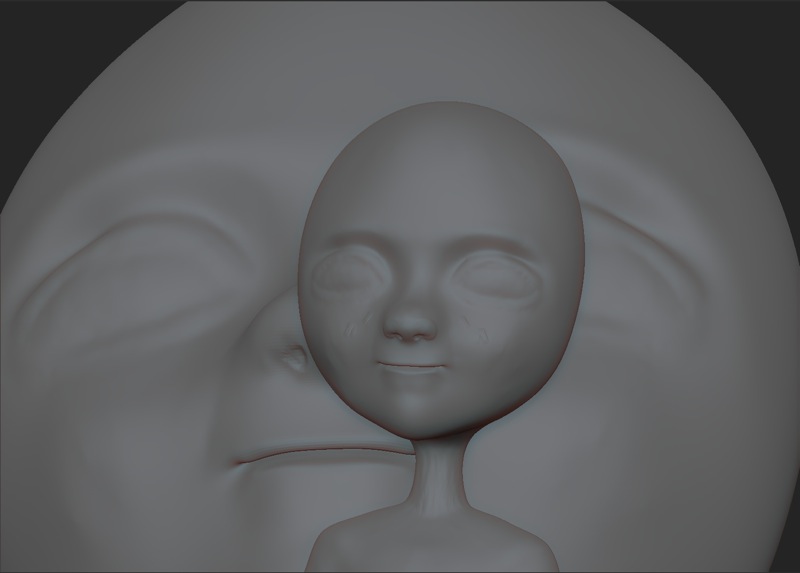
And now I’ve experienced something new : when zooming in closer to sculpt finer details, then suddenly a kind of snapshot happens as you can see in the following image.

In order to be able to sculpt, I have to move the brush real slow, because rapid strokes just don’t work :confused: ???

Has anyone else experienced sculpting problems in 4R2b?

Maybe I should send a support ticket?

Thanks for any help …

EDIT : I’m experiencing this problem especially when zoomed in into a model, when zoomed out the there seems to be no problem …
It gets better when I hide a big portion of the mesh and then zoom in on that unhidden part, but when zooming in on that unhidden part then there’s the same problem ???

Could this be graphics card related?
My graphics card drivers are up to date!

And I had no problem whatsoever in ZB 4R2 …

Attachments
bug.jpg

I’ve noticed something similar. Sculpting gets noticeably slower while zoomed in. A smaller document size suffers less from this problem…

have had this happen aswell, where its as if ive dropped my ztool to the canvas…

Hi sericks,

as if ive dropped my ztool to the canvas…

Exactly.

Do you also experience a delay when sculpting on a zoomed in part of a mesh like I do?

When I zoom in then rapid strokes experience an annoying delay forcing me to sculpt very slowly, except when I hide part of the mesh which is outside the white document borders !?

I’m having all of the same issues. It really doesn’t feel like a bug fix release. The brush lag is most annoying, and certain brushes seem worse than others. The snapshot thing is also very frustrating.

The fiber tools are fun to play with, but I need to get work done, so I’m rolling back to 4r2…

I’m “glad” I’m not the only one :wink:

A way around this for now is to hide parts of the mesh that are outside the white document borders : when I do that I experience no lagging and no sudden snapshots …

Support has posted elsewhere they will be releasing a patch next week, so I hope the most important things will get fixed.

This one has been driving me crazy! I’m also glad I’m not the only one. At first I thought I was hitting the snapshot keys by mistake, then that I was pressing the buttons or touch strip on my tablet, or that it was related to Windows tablet input gestures but it seems to just happen at random when sculpting quickly.

Hahaha, That is exactly what I was thinking. Nope, seems to be a real issue. It was pretty hard to know what to search for to find this thread, too.

This was already answered in the Q&T thread for 4R2b on Sunday. See the post by Support: http://www.zbrushcentral.com/showthread.php?165724-Sculpting-problem-in-ZB4R2b

I have had a reply to my support ticket and apparently Windows XP is getting too old for the newer ZBrush, so old that support told me that they will be removing XP from the requirements list.

So I guess it’s time to upgrade my operating system :confused: