ZBrushCentral

sculpting hoses

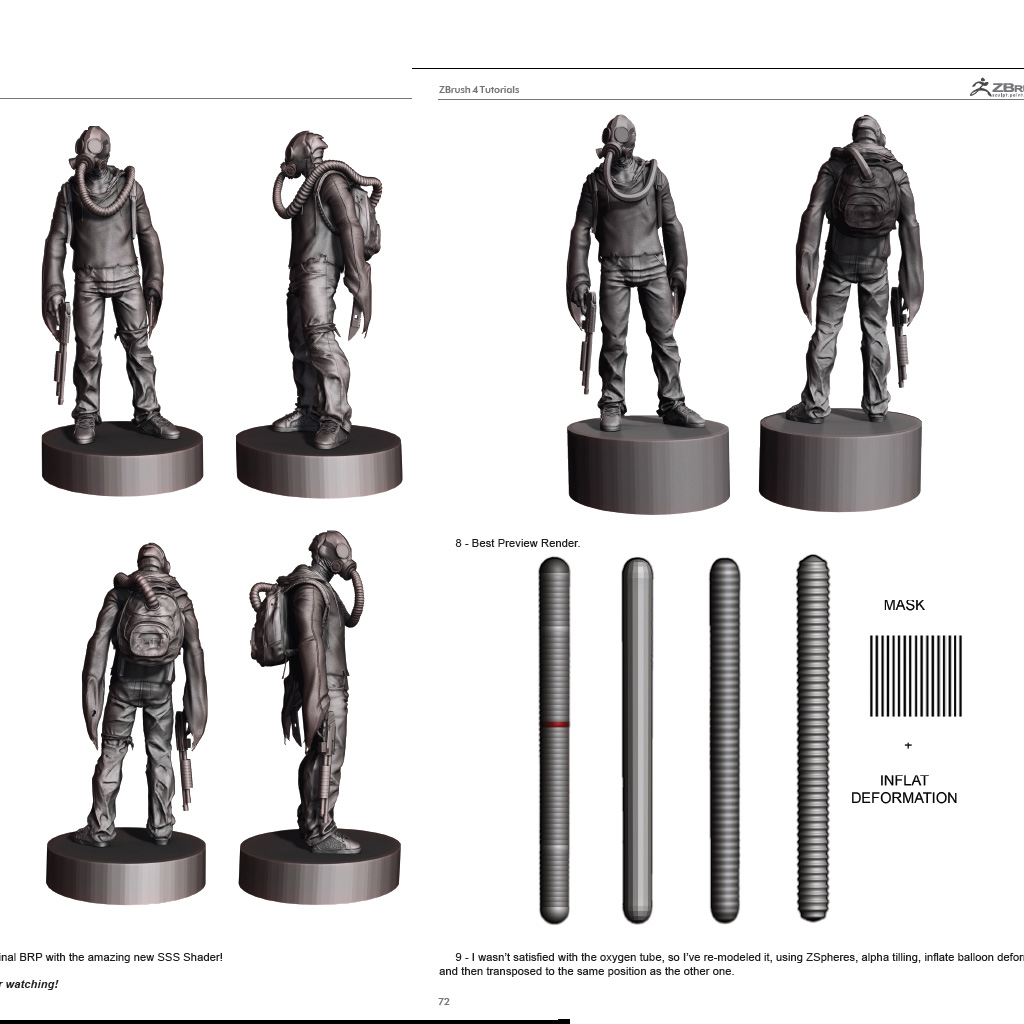
Hello guys , Im working on a character and just want to add a hose (for the antigas mask) as subtool , that looks exactly as u can see in this pdf that comes by the default in the zbrush documentation folder (page 72) , the artist is not that specific on how he gets that amazing result , he uses zspheres ok , but then he mask the adaptive skin but ,how can u be so precise when masking, mask evenly spaced , im using zbrush 4 r2 but so far i could get a solution and im stuck there , so please if anyone here knows how to get that shape and then how he bend the hose or how u get that specific curvature for the hose …

thanks in advance guys !!!

Attachments

sculpting.jpg

Hello giankharlo,

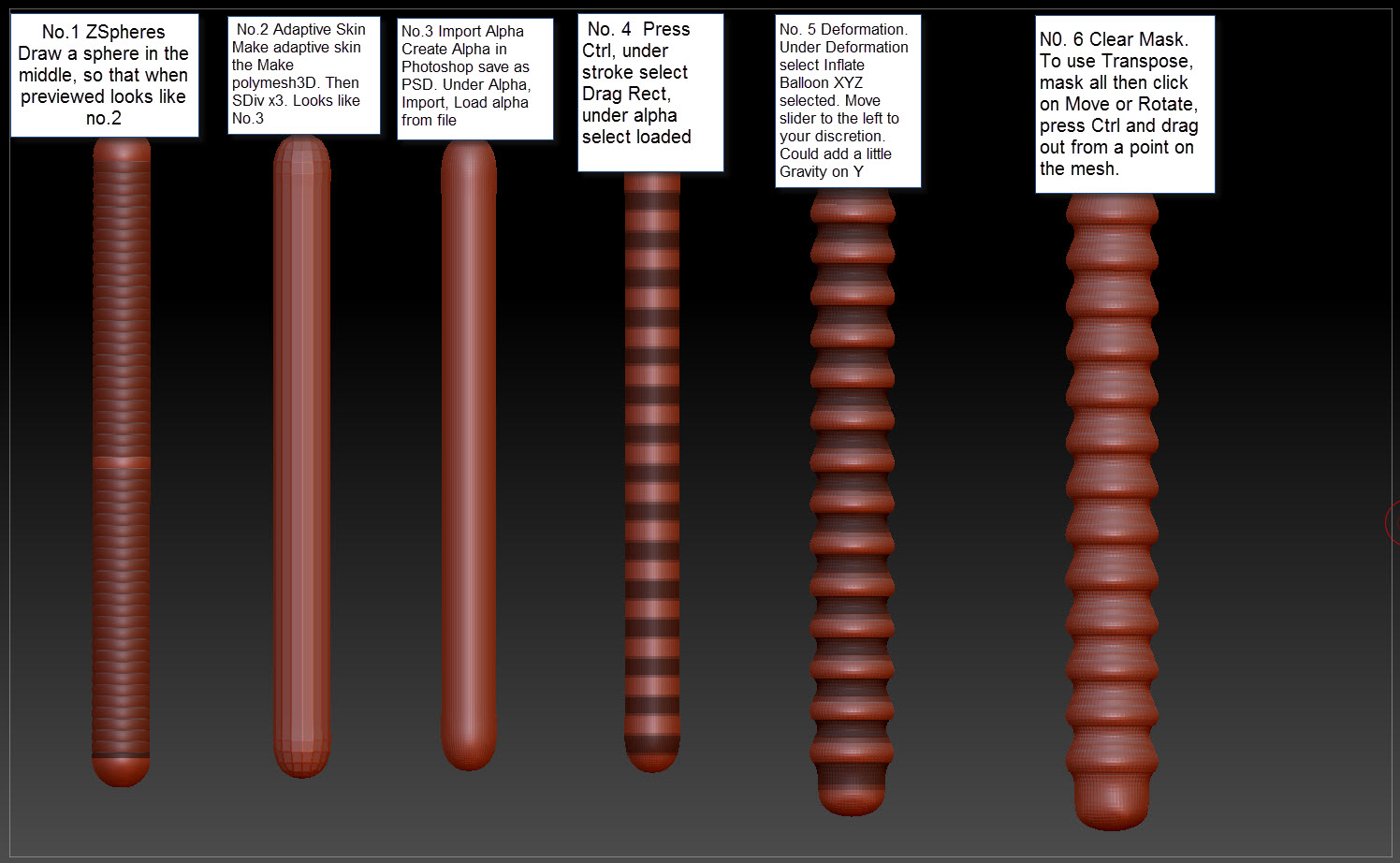
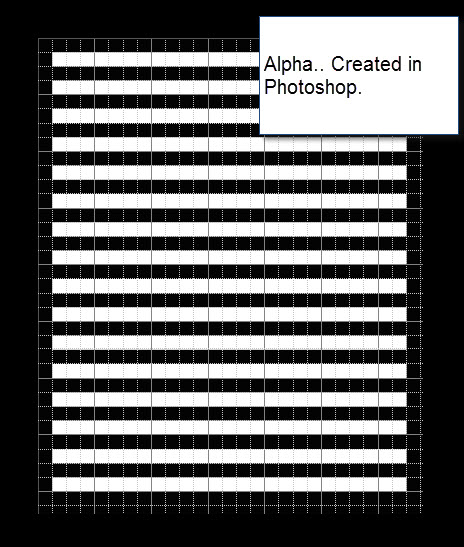
Below are to images that might help you create the pipes. I myself, am a beginner so hopefully this helps. When it comes to moving the pipe you will have to play around with Transpose and the move brushes.

Good Luck

Attachments

Tutorial on Pipe.jpg

Grid Layout.jpg

Hey Giankharlo,
You can try the Transpose tool for bending the hose but you might consider getting the result you want with morph targets under the Tool palette.
Here is a quick walk through that I hope will give you what you are looking for.


~j

Thanks jelee, I learnt something new today!

really smart , wyattfox never thought about doing that alpha in photoshop , thanks guys Jelee and wyattfox for your help and your time and I’ll try both techniques !!!

jelee im trying your technique in zbrush 4 r2 when i wanna go from step 3 to 4 means going back to my morph target position in zsphere mode, i got my stored morph target position in zsphere mode and then i press A to preview the adaptive skin but I lose all the details i do in the hose…???

Same here. I just end up with an unsculpted straight stick.

So I apologize for not stressing that I was using the Adaptive skin’s Classic Skinning mode. I have gotten so used to always using this skinning mode for my zsphere uses, that I didn’t test this technique on the default skinning mode.
The default skinning mode has a ‘unique’ feature in that after you store a morph target, you can cycle through the adaptive skin preview mode a couple times and it should show both the pre and post morph states. The sculpting should be there if you hit the preview button two more times. However, the effects are very much different than the method using classic skinning as posted above.

Other points I should probably mention just in case, is it is important not to add or subtract zspheres from the chain after detailing because this will also erase all details on the adaptive skin.

Also, should you finish detailing and switch back to the zsphere mode, and move the density slider to lower than the level you detailed on, switching back will appear to have lost detail but infact it is still available at the authored detail level. Just move the slider back to the original density level. Moving the slider above the level you detailed while in zsphere mode may take a little longer to preview but the effects should propagate upward.

I can’t think of anything else right now that could cause a loss of detail but I suspect the second you go down to Tools>Adaptive Skin while your Zsphere is selected and press the Use Classic Skinning button, everything should behave as intended.
Again I hope I didn’t frustrate anyone’s zbrushing experience too badly.
This is not the way I wanted to welcome giankharlo and Wyattfox to the community.:slight_smile:
Let me know if it still gives anyone troubles.

~j
just an small detail . the technique worked but see what happened to me when i had the straight chain and then i pressed A to enter to prview mode with level 6
to start the details , see what happned to the bottom of my mesh , is there any way you can fix it :

That’s because you have the root ZSphere (first one) at the end of the chain. Just add one more ZSphere below it and it will be fine.

@ jelee … Thanks a lot for this excellent tip. :slight_smile:

Giankharlo
I second zber2’s recommendation for capping the bottom of your adaptive skin. In most cases, this is how I solve my open adaptive skins. (Thanks, zber2!)

If for some reason you need a more refined adaptive skin capping, I might suggest the following steps (this is for classic skinning):
zsphere_capping.jpg
Basically we are disconnecting the root zsphere from the rest of the chain.
As you can see it creates a little cap but it will be automatically be assigned it’s own polygroup.
When sculpting is done and an Adaptive skin is made, it can be later separated as a subtool using the Groups Split button under the Tool>Subtool section.
Hope this helps.
@ zber2, Glad you found it helpful!:+1:

Awesome, i didnt expect that much assistance,so glad i can count on you guys…
See you soon

Hi, Great stuff on the hoses.

I’m a bit stuck on how to get the mask working correctly. Do you need to load a striped_alpha into both the texture slot and the Alpha slot?
Also sometimes Mask by Alpha doesn’t turn on!! Why is this? When I can turn on the Mask by Alpha button the Striped Alpha is not nicely
positioned on my hose. What causes this? My main question is how do you get you’re striped alpha on the hose correctly. Thanks in advanced.
decor

Attachments

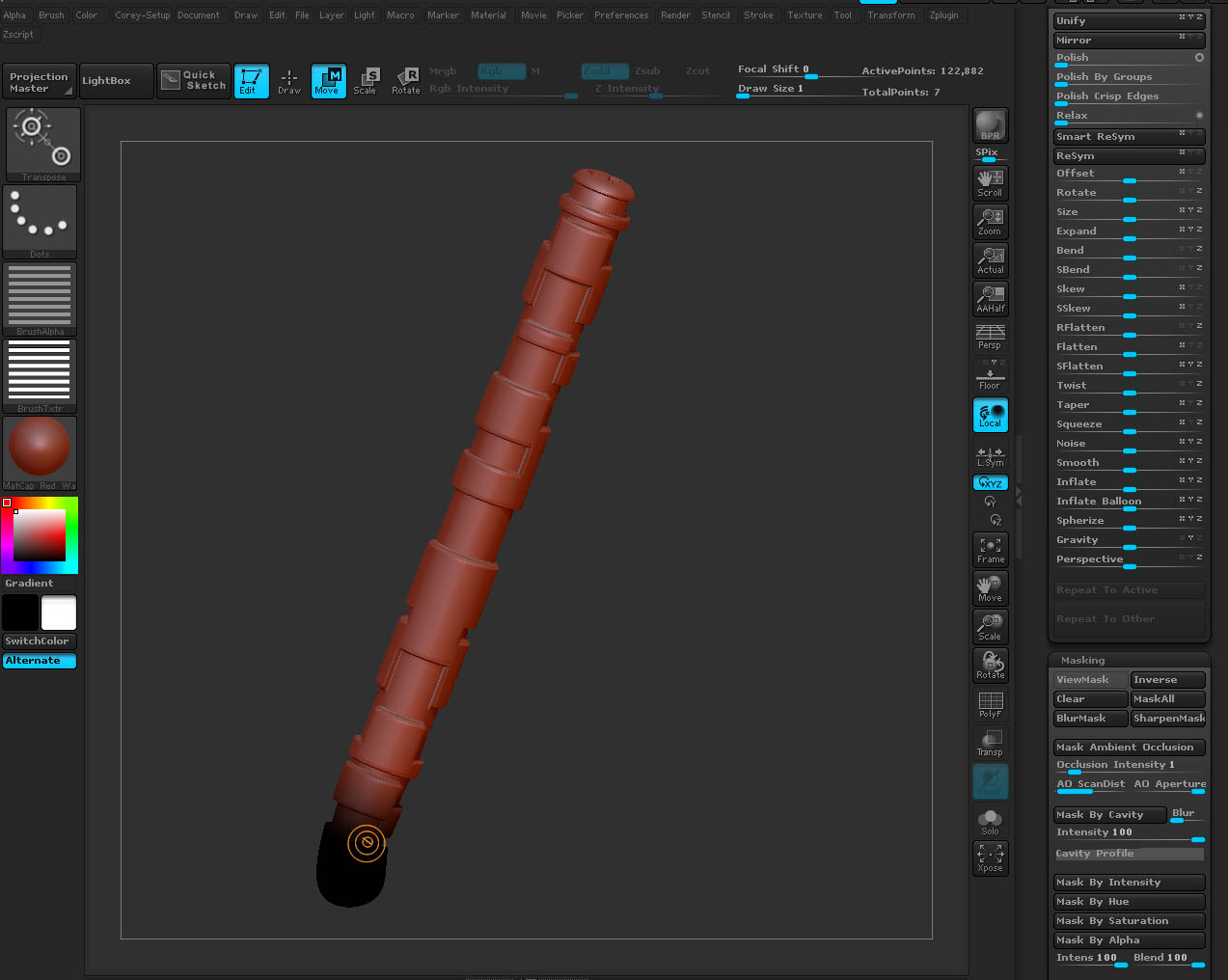
masking_hose.jpg

While holding down Ctrl, select the DragRect stroke and your striped alpha and apply it with mask brush. [edit] Wyattfox mentions this in his step#4 in post #2 above.

Hi Jelee and Ziber2,

Thank you both for the info. I didn’t realize that you needed to position the mask on the hose while it was straight. I thought the other pics was a different approach/technique.
I was trying to get a mask selection by loading in an alpha into (textureslot) striped alpha and then thru masking tools select by Alpha, but nothing was showing up :frowning:

But I managed to get something decent out of it and it works really well. When you snap the Zsphere’s back in a straight line does the distance of each zsphere effect
the tilling process when you morph back? I mean if the zsphere’s are further away from each other than the orignal morphtarger hose. Would you get some strechting?
Thanks, again.

I was trying to get a mask selection by loading in an alpha into (textureslot) striped alpha and then thru masking tools select by Alpha, but nothing was showing up :frowning:

Hey decorix,
I don’t think the above would work because, to my knowledge, zspheres don’t hold uv mapping coordinates. You would need to create an Adaptive skin or make a PolyMesh3d first and then apply proper mapping.
As far as the stretching is concerned, if you move the actual zspheres, you will see stretching in the adaptive preview. If you click on the connectors between the zspheres, you should see some respect for the spacing between the zspheres keeping them at a fixed distance. That doesn’t mean that there won’t be some ‘squishing’ on tight turns when returning to adaptive skin preview mode.
I will say there is a direct correlation between the number of zspheres in a chain and how smooth the transition is for a hose curve. The less zspheres, the greater the chance for unnatural warping. That’s one of the reasons for suggesting the zspheres are positioned to the desired pose first and then straightened. That way you can get a nice curve before adding the detail.
However I encourage you just experiment to see what works best for your situation.
If all else fails, there is always GoZ!
Best of luck,
~j