ZBrushCentral

Screen Refresh issues after upgrade to 4R5

Since the upgrade to 4R5 I’ve had issues with very laggy screen refresh of the UI. This doesn’t seem to affect modelling as wherever I move the brush updates properly, but many menus won’t fully display unless I wave my mouse over them. Then they start appearing only where I’ve moved my mouse. This happens all the time. Everytime I make a change (such as draw size for example) the corresponding menu item does not look like it updates (such as the draw size readout on the top menu bar). If I pass my mouse over that area of the screen, it will refresh at that time.
I’m running Vista64 (I know - could use an upgrade), 8Gb RAM, GeForce GTX 570 Ti with 4 Gb Video RAM, 2.4 GHz Quad CPU.
It was fine before the upgrade…
See the poorly refreshed screen capture attached.
Any thoughts or items I can change in the preferences to help with this (other than getting a whole new system…)?

Attachments
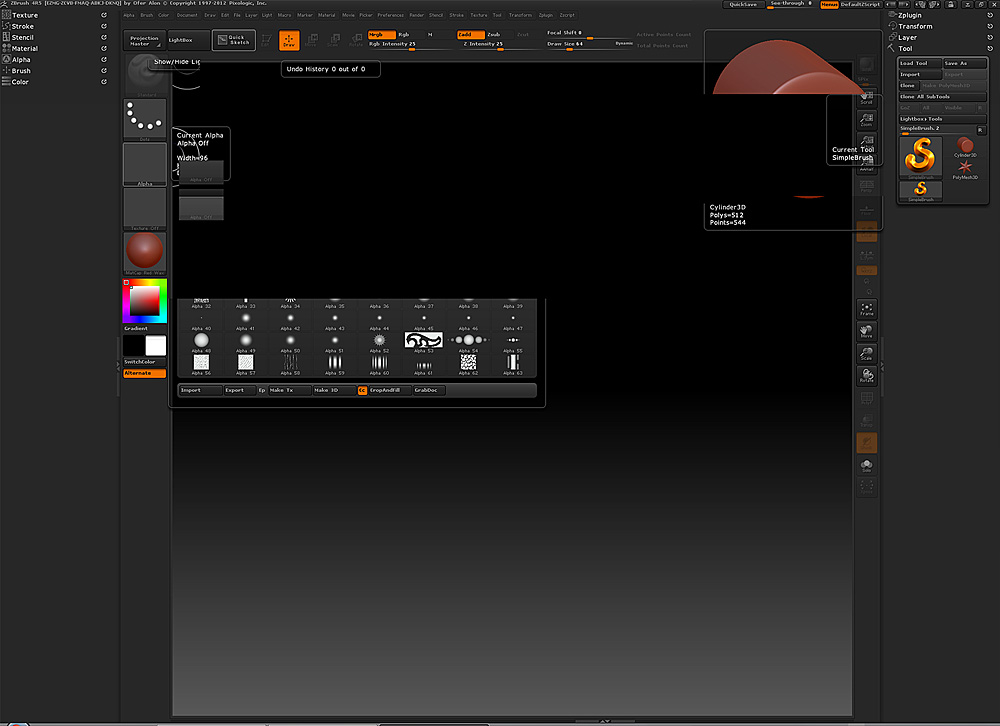
ZB4R5_Screen_Refresh.jpg

Forgot to mention - I do have the latest drivers for my video card.

Sounds like you might need to change video hardware settings, go into your nvidia control panel try adjusting the slider in “adjust image settings with preview” to performance, or go use the advance image settings and figure out what you might need to change. There are descriptions about the options you have at the bottom of the nvidia control panel window.

Also maybe try increasing the amount of RAM in the ZBrush preferences unnder mem, you might want to just try reinstalling ZBrush if that doesnt fix it.

Yeah, I went looking to increase the RAM as pretty much my first step, but it’s no longer there under Preferences>Mem. Can’t seem to find it anywhere…

Preferences > Mem … Set Compact Mem to 4096

Done. Didin’t make any difference. I’m guessing this is video card related, however there must have been some change between R4 and R5 in use of video acceleration as this did not happen before the upgrade.
Thanks for the suggestions anyways!
Perhaps Pixologic could look into this?

Make sure you have the latest drivers for your video card. Download Drivers

OK, I think I’ve found a solution!

Normally my ZBrush window is my full screen - 2560 x 1600. If I restore-down it to a smaller size then drag it right back up to full screen it seems to work fine with no screen refresh problems. Next step will be to re-save my custom startup window size and see if it fixes it permanently.

Some info here. http://www.pixologic.com/docs/index.php/Preferences_Palette#Draw_Subpalette

Yup, re-saving the config after re-sizing the window seems to have fixed it. Perhaps the config file was partially corrupted during the upgrade?
Thanks for all your feedback!
-Axe-
:smiley: