ZBrushCentral

scales leaves parts of circle if I make is smaller

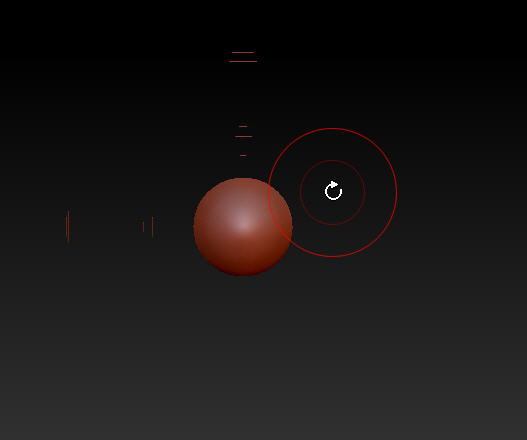
When I use the scale button on the tool menu to the right, and make my sphere smaller, it leaves pieces of my circle as I scale down, but if I use the action line, the scaling down works okay.

I hate to ask these questions, but Zbrush is NOTED for not having good documentation as a program, and we all have to rely on asking these dumb questions.

Hope there are some simple answers.
If nothing is masked it should work correctly. Is this sphere a subtool? If so try clicking the local sym before using scale. Hope that helps.

what is the sym your talking about. This mostly happens with any tool I have, If i move it too fast, it does this, could be my computer?

Hmm, I am not really sure. I have not experienced that issue. Would you mind posting a screen shot to show what the issue looks like?

yes hold on in a few minutes

her is the image scaling2.jpg. when I scale down the ball, it leaves parts of it as I make it smaller

Attachments

scaling2.jpg

Oh, now i see exactly what you mean. After you scale, have you tried orbiting around the sphere? Do the artifacts still stay there? Sometimes orbiting around an object will refresh the screen and remove the artifacts like the ones you have. I would be willing to bet you did, and they still stay there. I have never seen this issue, but Aurick may have suggestions.

actually this has popped up quite a bit for random people. first off you can clear the canvas by using CTRL+N or go to Layer clear layer.
also this usually happens when you use the scale/move onscreen buttons, use the ALT button hotkeys instead.

thanks so much…I never had this problem with Version 3.1, maybe you can do me a favor and let the people in Zbrush about this for me, as you probably can tell them bettter than I!!

Great info spaceboy412. I had not heard of it other than in this thread, but good to know.

I thought Madwolfproductions was actually scaling the circle, like using the deformation tool at the right. I see now that he was simply trying to zoom and not actually scale. Not quite sure how clearing the canvas would help. Hopefully using the hot keys as you mentioned will help solve the issue.

Sorry Madwolfproductions I miss-understood what you said.

you are right in a sense he is scaling and not zooming (canvas based). clearing the canvas gets rid of the artifacts.

@madwolf yes sadly this has only occurred in the new releases, but if you use the hotkeys you’ll most likely never see it again.