Hello,
I saved a project in ZBrush I was working on but can’t seem to add a sub tool to the project without affecting the project itself. My work shows up in the sub tool palette and I want to add another tool to this project but when I try to add the tool I get a message that the current tool is in edit/draw mode which would you like to select. I’m not sure which to choose without losing the main tool. When I choose a new tool I append first, then initialize it, then make poly mesh 3D. Afterwards the new tool shows up in my sub tool palette but then I lose my main tool from the palette but it’s there in the simple brush Palette. When I click on my main tool from the simple brush palette both tools show up in the document area as I want it to but now I have 2 main tools instead of 1. Help!
Thanks
what?
http://www.techsmith.com/jing.html
Make a video of your issue and upload it so that we understand exactly what you are trying to do.
Select the tool you want to delete, append the tool you want to keep. Delete the one you don’t want.
Sorry for the confusion. I am trying to add a second sub tool to a saved project I’ve started so that I can work further. The ZPR file I’ve opened with ZBrush after adding a second sub tool and appending it stays on the screen and there’s no way I can remove it. The second sub tool shown with the saved ZPR is what I want to work on but the one facing forward cannot be edited or deleted.
Attachments
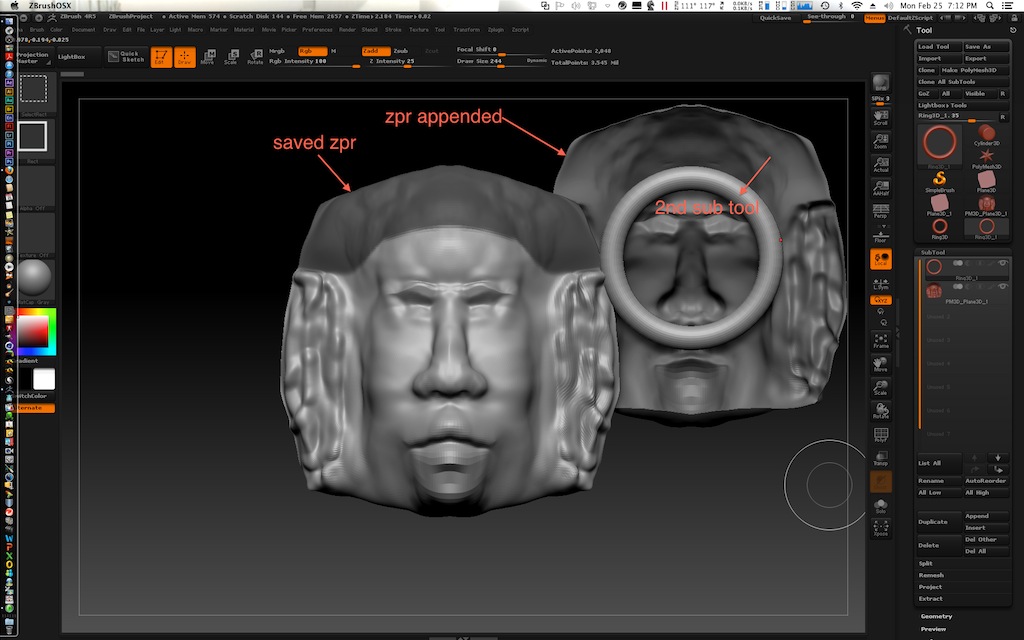
Hit ctrl+n to clear your document. This can be confusing. Objects shown in top can be stand alone or have subtools. You have to manage them in the subtool pallette. I hope that makes sense with my other post.
Thanks for your help. I believe my mistake was that I didn’t save my project in Ztl. format. I’ll use your tip for future references.
ZPR is the project which contains all your stuff. The ztl which is just the tool may be a single or multiple subtool object.
Yeah! just figured it all out. I also discovered that I couldn’t do anything with the ZPR document because of the edit mode. All I had to do was change the brush back to standard and I was able to add the second sub tool I wanted. I’m good to go. Learning is fun. Thanks.