Hi everyone, I am trying to rotate my characters forearm around it’s own axis, but whenever I try it starts rotating on a different axis and the arm starts stretching and moving far away from it’s original position. Whenever I rotate along the axis in a tpose (which my model is not in right now) I can get it to work properly, but when it’s in an offset position, rotate around axis starts acting up. Any tips? Thanks!
Some images (that includes the UI) might help us see what is happening.
I apologize for posting this in the wrong forum, I should have read the rules first.
Here are a few screen shots of what’s happening.
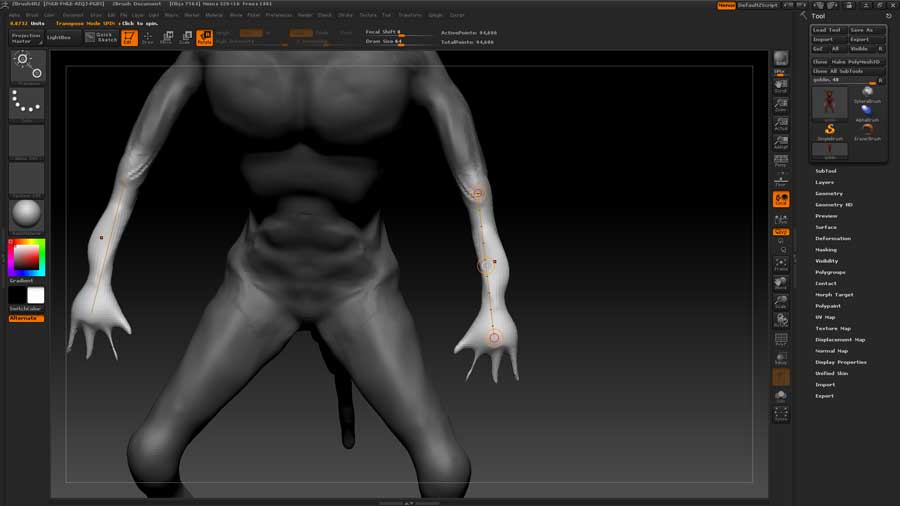
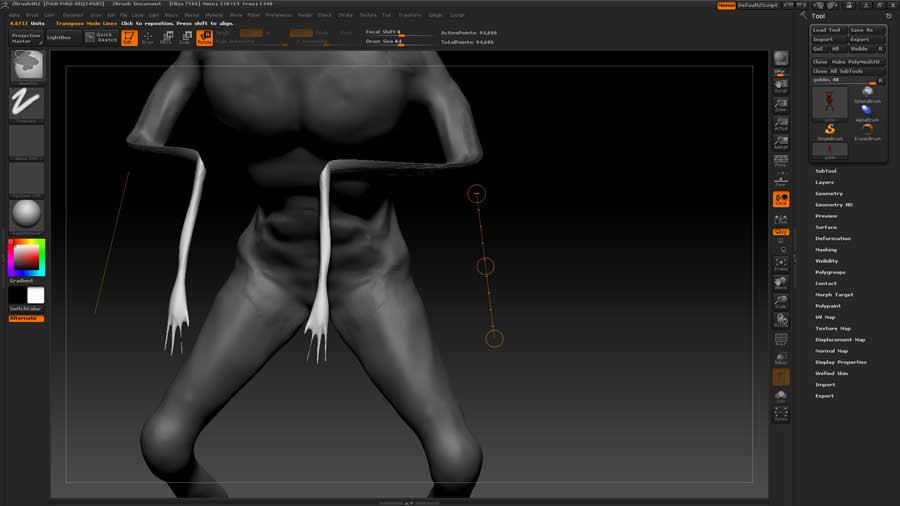
I want to rotate them around the forearm axis so they face inward, but I run into this problem. Thanks!
It looks like you are grabbing the white (center) ring on the transpose line. You want to position the transpose line with one end at the pivot point and then grab the red ring at the opposite end to rotate around the pivot point. It also appears you have your transpose pivoting point too far away from the masked section it should be aligned over the center of the mask edge.
Sorry, I wasn’t very clear. I am trying to actually just twist the forearm in its current position so the arm stays stationary but the hands will be facing medially and laterally.
Turn off symmetry.
If I understand you correctly, you are trying to “barrel roll” the arm, so it twists along the axis of the transpose line, altering the palm facing. You’ve got the right idea dragging on the middle rotate circle, but Symmetry works differently in some situations with transpose when its on. This is one of them.
Do one arm at a time, then if you want the pose to be symmetrical, mirror the symmetry with Smart Resym(Tool> Deformation>Smart Resym), or Mirror and Weld (Tool>Geometry>Mirror and Weld). Assuming your topology is already symmetrical, Smart resym may give you a little more flexibility in this situation, because it will let you isolate exactly the parts you want symmetrized (I made that word up). For instance, if you only want one of the arms mirrored, but not a twist you gave the left foot, mask everything but the arm, and hit S.Resym.
S. Resym only mirrors form, though. If you need to mirror the geometry exactly, use Mirror and Weld.
You’re a genius Spyndel, that was it. Thanks for the help guys I appreciate it.
Hello,
I got the same annoying problem with the mirror transpose…
Also i use the smart symmetry approach in this situation .
I think the transpose tool actually uses as a pivot point the reverse pivot point (mirrored one), at least it looks like the rotation and scale pivot point is in the mirrored area, not it’s own.
I think this is a small bug that could be easily fixed if Pixologic would be aware enough of it’s existence.
Yup, this issue was not there till the last release or 2. I hope they fix it soon