ZBrushCentral

robe-two questions

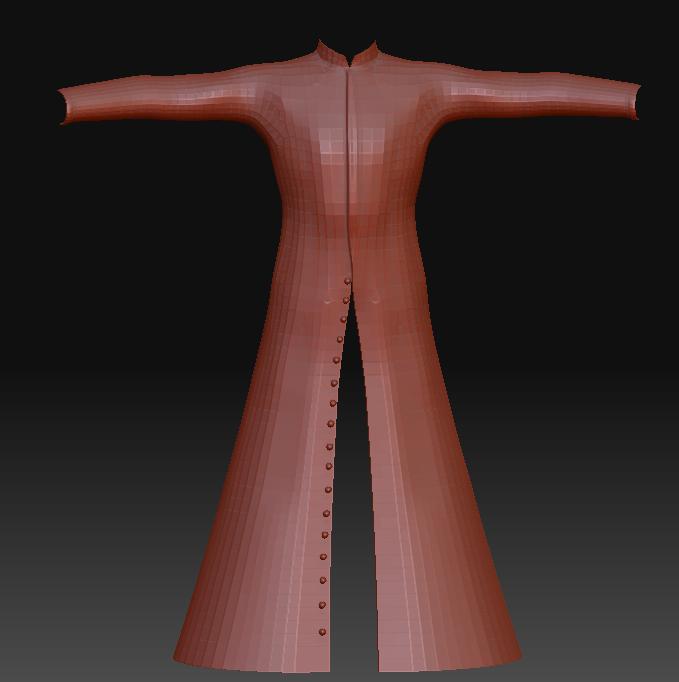
This is a freebie robe OBJ I found. Two questions:

  1. if you were going to make this from scratch in ZBrush, how would you go about it? ZSpheres?

  2. the mesh continues round in back of the open slit area, so how come it isn’t visible through the slit? It’s all there when I rotate it around, but becomes invisible from the front as in the image here.

(PS. I just bought the Scott Spencer book, ZBrush Character Creation. Awesome. Gotta love the full color illustrations throughout)

Attachments
robe.JPG

  1. Couldn’t tell ya, but there is tons of documentation in the forums and at www.zbrush.info to help.

  2. Check under Tool>Display Properties and click Double to make your tool double sided.

To answer your first question, the easiest way to do it will be with retopology. You can learn how to do that at www.pixologic.com/docs

For your second question, the thing to remember is that all polygons are single sided. This is a long-standing convention with computers that speeds up rendering. Turning on Double as mentioned in the post above mine changes things so that the polygons are rendered as double sided. Only use it in a situation where you actually do need to see both sides. For example, it’s a waste to have it active if you’re working on any solid object because it’s impossible for the interior to ever be visible.

If I retopo the robe can I bridge the open area of the robe in front and create geometry to fill this area? Or, is there an easier way?

Thanks.