ZBrushCentral

Ring around paint with polypaint

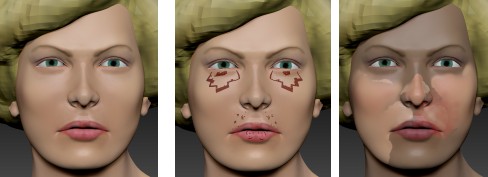
I don’t know what I did, but now when I paint on one of my subtools I get a dark ring around my strokes, like this:

[tt.JPG](javascript:zb_insimg(‘267252’,‘tt.JPG’,1,0))

This only happens with one of the subtools, and it only started today. What’s happening?

Looks like you have gradient by the color picker selected. Not sure why it’s only on one subtool though.

I checked. The ‘Gradient’ button is not on.

I noticed something even more bizarre (to me). The subtool is originally filled with SkinShade4 (first pic below). If I fill the object with MatCap Red, I get the 2nd pic. If I fill with SkinShade4 again I get the 3rd pic. Why??

[tt.jpg]

Are you painting on a layer per chance?

Also, do you have anything masked? Sometimes “View Mask” is accidentally toggled off and you could have remnants of a mask?

I do have multiple layers. But I did double check for masks (by selecting an empty area as mask).

Why would layers cause this problem? I had recording on for the 1st layer. The 2nd (the only other layer) had recording off.

I found that if I turn off recording and then do a material fill, then it doesn’t create the weird masked effect.

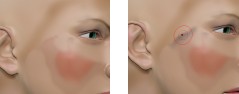
However, at certain positions such as the pic below, simply doing an RGB smooth creates a dark edge. But all the original colors are much lighter. Where does the dark color come from?

[tt.jpg]
I believe this is a known bug. There are multiple posts about it here with people complaining. It is quite annoying frankly. Layers are “transparent” and when you blend semitransparent color freaks out trying to blend the color underneath is what I have concluded. My personal work around is to fill the entire layer with the base color by brushing over the entire mesh and doing most of the painting on this layer. Yea its super annoying.

EDIT: The bug is annoying not the people complaining about it!

Ok, if it’s a bug I can live with it. Just wanted to make sure I’m not doing something stupid. Maybe I’ll just avoid layers altogether.

Thanks to all who helped.