ZBrushCentral

Return Section of Mesh to a Previous State

Hi ZBC,

(First post I know - Don’t know if you have an introduce yourself section)

I’ve only recently started using ZBrush for anything more than ZAPPLINK.

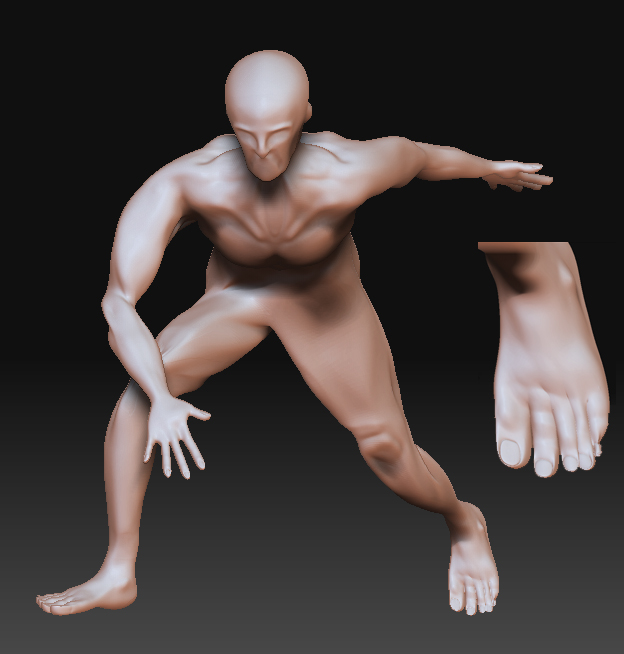
I have made a mesh and detailed it and transposed it; However I have noticed I’ve broken one of the feet in a transpose / masking error.

Is there an easy way to mask that section and return it to a previous state using some clever morph target type thing? Or is is possible to chop off the foot from a previous save and attach it to the transposed file?

Many thanks in advance.

  • Kane Forrester

Attachments

fail.jpg

Welcome to ZBC.

If you store a morph target before you begin sculpting, you can use the Morph sculpting brush to return portions of the model to the stored state. Unfortunately, that wouldn’t work for what you’re doing, because it would also undo the posing.

The best I can think of is to append an undamaged foot to the model as a SubTool and move it into position so it’s correct relative to the damaged foot. You can then use Tool>SubTool>Project All and/or the ZProject brush to copy from it to the fix the damaged one.

Thanks very much for your reply. So place an undamaged foot in line with the damaged one then use the project all button?

At the moment i have insert mesh an unbroken foot onto the mesh so i have one tool but theres 2 polygroups and a split in the mesh. Your solution may mean I don’t have to put up with the split in the geometry.

I will let you know how it goes :smiley: