 hi guys.
How create a symmetrical retopology in Zbrush?
‘‘Activate symmetry’’ doesn’t work in Retopology mode and i can create only a half of wire for my midel. 
hit X to active sym.
if your sym line isn’t on the X axis change it in the transform panel like normal.
you won’t see the two dots like you would when sculpting…but it will build both sides. there will be a small gray box in the upper corners of the canvas, 1 side means no sym, both sides means sym.
ahahhah lol.
thanks, i’m so stupid, i looked at ‘activate symmetry’ and it was grey. i thought that it doesn’t work in retop. mode. why i think so? :lol:
guys, tell me pls, how i can retopo this
difficult place?
Attachments
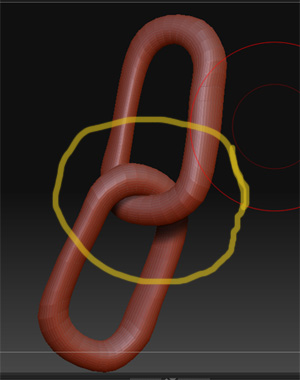
are you trying to get one solid mesh…or multiple meshes? One for each link will be your best bet. So you should break that part of the mesh into different sections.
make the chain links visible
tool>polygroups>auto group
tool>subtool>grp split.
that will break each link into it’s own subtool.
clone it out, and topo it