ZBrushCentral

Retopology; Solid mesh is misbehaving

Hi there

I have just dived into the world of retopologizing and while its an amazing ride its to me an equally frustrating one.

I am experiencing the new topology being misinterpreted by zbrush on a large scale. Please see this illustration of the problem;
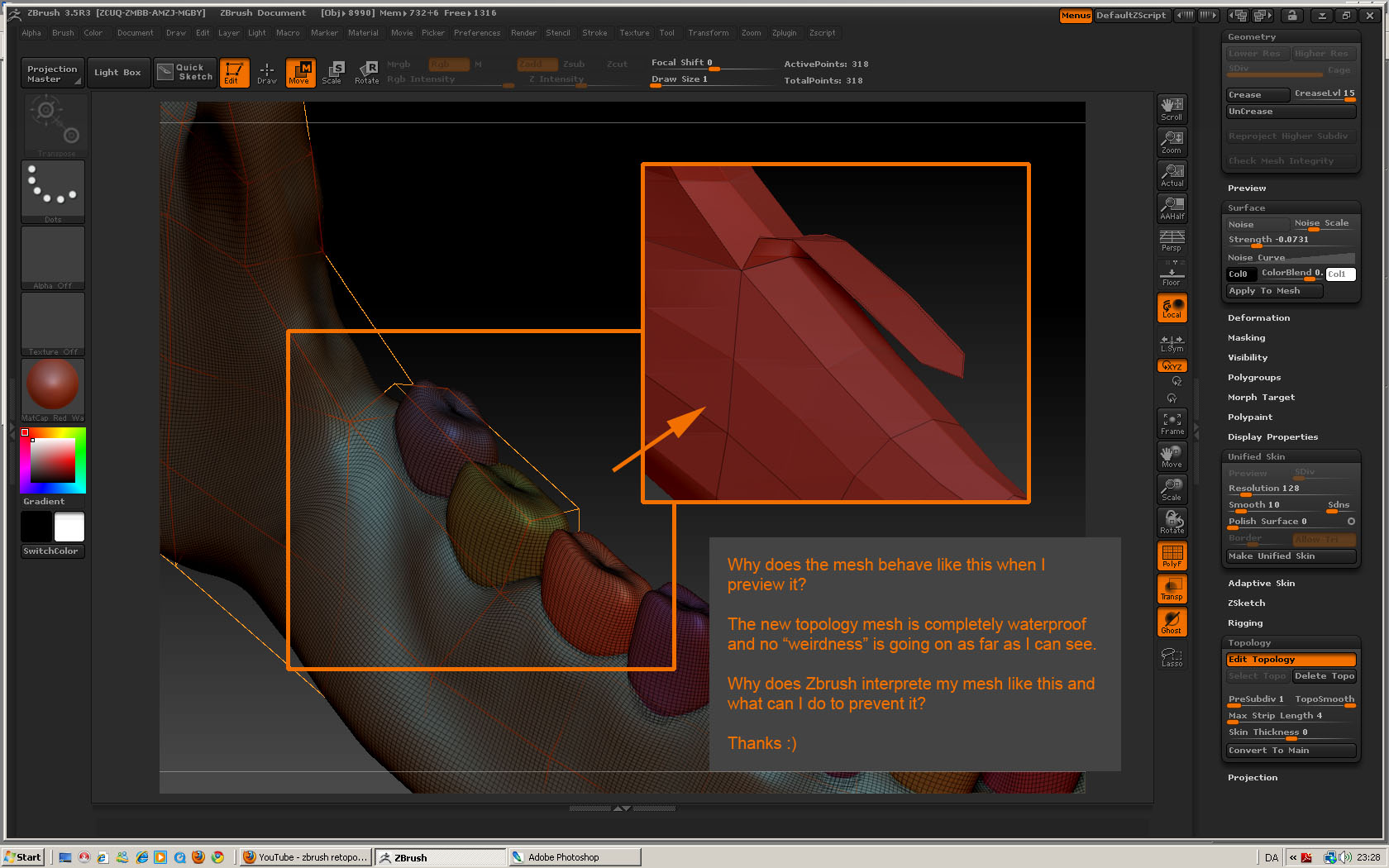
This is a fairly simple mesh and also quite a legal and solid one. To my best knowledge there should be no holes or any other issues that should cause the faces being drawn wrongly as can be seen in the illustration.

I have tried lowering the max strip length but with no result.

Am I missing something basic or ?

Thanks a lot in advance :slight_smile:

Like fingers, your retopolgy needs a reasonable number of zpheres to calculate the adaptive skin correctly. I would try drawing a 5 sided “mesh” around each tooth.

I experienced many challenges with my first retopologized mesh. I am glad my first time is over. I learned a lot.

D:idea:

Thanks for your reply profDennis :slight_smile:

Well I am a games artist and I was hoping to do my lowpoly mesh entirely in zbrush (partly just as a learning process) but does that mean this is not the right way to go about it?

It just seems really quite different from how topology is handled in other programs and what would be perfectly fine and “legal” meshes in say 3ds max is not rendering correctly in zbrush.

I can sort of force zbrush to do what I want but this requires me to add unneeded polyloops. I seem to experience these issues especially in situations similar to when you in other programs would select a single poly and extrude this. Normally this is not an issue at all but it seems like zbrush just doesnt handle that very well.

Should I go about this in a different way?

Thanks

Hmm just had a chat to a friend of mine and he believed it happens as I may still have a face beneath the extrusion. This is something I have suspected myself before but is there any way to prevent this from happening?

Is it possible to select a specific face and just delete that or do you have to retopologize in the exact correct order to avoid situations like this?

If this is the case I must say I am quite disheartened by the retopology tools and to me its not close to being as useful as I was hoping for :frowning:

I would suggest you retop your mesh giving it as many zsheres as it needs to give you a perfect quad mesh.

Once you have completed the retop, generate a mesh, export it to your primary animation software. Delete excess baggage and import back into your adaptive mesh at its lowest level.

You may need to resculpt some areas, but not so much as to be a problem.

Keep working with it. You will get the hang of it and learn to appreciate it. Its a new tool. It will get better.

D:cool: