ZBrushCentral

::: Retopology Problem :::

Oki so this is my first retopology of a model.
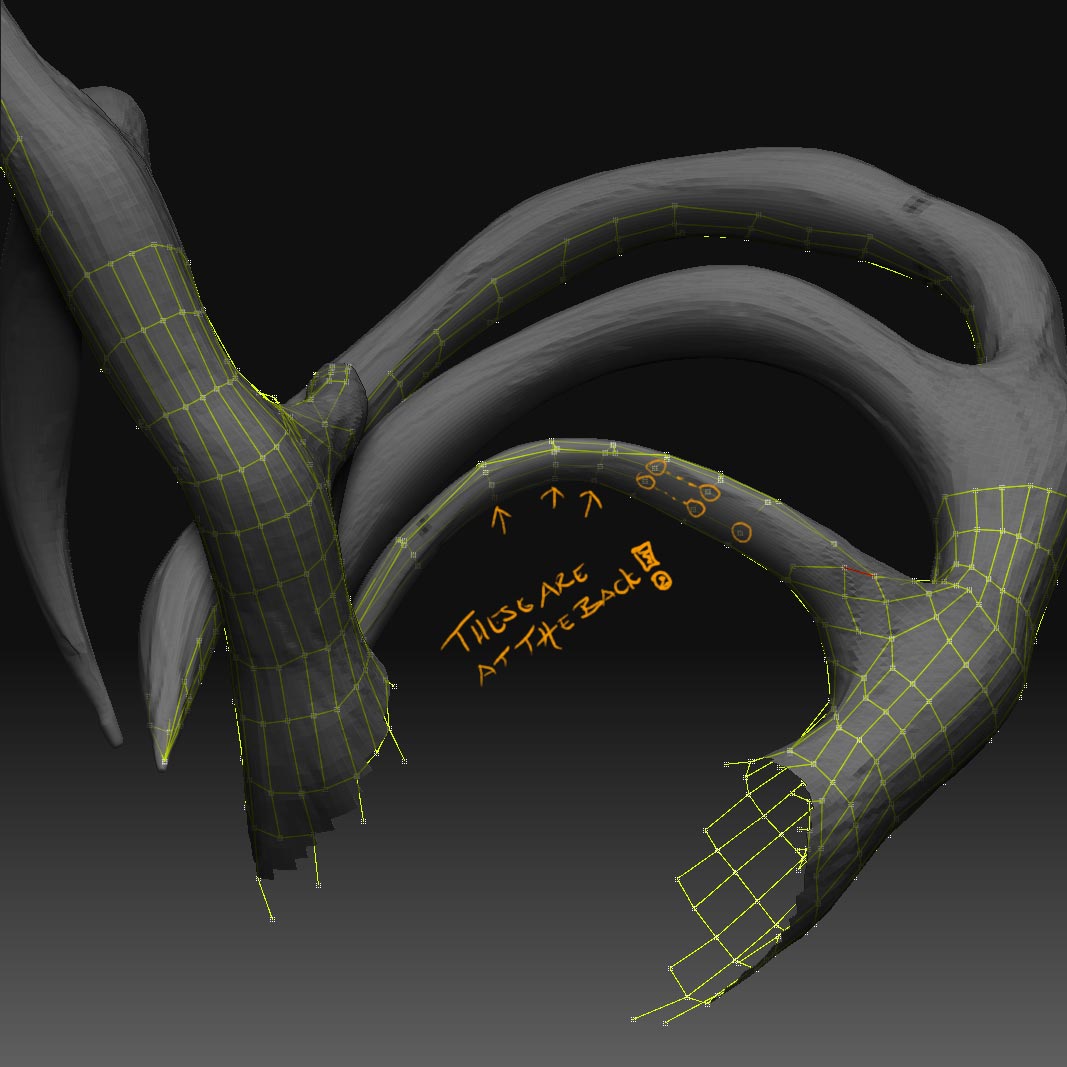
I stumbled upon this problem, all of the sudden the model or part of it is semitransparent!
As you can figure this causes problems when the pointer starts to mark nodes
at the BACK of the model instead of the flow of the front surface.
Wtf!
How do I avoid/repair/solve this problem?
Best mates!

KHAlexander

Attachments
Lady-Of-The-Dead.jpg

Zoom in closer and make sure it’s finding the front.

on thin objects it has trouble figuring out which what is out.

Hmm. problem is that I can’t zoom in more…

hmmm…kick it?

You can skip that part for the topo. Finish the rest.

Then create a new topo for just that part, deleting everything else.

You can then merge the two topo’s together and then project that new combined mesh.

Hmm. okey I’ll try it.

Thanks again goast! :slight_smile:

Best.

Ok, so I decided to start over with the retopo, for training purpose and to get faster with it.
But anyhow, How do I retopo part of the model? The whole model has to be loaded as a tool and therefore I can’t zoom enough to “get rid of the transparency-problem” regarding the nodes.
I have to do this with the horns and hands. It also needs to be done with another model I have. (have to retopo the head only and merge it with the body.)
Best.
Ps: Thanks a bunch for all the help goast666! :slight_smile:

You can use the normal Ctrl+Shift+Click-n-Drag approach to hide\show portions of the mesh that you don’t want visible during retopo. This’ll let you zoom closer. Honestly though for antlers or horns or something like this, I think you’ll have and easier time using extrude-along-spline tools in your main modeling app (or Polyboost in max), then lining up the result to this mesh and bringing that back in as your new mesh-to-be. Retopo on tiny, awkwardly shaped stuff can be miserable!

Yes I tried that too. It didn’t work. It just got to the “maximum” level.

Well, you can also try to use the original mesh as a starter so you don’t have to retopo the whole thing. Doing this you can even ‘paint’ vertices from the original mesh in and out during retopo. I guess I’m thinking that that would allow you to go in and edit the bad parts, rather than redraw everything and then you could avoid this issue if the areas in question were ok in the original mesh.

Yeah I tried that but I actually don´t know where to start :slight_smile:
Haven’t done this before/yet.
Do you have any tip of where to see a tutorial/progress to do this?
Thanks in advance man.

Yep go to this link here:

http://www.zbrushcentral.com/zbc/showthread.php?t=44876

And look at the procedure for “Edit Existing Topology”.

Thanks man.