ZBrushCentral

Retopology of an African elephant

Hi All,

I made this African Elephant (render done in Blender) and I want to retopologise (how do you spell this word?) it into a workable mesh for rigging and such. But… I already polypainted it. Using Qremesher results in an empty “canvas”. Is there a way to keep all the (polypaint) details and yet have a descent mesh?

Attachments

elephant.jpg

Make a copy of your elephant in another subtool and qremesh one of them (the second one). Then subdivide it till you get the resolution you want and reproject it with your polypainted one!

BTW: Great elephant!!

Ah! Thanks, I am going to look into that!

Thanks!

o wow!! that indeed did the trick! and how easy that was ;-). I tried it on a rough duplicate, but it did exactly what I was hoping for! Thanks again!

Great elephant indeed. Cycles or BI?
Do as Psycotik2002 suggests. Subdivide after duplication a lot ~2-8M points or something.
In project palette, you’ll find it under subtools palette.
Use as “dist” a 0.2 value instead of the 0.02 default one.
Say yes when ZB prompts you to capture polypaint. (you need lot of subdivisions to capture it, as suggested)
Before subdividing, you could use UV master to UV the base mesh. It’s a tricky procedure.

But, you’re a blender user. So, why don’t you export the retopo mesh, do UVs there (better control, loop cuts) and re-import it in zbrush first? After all, you’re talking about Qremesher auto topology. For manual topology, which is far the best, do it in blender.
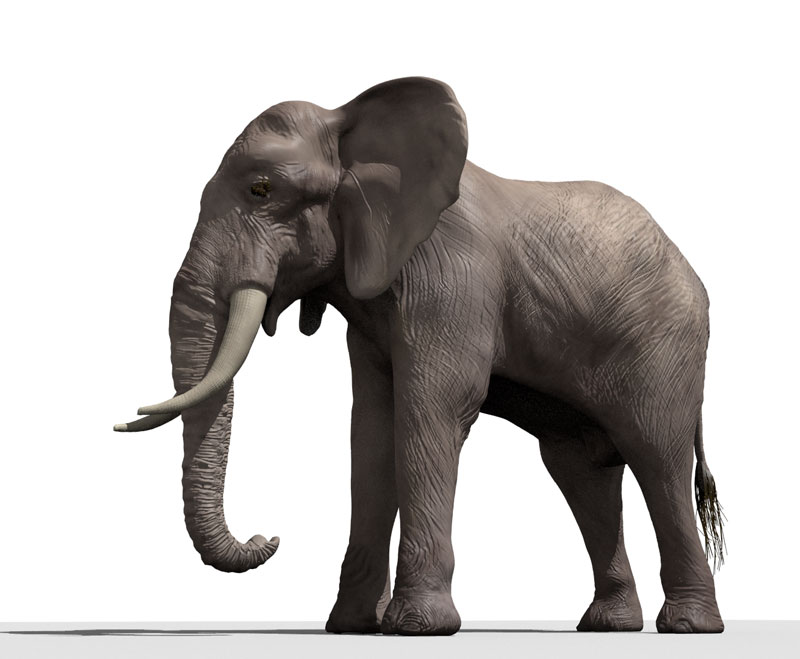
Thanks! I rendered it with BI, but rather quick. It only has the texture map and normal map applied, but it still needs some translucency in the ears for example and the lighting isn’t optimal yet.
So I can re-import the UV’s from blender also into ZBrush? O, that would be great indeed! I was planning on exporting the retopo mesh to blender, workout all the glitches and then import it and reproject the original on it.

As it is right now: I am good at sculpting and learning the whole mapping, rigging and skinning part (in blender) right now. And after that I want to be able to give the animals I make a realistic movement, so I still have some things to work out. I come from a 2d world and I am using the time I have right now to submerge myself into “real” 3d :wink:

Nice elephant!

Cheers,
Josh

I have an additional question:
Psycotik2002 and michalis, you said that I have to subdivide the second subtool as much as possible after Qremesher and before reprojecting the original. What if I freeze the subdivisions instead? What is the difference and which one is the preferred way to go? This elephant has 3 subdivision levels, the lowest one is already rather high though (I started with a DynaMesh sphere and used DynaMesh pretty far into the modeling phase)

Sure you can freeze the subdivisions levels too. But i dont like the fact that you dont have much control about the automatic projection it does. If you duplicate a copy of your high rez you can have more control over the projection and it gives you the option to tweek our mesh before and while you reproject. That been said, the feeze subdivision levels can do a pretty good job too. You can definitely try it! :+1:

I tried both, but the suggestion to do the uv mapping in Blender gave me just one way to go: I exported the Qremeshed elephant to blender, cleaned it up and uv mapped it and then imported it again and subdivided it as much as possible. then reprojected it and exported texture map, normal map etc back to blender. the result is slightly different from what I had: I had to lower the influence of the normal map a bit to get similar results and due to the different uvmap the trunck and body appear different. I didn’t put the tail and such back on yet: I did that one in blender :wink: SO it still needs some work, but this one has a whole different and more workable mesh!

4.jpg

Attachments

3.jpg