ZBrushCentral

Retopologise, save/load problem

I was using a zsphere and the edit topology to create a low res mesh, i got half way through and needed to leave, when i tried to reload it, the zsphere is just a normal zsphere with no retopologised bits… even though it autosaved a number of times during the process, and i chose to save a few times, ALL of these saves just come up with a regular zsphere.
Does anyone know why this is? Or how to get it back?!
So can anyone help regain my work or stop this from happening again?

You can clearly see here the quicksave shows my work, but it’s not there when i load it
[PS. the zsphere and highres mesh were seperate tools, each with no appended subtools]

Attachments
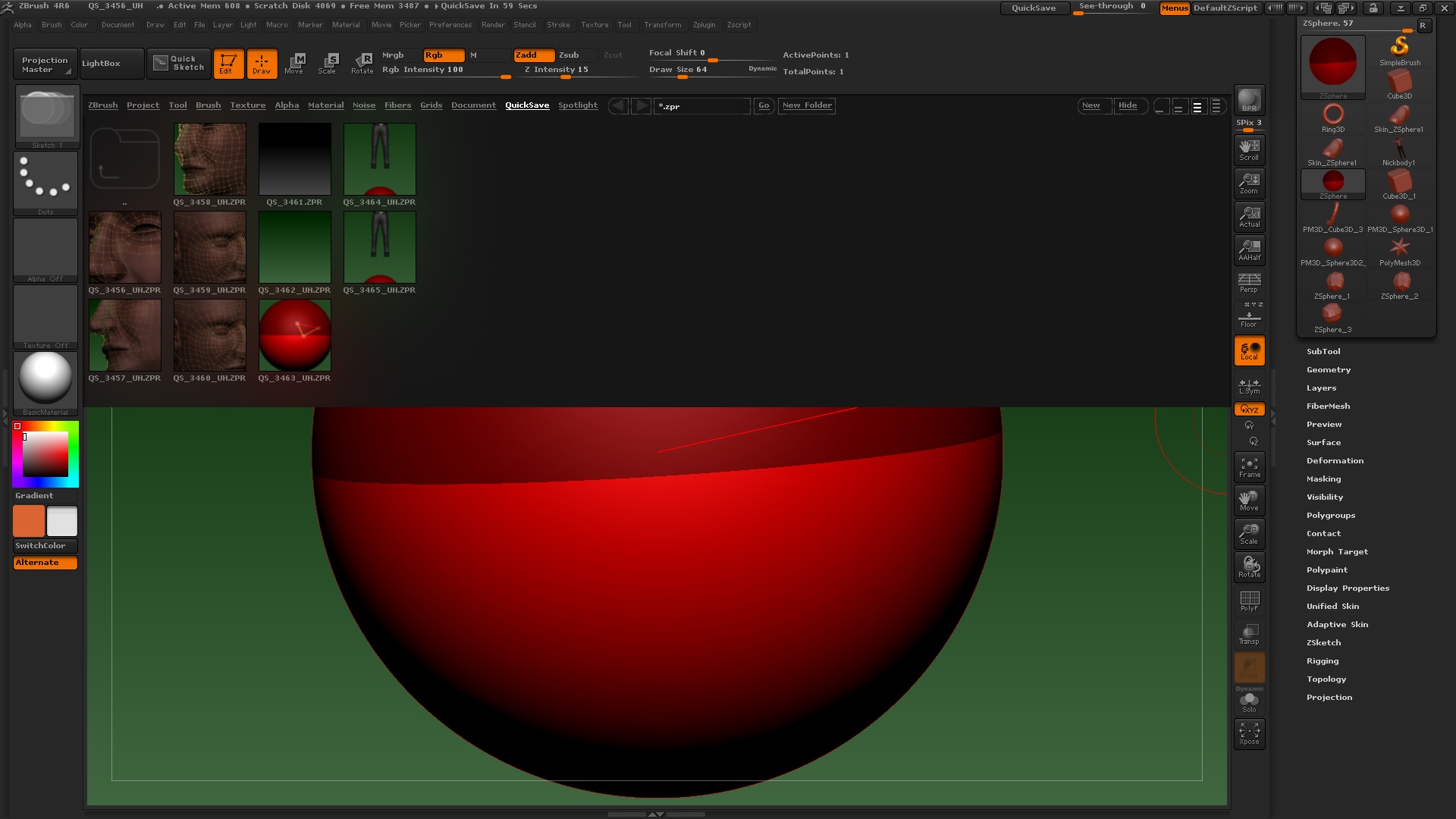
edittoposave.jpg

It’s been several years since I’ve retopod a model this way in Zbrush, so I don’t honestly know what has happend. I was able to save and reload a Zsphere retopo successfully. But I can give you a few things to try:

  1. In Tool> Rigging, does the selcted Zsphere have “delete mesh” lit as an active option, or is it greyed out? If it’s greyed out, then no mesh was saved with that particular zspehere. Are you sure you saved the correct active tool? Are you sure you’ve selected the correct zsphere tool from the tool menu?

  2. After saving a Topo-in-progress Zsphere, it’s necessary to reactivate “Edit Topology” in Tool> Topology again before you can see the wires and further edit them. A quick test reveals this is still the case.

  3. If the mesh is still attached and you’re in edit Topology mode, but can’t see the wires, try shift-ctrl clicking on the canvas to reveal any hidden elements.

Tips:

  1. At one point I recall it was advisable to exit “Edit Topology” mode prior to saving a Topo-in progress zsphere. I don’t know if this is still the case

  2. Have you tried Zremesher? This is the sort of mesh it excels at, and you might save yourself a lot of work. Zremesher guides can help tweak the polyflow and the Topology Brush can spot edit topology in places.

  3. In many situations, the new Topology brush can be used in place of Zsphere retopologizing. It’s a little more accessible without the cumbersome zsphere elements.

  4. I strongly recommend not relying on autosave as a primary backup mechanism. In ANY 3d program, save manually, and save often in alternating files. The autosaves should be last resorts, and I’ve experienced unpredictable results when using them.

http://docs.pixologic.com/user-guide/3d-modeling/topology/zremesher/

http://docs.pixologic.com/user-guide/3d-modeling/topology/topology-brush/

http://pixologic.com/zclassroom/homeroom/lesson/topology/

Good luck!

This is highly recommended and a system I use all the time. I’ve experienced corrupted file saves twice within the last 2 weeks. I usually do between 3 and 5 different files, I name with a letter at the end, a, b, c, etc… After about 3-5 different files I overwrite the first one and restart the sequence. Once I’m officially done with the final file I remove the lettering and delete the extras. And always have extra backups of everything.


  1. I saved the project not the tool… could that be where i went wrong? I always save project, because i’ve lost some info in the past by mistake when saving tools. It is greyed out yeh… annoying… so why is it, this is the first time this has happened but it did it for all the save files along the way (i save a lot, which is why it annoyed me so much) The only thing i think is because the zsphere was a seperate tool, not a subtool of the mesh… but it seems like that shouldn’t matter.

  2. when i was saving them it was fine, (although turned it to the preview mesh) it’s just loading again comes up with a blank zsphere, with no attached rig…
    3.nope

Thanks for the response… still can’t work it out, i think it’s something to do with ‘1.’ what do you think?

Ok, did it again with the zsphere as a subtool rather than a seperate tool… same thing happened, just returns to being a regular zsphere not rigged or edited in anyway:evil:, it’s even returned to it’s original position.

I’m sorry, I don’t know what’s going on in your situation. Tool vs Project save should make no difference. All I can do is walk you through the process that I know works in my installation, and have you compare it with what you’re doing.

  1. For this exercise, I’ve imported the Demo Head model from Lightbox> Tools. Import into your active tool list by double clicking the demo head icon in the Lightbox menu.

  2. Select a Zsphere tool.

  3. In edit mode for the Zsphere, go to Tool> Rigging > Select Mesh. Select the demo head from the pop up. You should see a Ghost image of the demo Head over the Zsphere.

  4. In Tool> Topology, enter “Edit Topology” mode. Draw out some orange edge lines on the surface of the head.

  5. In Tool> Topology, deactivate Edit Topology mode. Save the active Zsphere tool in Tool> Save As.

  6. Exit the program.

  7. Restart the program, and load the file you saved tool in Tool> Load Tool.

  8. Draw out the tool you loaded, and enter edit mode. You should see the ghost image of the source mesh still attached to it.

  9. In Tool> Topology re-activate “Edit Topology” mode, and continue to work on your topo.

That works for me. I suggest running through the process so you can see it work, then figure out where you might be diverging with your current tool.

Even if you figure it out, I strongly recommend researching the Zremesher and Topology brush tools I linked earlier. Zsphere retopology still has applications, but should no longer be a first resort in the the program.

Good Luck!

Yeah, i started looking into them, for the head it doesn’t mesh quite right, i really like to get the polygon flow right around the eyes and mouth… I’ve done it before and it was fine… just this project file seems a bit buggy… it crashed a minute ago and i panicked but for some reason it saved this time… still a little scared of losing everything.

the topo brush i tried to use but it was hard to get the right precise curve that you can get by one by one placing the polys, (all in the face)
as for the zremesher, i’ve tried before and it gave me bad results, this time i tried and it was fine, but glitched around the eyes and mouth (it’s not very widely open) but for the rest of the body should be fine, i’m gonna try and use it for the torso (should kill some time) and connect it to my manually editted head, dunno quite how to do that, i’ll let you know how it goes