ZBrushCentral

Retopolgy/Adaptive skin mesh problem

Hi experts, i am facing a problem i never faced before :confused:. Please see the image attached. I sculpt a character, then did retopology in zb, made adaptive skin. Now the problem is when i make it mesh by Make polymesh or even import the model (obj) without Polymesh in 3ds max, it deletes many parts of the mesh. Sorry for my bad english, please help.
Thanks

Attachments
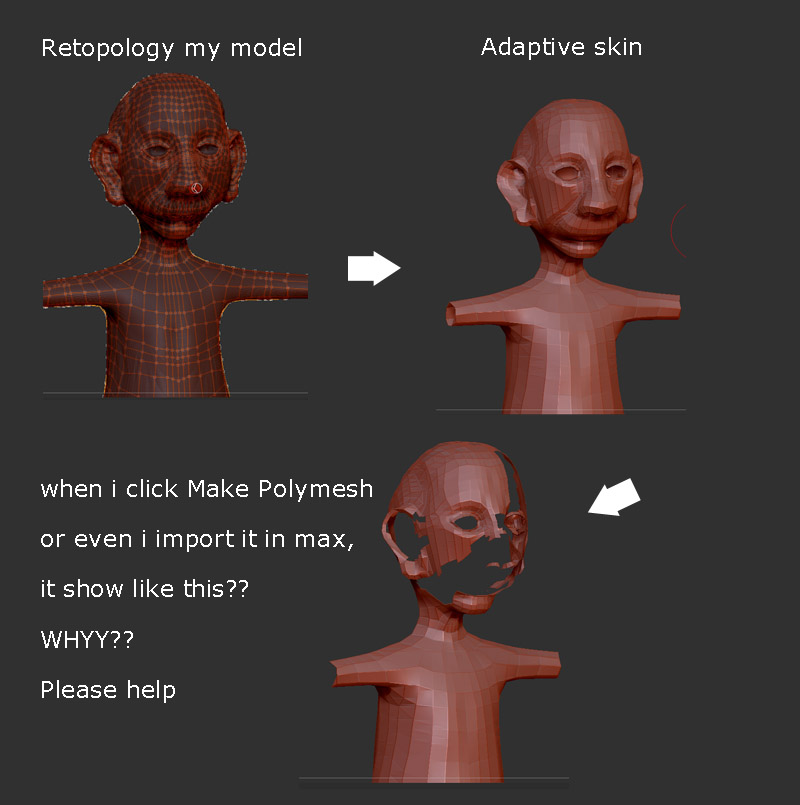
reto_problem.jpg

Hi, junaid_miran.
I’m not sure what is happening, but maybe I can help you.
Are those faces really deleted?
They probably just be flipped.

What happens when you click Tool menu > Display Properties > Double ?

If the vanished area appeared, it means the feces are exist there and just not be displayed.
In such case, you flip the flipped faces once more and the problem will be solved.

If those faces were not really exist there, maybe a problem or some problems have happened while you were performing retopology; for example, some vertex are connected to edges and making N-gons.
(I’m not sure if N-gons made a hole or not for now…)

I’m also so sorry for my poor English.
I hope it helps you.

Good luck.

stuart1983… LOve you :smiley:
Thanks a lot. Tool menu > Display Properties > Double solved the problem.
God bless you :slight_smile:
good day.
Junaid

Also, try re-topology after you make the adaptive skin. Re-topology on a ZSphere preview mesh is fraught with uncertainty. ~S.~

Hi, junaid_miran.
I’m happy that it solved the problem. :smiley:

Good day

junaid_miran,

Fyi, that doesn't actually fix the problem in the end. The normals are still reversed in the other direction, pointing inwards. To correct the problem you would have to export the mesh to a modeling application and average the normals so they would be pointing outwards, then import it back in. If left like that you could end up with odd rendering artifacts. But its an easy fix and render doubles helps till you get a chance to flip those normals.

Thanks for the complement, andrewPavlick. :smiley: