ZBrushCentral

Retopo...

I started to retopo a mesh, but tested saving with the subtool master ‘save ztool’, and it froze up the vertices. I could add new points and move them around, but couldn’t move the ones before saving.

If you cannot save while retopologizing, then that is a feature request from this guy.

This is the first time I’ve retopologized a mesh. I’ve used the tool to create subtools, but not retopo. It’s not very much fun, but I am getting very strange displacement artifacts in my modo render, so I think it might help.

Whoa, I just went back to finish my retopo, and now all of the points are frozen again. Can you not leave ZBrush at all while doing retopo? WTF? Even though I know it will be worth learning in the end, I’m really starting to hate 3d.

I’ve ran into that myself. Been a while though. Lessee. If I remember right, I think it masks the points. Try hitting Ctrl-a and see what happens. With me, it would lock up and some points would disappear, but still register when I checked adaptive skin preview. Another thing that worked out was to un-check then re-check the button to edit topology. That should probably get things set up for you. Don’t go hating the 3D just yet, there’s always a trick and a shortcut somewhere. Just gotta find it or invent it.

Exit topology mode (un-press “edit topology”), and save the tool.

Then, to reload, load the tool, enter edit mode again, re-press “edit topology”, and continue working.

That’s what I hate about it. So much technical, mathematical, work around bs to learn. I’m just an artist who wants to create art! That’s why I love ZBrush, but I’m branching into the tech side with modo because I don’t want to limit myself. Really, I love it too, but I still hate this learning curve. Don’t worry, I’m no quitter. I’m just a guy who only has enough time and resources to get baptized by fire.

The workarounds you suggested did not work. However, I can continue to add new points, and adjust them, just not the previous ones. It freezes them every time I leave the app. I can still delete any point. I’m going to finish it out, since it’s pretty good as is.

However, I was wondering (as I invent), can I bring the retopo base mesh into modo to clean it up, then bring it back to ZBrush to project the hi res details? I don’t see why not, but it’s best to ask.

Thanks Bingo, I’ll give it a go. Is this a bug, or are you limited to staying in ZBrush while doing retopo.

No, you can save retopo work in progress, and continue at any time via the process I described above. It may not even be strictly necessary to exit topology mode when saving, but this was always considered the “safe” procedure in the 3.1 era.

I do not know what sort of issue you may have encountered, unless your points had become masked.

Bingo Jackson, that didn’t work either. I’m using 3.2 for the record. Thanks for the feedback though, u da man.

Dude, don’t beat yourself up - we’re all learning, even the veterans among us. You’re actually in a good place since you have a license for Modo; export a relatively high res version of your sculpt as an OBJ, bring that bad boy into modo and retop/UV map, etc. within modo - then bring that new low res mesh into ZBrush, add your high res sculpt as a subtool and project your details. Done! :smiley:

For some reason, they were being masked! Must’ve been control clicking on accident. Ok, I love 3d again, for the rest of the day at least. I really can’t wait to get used to all these new workflows. I said it just yesterday - I hate being a rookie.

Thanks again :+1: :sunglasses: :+1:

I have no experience using 3.2. And I am not using Sub Tool master. But I assure you, it works (at least in 3.1 and 3.5 PC). It is the recognized method for saving retopology work.

Put aside the tool you’re working with now, and make a new test. Exit “Edit topology” mode before saving the tool. Don’t use Subtool master to save, just for the sake of consistency. Restart Zbrush, Reload the tool and enter “edit topology” mode again on the tool.

On your existing tool with the frozen points, when in “edit topology” mode, go to the Maksing menu and hit “clear mask”, then try moving them again. If that doesnt work, somehow the tool has become corrupted, possibly through a quirk (it happens), or maybe incorrect saving procedure.

Oh we’re good to go dude. Like I said, u da man. I’m just a retopo noob who didn’t think about the fact that these verts are ZSpheres, and that they can be masked. That’s what happens when an average artist tries to keep up with you smart people :smiley:

No, not at all. The Zbrush documentation is not clear in this area, and you pretty much have to learn this stuff though asking or trial and error. :wink:

Squeaky wheel gets the grease, ya know. I’m going to figure all this out one way or another. Again, I really appreciate the help. Clock’s tickin’ fast for the new guy! :smiley:

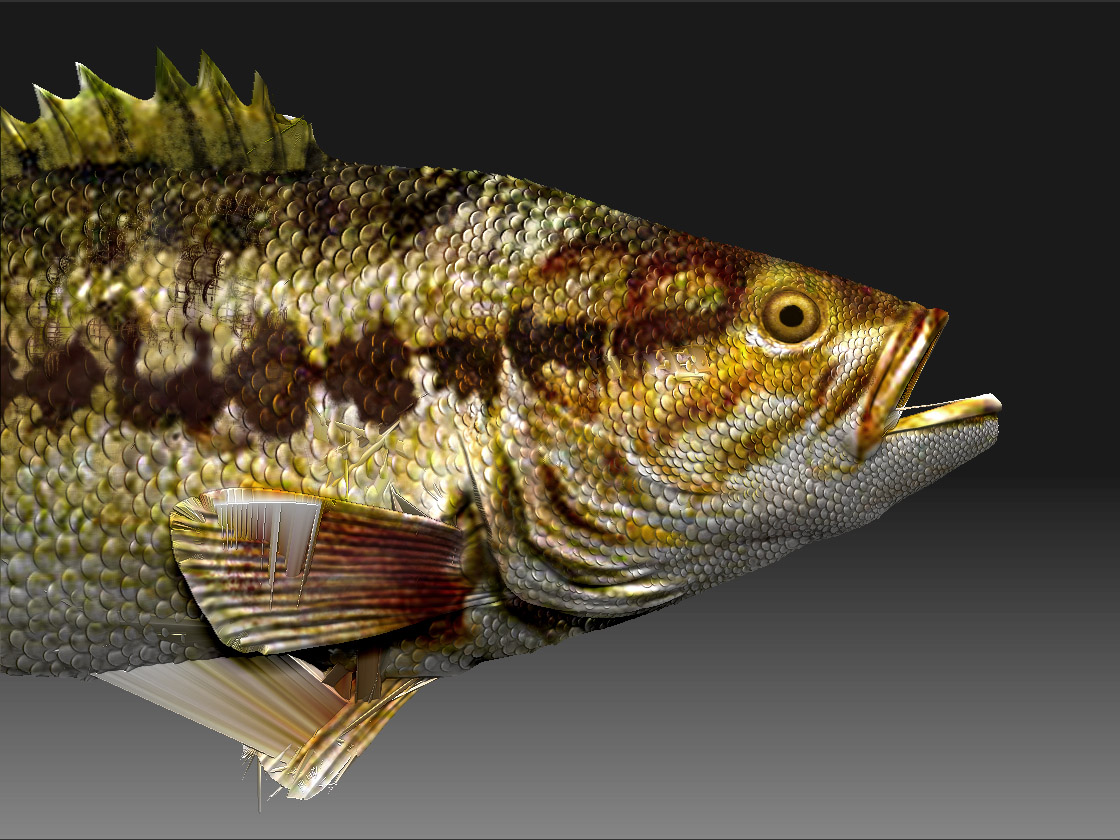
This is the best projection of the hi res onto the retopo base that I’ve gotten. Getting close I guess. I’ve read the Rastaman’s pdf and watched NickZs Veoh tutorial, and I’ll be back at it tomorrow. I’ve tweaked these settings a hundred different ways, must be the base mesh still.

However, this makes three long days trying to get a clean test render of a three hour wip sculpt! I was on a roll man!

I gotta figure this out. Something about the very top of the dorsal is unable to displace properly. It’s slightly inflating and bloating in the render. Other than that the original renders fine. I just built a shark the same way, weird.

I was hoping retopo might do it, even though the base mesh is clean.

Now retopo’s making my face look like this guy: :mad:

Tomorrow’s another day, sorry for venting. Any advice is appreciated of course :smiley:

kissmybass.jpg

james - a projection isn’t going to be perfect…very rarely have I never needed to do clean up on a projection. It’s just another part of the game, so to speak.

You may also want to think about moving the fishes side fins away from his body more so the projection doesn’t get so confused on which faces it’s supposed to be going to.

Hey! Your fish ain’t bad at all. I do hate the weird artifacts that come with some reprojections. If I might make a suggestion, (if not already like this) try projecting with the fins and such as separate subtools. This might make things a little easierfor the re-projection. Another idea you might try is to bind your fish model onto the zshpere as you would when starting the retopo, but instead of adding points, you can import an existing topology instead. Do that and you can exercise a little more control on the density of the en result and a few this’n thats on the projection itself. Worth a shot.

Thanks guys, much appreciated. I’m getting back on it today, and I’ll try out your suggestions. Didn’t realize that projection errors like this are common.

Being that I store a morph target of the original hi res, I use the morph brush on the new projected hi res to clean it up right? I would assume I use it on the adaptive skin, but I am the new guy to this technical side of ZBrush and 3d.

Thanks again for the input :+1: :sunglasses: :+1:

I’m getting crashes immediately when trying to use the morph brush to clean up the projection on the adaptive skin. The morph is stored from the original hi res mesh. :+1: or :-1: :question:

Surely I’m doing something wrong, this computer doesn’t crash very often.

For the record, after taking some good advice, I’m using normal mapping. The silhouette is barely losing quality. Now there’s zero bloating in the fins, which is what raised the red flag to begin with during this wip. It’s rendering lightning fast now. I just did a 1500x3000 with an environment in 40 seconds!

Thank you all for your help though. I know I’ll stumble upon retopo here soon, and it will come in handy.

modobasswhite.jpg