ZBrushCentral

Retopo visibility question

Hi! I am trying to retopo a mesh in ZB4 (mac), but I find it hard to see the points where I have drawn my new edges, they are kind of hidden by the underlying highpoly mesh.

What settings are recommended for best visibility when doing a retopo in ZB4? I have seen the posts about setting “pref->draw->back opacity=0” and that helped with the backface snapping, but this seem to be something else.

Hope someone can give me some help. Thanks in advance!

/ tennet

Attachments
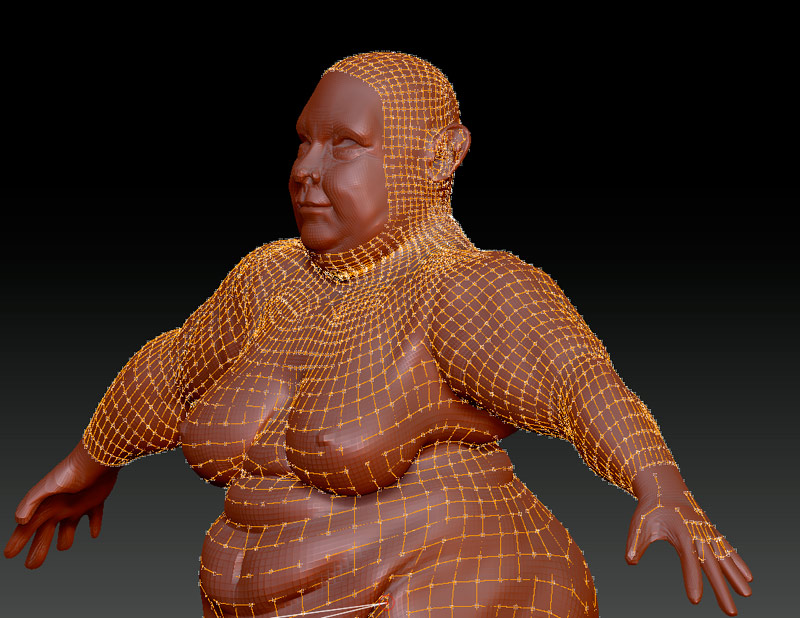
retopo_01.jpg

retopo_02.jpg

Retopo visibility is pretty much all f****d in ZB4, so not much you can do about it. But to wait for update.

This is what it looks like if you append a zsphere and use BumpViewerMaterial. The only drawback to the appended zsphere method is that you have to toggle the visibility of the underlying mesh to view your skin but once you get used to it, it’s easy.

retopo.JPG

Are you sure?! There must be something to do?! I do use this back opacity setting, but I still get some snapping to the back faces?

I was watching a retopo tutorial with ZB3 and there it almost looked fun to do retopo, but this isn’t fun… it’s annoying.

Hope there is a solution.

/ tennet

I am using the Appended ZSphere Method here. There is no snapping to backside points.

Thanks zber2, didn’t see your answer! I will try that. Hope they will fix this with an update soon.

/ tennet

Is it possible to create a custom menu just showing my subtools, like a popup “subtools window” where my cursor is? Then I could assign a hotkey for it and that would make it easier (and quicker!) to show/hide subtools while doing retopo using this “append a zsphere technique” mentioned above.

I created a custom menu, but I couldn’t figure out how to add the subtool palette in it. Is it possible to make a copy of the “tool” palette and then delete all the items I don’t need?

Thanks again!

/ tennet

Originally posted by tennet:

Is it possible to create a custom menu just showing my subtools, like a popup “subtools window” where my cursor is?

No, it’s not possible.