ZBrushCentral

Retopo Explosions! Holes in scanned mesh.

Hi Guys,

I am new to retop in ZBrush and I am having troubles with a Mesh that explodes once the Adaptive Skin Preview is turned on?

Before
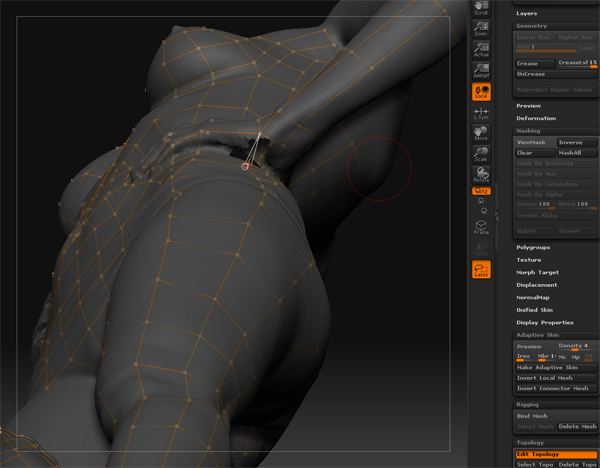
[prev.jpg]

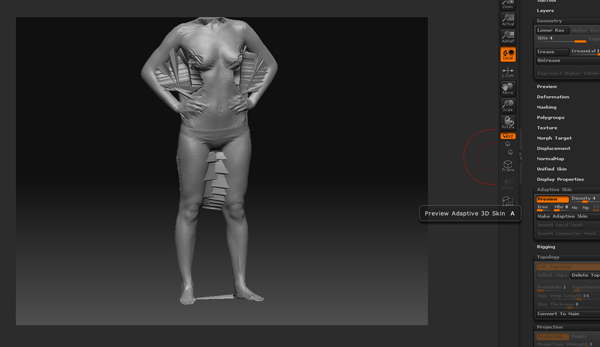
After

[http://www.ir-ltd.net/uploads/prev-1.jpg](http://www.ir-ltd.net/uploads/prev-1.jpg)

Basicaly the imported scanned .OBJ model has holes in it. So when I retopo the mesh I would have expected those holes to be just filled over but they seem to create weird exploded polygons once the Adaptive Mesh is previewed and then created. To get rid of them they have to be manualy smoothed out at the highest subdiv.

Any help would be much appreciated? or is this a known bug?

Reagrds

Lee
it’s not a bug, it’s how projections work… Each point is raytracing until it connects with another surface…

anyway…try to use project all (subtool panel) instead of project (project panel). It usually does a better job with a projections.

take your adaptive skin mesh to level 1 (projection OFF)

create an adaptive skin.

open up the original scanned mesh.
append the new retopod mesh as a subtool
divide the new mesh up to the number of SubD’s you want.
store a MT (tool>morphTarget>storeMT)
now…tool>subtool>projectAll (make sure the new mesh is selected and both mesh are visible)

now look for any area where the mesh spiking. remember these

now
tool>morphTarget>Switch (will take your mesh back to the smooth unprojected version…no spikes now)

grab the morph brush and go over your model avoiding the areas where the spikes are going to happen.

Then sculpt in the areas that you missed.

hope that helps

thanks for the reply goast666, although I can actualy just do the same thing by just smoothing the mesh afterwards.

It would be better to somehow fill the gaps in the original high res mesh using some polygons and the clay tool but I guess there is no way to update your original mesh underneath the retopo setup?

You could also try to ZProject brush. It allows you to paint in the projection by hand, so you could avoid the areas with holes on the scan.

Something else you could do is set a morph target on your new adaptive skin, then do a Project All like ghost666 said, and on any areas that came out funky you can just dust over them with the morph brush and make adjustments from there.

Now I am totaly confused? the whole model has been carefuly retopo’d when I preview the skin, the whole thing explodes! the mesh is perfectly enclosed. I must be doing something wrong here. The underlying Hires mesh has a couple of pin holes near the hands and that’s it?

So why is the whole thing exploding? :rolleyes:

[prev-2.jpg]prev-3.jpg

Example .ZTL file: http://www.ir-ltd.net/uploads/example.zip

it looks like a scale issue.
but I’m d/lin the file to check.

Hello 8INFINITE8,

I’ve had a similar problem in the past. I got around my problem by doing the following:

  1. Retopologise (as you’ve done).
  2. Deformation–>Inflate topology by a small amount.
    This helped to reduce some of the spiking when I used the projection option. I also tried various projection strengths until I got the best result I could.

I dealt with any left over spiking by dropping down my SDiv and using the smooth and move brushes. I did this working back my way back up to the full SDiv level. You can use the morph brush as others have suggested, but you’ve got to store a morph target prior to projection (as far as I know).

Hope this is some help. :slight_smile:

Thanks for the feedback guys. I am trying out those suggestions now.

  1. Retopologise (as you’ve done).
  2. Deformation–>Inflate topology by a small amount.

How do I do this?

This helped to reduce some of the spiking when I used the projection option. I also tried various projection strengths until I got the best result I could.

Tried that but it didnt work so well, it just got rid of the details, still spiked.

I would love it if someone could have a look at the file previously attached as I cant fix this, and that was about 2 hours of retopo. :cry:

Has anyone had any luck with this?