ZBrushCentral

Retopo adaptive preview + projection problem

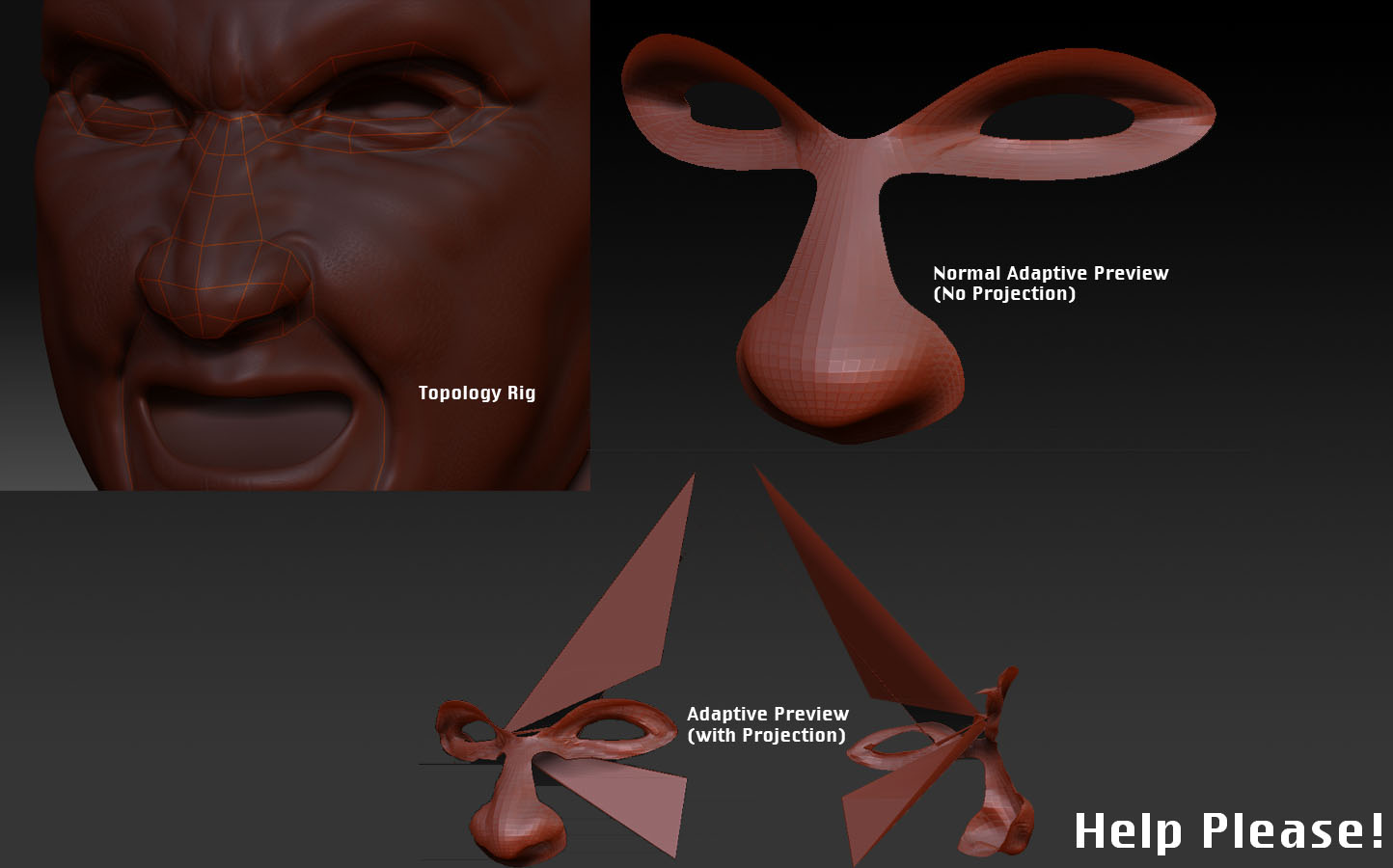
Sorry if this has been posted before, I did a search but didn’t find anything related to my problem. Anyway, I’m in the process of retopologizing my mesh, but when I try to do an adaptive preview of the mesh with projection turned on, there are some serious problems (vertices flying off in every direction). Is this a bug, or am I doing something wrong? I’m using the default rigging/topology/adaptive skin settings, if that helps.

Attached are a couple of screenshots of what’s going on. It’s worth noting that when I do an adaptive preview without using projection, there are no stray vertices, which is what led me to this post.

Attachments
topo_yipes.jpg

I experienced the same weird results and other quirks.

what helped sometimes is to place more points on the rig, to get a more exact match.
I also noticed that symmetry breaks really easy, so the rig is not closing propery on the other side sometimes which can cause exploding geometry and holes too.

and sometimes I needed to start all over to fix the problem.

This probably isn’t much help since it doesn’t look like it applies in your case, but I’ve had problems with projection rigging when one of the surfaces of the adaptive skin is flipped (normals facing wrong way). Usually when you turn on adaptive preview, it also turns on ‘double’ so the cause of this problem is not always clear, but by turning off double you can verify that the skin is correctly oriented.

Otherwise, I wonder if moving the topology used for the skin inside or outside the mesh helps in your case?

that is for sure you missing that point at the beginning of making your new mesh, to avoid that you have to press ****f +lmb+click to cebter THE FIRST POINT of your new mesh.
Andreseloy

Thanks for the advice guys, it seems that a few of my zspheres went below the surface of the skin causing that weirdness… I’d just assumed the points snapped to the top of the mesh because I’ve been using Topogun and Polyboost for so long (there really should be an option to enable mesh snapping, for the record).

However, now I’ve run into a new problem around the ears… Even though I’ve been working in complete symmetry from the beginning, my projection adaptive preview is having strange insymmetrical problems. Is there a way to use Smart ReSym on a topo rig? I tried doing it on the adaptive preview, but that obviously didn’t work. It seems Z3’s retopo features need some improvement :slight_smile:

Here’s a screenshot of my new problem

Having had similar problems that my mesh was all distorted when turning “Projection” on, I solved my problem by setting the “ProjectionRange”-value-slider to -1.

-0,50 and -0,10 also work, so it seems that when the “ProjectionRange”-value-slider = higher than -0,10 (e.g. 0 or greater than 0) then the projection fails.

When negative (the ProjectionRange) then my mesh was projected completely OK with following attributes:

  • original mesh = 9 million polys (7 subdiv levels)
  • retopoed mesh = 2292 polys
  • adaptive skin “Density”-slider = 7