Ok, thank you very much. I think I know why that may only appear on Windows 7 and not 10.
I will see if I can make some changes tomorrow.
Ok, thank you very much. I think I know why that may only appear on Windows 7 and not 10.
I will see if I can make some changes tomorrow.
P3 is the latest release/patch.
Thanks skaale, sorry I didn’t see your comment before. Would love to see your fractals rendered.
So, here is a new version of the VRMesh Export ZPlugin. The main change is compatibility with all versions of Windows (hopefully) and some refactoring of the code to make it easier for me to make further changes.
If the ZPlugin does not work for you then please let me know the version of ZBrush and OS that you are using and any error messages you received. Posting the generated VRMeshCreate.bat (Windows) or the VRMeshCreate.shl (OS X) would also help.
The latest version is now >>here<<.
don’t working : ( The same thing - there is an OBJ file, not VRMESH. I even tried in 32 bit version - the same bug.
Hmm, not sure what is going on. ZBrush might perform the [ShellExecute,…] command differently on Windows 7 as the ZPlugin is working fine on Windows 10.
Could you please post the contents of VRMeshCreate.bat?
cd “VRMeshExportData\ExportedFiles”
if errorlevel 1 (
echo Could not change to the correct directory.
echo Please check that the VRMeshExport ZPlugin is installed with folders intact.
pause
exit
)
ply2vrmesh.exe *.OBJ ZBrushExportedVRMesh.vrmesh -flipYZ -previewType clustering
echo ###### Deleting the .OBJs and .MTLs exported from ZBrush ######
del *.obj *.OBJ
del *.mtl *.MTL
del *.bmp *.BMP
It seems that the initial directory for the [ShellExecute,…] command varies depending on where the ZPlugin is located. If the ZPlugin is located in ZStartup/ZPlugs or ZStartup/ZPlugs64 the initial directory is the main ZBrush folder. If the ZPlugin is located in ZScript/VRMeshExport, for example, the initial directory is ZScript/VRMeshExport.
I have updated my previous post with a ZPlugin that now works on Windows. Please tell me it works chooj, please 
Btw, I don’t there exists a ply2vrmesh.exe for 32bit Windows, so if no vrmesh files are created that could be why.
the same error - something about wrong directory… The difference is that now it not generating an OBJ, only BAT. Im start to thinking that this bug could be because of cyrillic letters in the name of my disc.
a text from BAT :
cd "ZStartup\ZPlugs\VRMeshExportData\ExportedFiles"if errorlevel 1 (
echo Could not change to the correct directory.
echo Please check that the VRMeshExport ZPlugin is installed with folders intact.
pause
exit
)
ply2vrmesh.exe *.OBJ ZBrushExportedVRMesh.vrmesh -flipYZ -previewType clustering
echo ###### Deleting the .OBJs and .MTLs exported from ZBrush ######
del *.obj *.OBJ
del *.mtl *.MTL
del *.bmp *.BMP
The ZPlugin should still be exporting .OBJs. Nothing has changed with how they are exported. The “problem” is probably that now the .bat file is actually being executed and it removes the .OBJs when it is done. But the ply2vrmesh.exe seems to be failing.
Im start to thinking that this bug could be because of cyrillic letters in the name of my disc.
Aaah, that might be why ply2vrmesh fails. I have added checks for extended ascii characters and removal of the path from subtool names (if you import an .obj into ZBrush the subtool name actually includes the path it was imported from.)
Please give it one last try. I have updated the ZPlugin in my previous post.
same error again 
Sorry about that.
I downloaded a Windows Virtual Machine from Microsoft and the ZPlugin works fine on Windows 7 and 10, so I am not sure what else I can do. You could try running ZBrush as Administrator but I did not need to.
There could of course be a problem with your ply2vrmesh.exe, either it is corrupt or does not work on your version of Windows? You can try it out by starting a command prompt (cmd.exe), drag the ply2vrmesh.exe file into the command prompt window and then press enter. It should tell you if it can run or not.
Here is a new version of the VRMesh Export ZPlugin.
The main addition is actual functionality for the VRMesh Export > Export Highest SubDiv switch. Before it did nothing, now it automatically sets the subdivision level of each exported subtool to the highest level. When the export is finished it returns each subtool to its previous subdivision level. Useful if you have many, many subtools (VRMesh Export has a limit of 400 subtools, but I think that is ok;))
The second addition is VRMesh Export > Show Command Execution, which is helpful when troubleshooting errors or to determine the effect, timewise, of the various ply2vrmesh settings. On OS X it launches the shell script in Terminal.app and on Windows it pauses the batch script execution before it exits.
If you run into any problems with generating the .vrmesh files then please run the ZPlugin again with VRMesh Export > Show Command Execution enabled and post the output here.
Edit:
It appears that some arguments are not supported on older versions of ply2vrmesh. Please make sure you are using a recent version. The ply2vrmesh executable displays the build date when run. When writing the ZPlugin I used ply2vrmesh builds from June 12 2015 on OS X and June 16 2015 on Windows.
Here is the ZPlugin:
How to Install:
Extract the VRMeshExport.zip file and copy the VRMeshExport.zsc file and the VRMeshExportData folder to the ZStartup/ZPlugs and ZStartup/Zplugs64 folders of your ZBrush installation.
Locate Chaos Group’s ply2vrmesh executable (ply2vrmesh.exe on Windows and ply2vrmesh on OS X). Copy and paste it into your ZStartup/ZPlugs/VRMeshExportData/ExportedFiles and ZStartup/ZPlugs64/VRMeshExportData/ExportedFiles.
Restart ZBrush and you are good to go.
How to Use:
The ZPlugin is located in ZPlugin > VRMesh Export.
Select a tool with polymesh and/or parametric primitives (ZSpheres are ignored). Adjust settings and export to a single or multiple .vrmesh files (OS X only supports multiple files). Manually open the .vrmesh files in your DCC app of choice. The exported files are located in ZStartup/ZPlugs/VRMeshExport/VRMeshExportData/Exportedfiles or ZStartup/ZPlugs64/VRMeshExport/VRMeshExportData/Exportedfiles, depending on which version of ZBrush you use.
Great !!! Thanks a lot TVEyes !!!
(If you read my message previous to editing, sorry my browser for some reason showed me only some of the first messages when I wrote it)
Hi Mark. Thanks for doing this. I tried the last script you posted above and keep ending up with just a VRMeshCreate.bat file. I hope you can see the attached image, showing the scriptoutputwindow. Does this make any sense to you? Thanks a lot. Hilmar
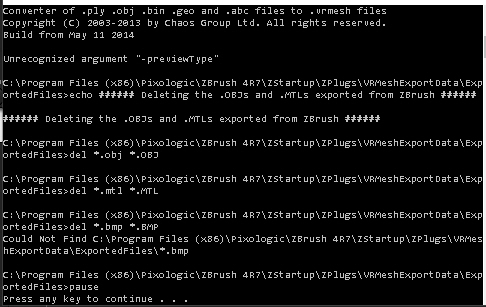
Thanks for the output Hilmar, that does help.
The ply2vrmesh executable that you are using is from May 2014 and apparently does not support one of the arguments. If you can update ply2vrmesh to a newer version that would solve the problem. If for some reason you cannot update then I could make the offending argument optional, previewType in this case. But there may be other arguments that are not compatible with your version of ply2vrmesh, so it would be easier for me if you could update.
I used ply2vrmesh builds from June 12 2015 on OS X and June 16 2015 on Windows. Not sure where you can get a new version if you are a licensed V-Ray user, I got them from the V-Ray for Maya 2016 demo on Chaos Group’s website.
Thanks KeuPon! If your original post was very naughty then don’t worry, I never saw it
I got it. AND YOUR SCRIPT IS WORKING NOW!!! That is so cool!!
Thanks a lot!!! Will make things a lot easier.
Thanks!
That is great to hear, hope you find it useful. Let me know if you think of anything I can improve.
Chooj, you might also want to check you are using the latest ply2vrmesh executable.
I’ve updated the “ply2vrmesh” file and now the script works! Now there is a little issue - if I import more than one subtool in one single file, I see only the first subtool in 3ds max, the other subtools is gone… But I can use “Export to multiple files” button and this works fine. The main question is - is it possible to transfer polypaint data in 3ds max with Vraymesh Exporter? Maybe there is a way to convert polypaint to vertex color? Anyway, thank you for the great script! : )
Thanks for the feedback Chooj, I have uploaded a new version in my previous post which should fix the single VRMesh file export. I also added the Merge Voxels option, that I think prevents overlapping voxels, and an option to open the export folder in Windows Explorer / Finder.
Polypaint is exported as vertex colours but ply2vrmesh does not currently support them in .obj files (vertex colours are not part of the Wavefront Object specification). I will try and figure something out when I get some spare time.
I’ve tested new version and Single File Export works fine, thanx!