[FONT=Arial]Just started with ZBrush and man, it’s so completely different from 3dmax or maya. For now, I got a major question: how to do a proper render of the objects created? My subtool has 900k polys, but yet I can see the faces of all of them, and looks like it has just 1k polys. Any way to improve that to export to a png? Tried playing around with the render menu, but unfortunately I cannot find an option…
i can’t really help you with rendering per se. but it sounds like being so new to zbrush, maybe some general info might help.
zbrush doesn’t apply gouraud shading (smooth shading) to the object, that’s why you see faces.
subdividing a low poly mesh will give you a smooth look.
It now has a division level 5, with 3m polys, still see faces, which should be impossible. Maybe render as I know it is impossible? I need to import in 3dmax to render properly?
you’ll want to post up a picture to better show the problem, rather than trying to tell me what a picture looks like…
also, you can smooth your facets inside of the render panel.
Valid point. Here is what I have been working on. It’s an extremely basic level, so I apologize in advance for that. It’s the base platform for a model I’ll start working soon. 2.3 million polys. Main issue is in the big rock on the left
Attachments
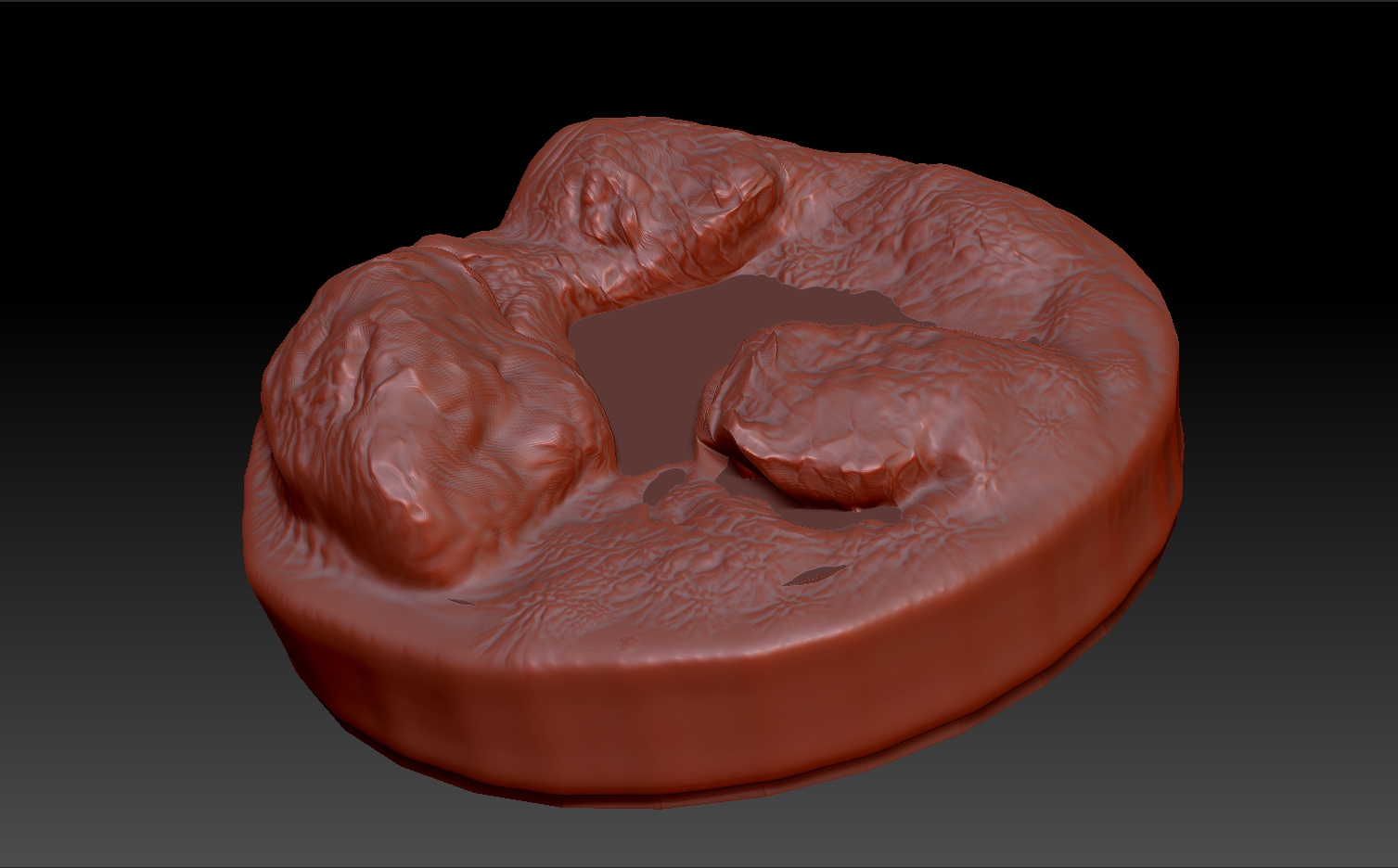
Looks like 1 tool (or 2 subtools). material used plays heavily as well as paint and or textures (and light properties) as well as the render settings. Split your thing into polygroups maybe would help you.
a few things.
- change your material, red wax is the devil.
- A model with 3 million points doesn’t mean it will be smooth. You’ve got some really stretched polygons from the looks of it, also, the sides and bottom of your mesh, are eating up the most of your 3 million points, so your actual sculpted mesh, is probably less than 1 million, probably like 800k or so, which isn’t really that dense.
You’ll want to split your rocks into subtools, as well as your base. Dynamesh your objects to clean up your stretched polygons and then clean up your sculpt in the areas that need it. If you need lower sub D levels for some reason use Zremesher and project your details back on.
hope this helps.
thanks for all the tips. Will study some more and implement then
Yes it looks like some stretching. I recommend turning on your wireframe on (Polyframe [SHIFT+F]) once in a while. It helps you to get a visual of areas that might be stretching too much. Try to keep all points on your model within the same general distance from each other. Zbrush tools and brushes work best if this is the case. If not you’ll get some visible stretching and some inconsistency with brushes like smoothing, etc.
Special attention is needed when dealing with resolutions in ZB. Needless to say that how you play with resolutions, Zremesher, and dynamesh is in itself a way to sculpt shapes. Is possible to still have faces if you dynamesh a mesh with few polygons but if you run the relax control, or use the smooth tool you’ll see that it will change having said that one must have some form of strategy to obtain the desired shape, usually starting with a low res and progressing to a finer mesh as finer details are needed…it takes time and there are several ways to skin the cat…