Hi,
I just can not figure out, when in ZB go to render tool, and then enviroment, and then txt, and I pick one, there is no render with this new txt, and same with color, and how to pick a color for background and not to color whole model.
Thx
Hi,
I just can not figure out, when in ZB go to render tool, and then enviroment, and then txt, and I pick one, there is no render with this new txt, and same with color, and how to pick a color for background and not to color whole model.
Thx
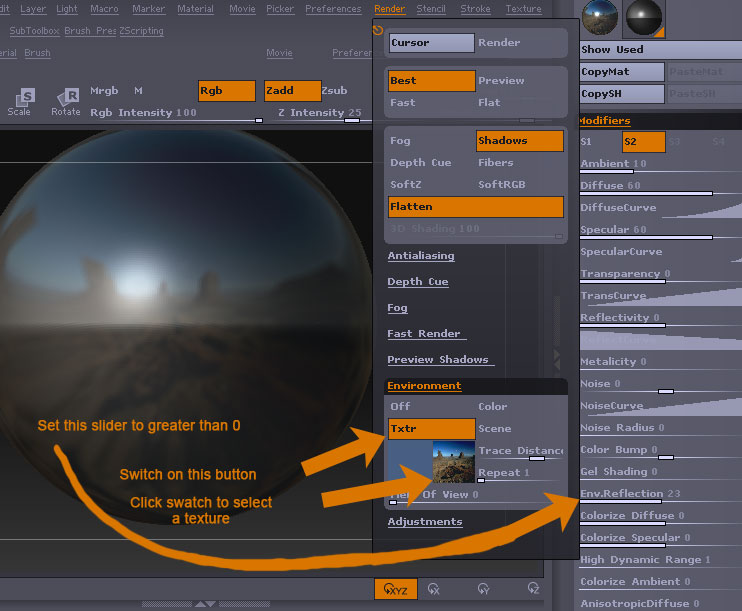
The Render:Environment settings are to do with the environmental refelction option in some materials. You need to set the Material Modifiers: Env. Reflection slider to greater than 0. Then adjust the options in the render palette. The effect is only seen with a best render.
To change the canvas background color, select the color you want to use (the model will change color but don’t worry) then press the Back button in the document palette. The background will change color. Select White again in the color palette to restore your model’s color.
hi Marcus,
thx so much for such a detailed answer. But this means that only color can be added as background, no texture, I mean enviroment texture.
Marcus, one more thing, how can I create new material?
thx
You don’t create a new material in ZBrush. Instead, you select your materials from the Material palette. There are options there to copy materials from one slot to another, or copy shader channels (S1, S2, etc.) from within a material itself and paste it into another material.
You can fill the canvas with a material. Create a blank layer, turn on Zadd and Mrgb, then press Ctrl+F to fill the canvas with the currently selected material. Some materials also have a canvas bump option which will tile an alpha as bump across the entire canvas.
Thx Aurick for this
new question,
are those light settings working at all? No matter what I do I get always the same result, and only sun type light is working, but when I put global, nothing is going on, no matter what intensity is there.