ZBrushCentral

Render issues in Maya Software for ZBrush normal and displacement maps

Hello there,

Any help with this dilemma will be greatly appreciated. I have modeled a bust in Maya, and sculpted it in Zbrush. I have tried using the GoZ function, and everything works fine until I begin to render. There is really intense artifacting when I use Maya Software, and Mental Ray does not function properly.

I have also tried other ways of getting the displacement and normal maps into Maya, though the same issue occurs. I think there is an issue with just the displacement maps when rendering in Maya. Does anyone know of this problem?

Thanks for any assistance.

Attachments
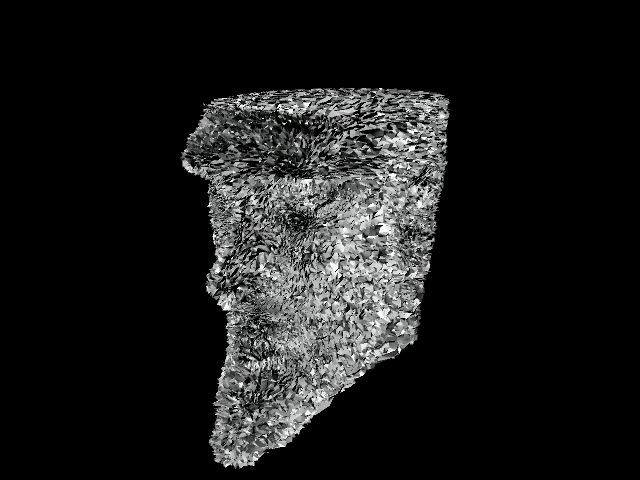
artifact.jpeg

I’m just a noob but this may be the smooth UVs problem.

Try this:

  1. create mesh in maya with UV maps assigned.
  2. export as obj
  3. import into Zbrush
  4. When increasing subdivisions in the geometry tool: make sure you have Smooth UV turned on.
  5. When ready to create displacement maps, go to highest subdivision, make sure Smooth UV is turned on and click “ReUV” which will rebuild the UVs without Zbrush’s UV scaling algorithm.
  6. Go through the rest of the creation process for displacement maps, exporting etc.
  7. Make sure that when you have exported the maps, they are flipped vertically: if you don’t know how to do this, open the original obj in maya, take a look at which way up the UVs are oriented. If the displacement maps etc are oriented in the wrong vertical direction in photoshop, flip them vertically and then re-import.

I hope this is what the problem is. If not that’s about all the knowledge I have and I tried my best.

Thank you for the help. I am going to give that a shot. :cool: