ZBrushCentral

Rendeer questionds ..

HI

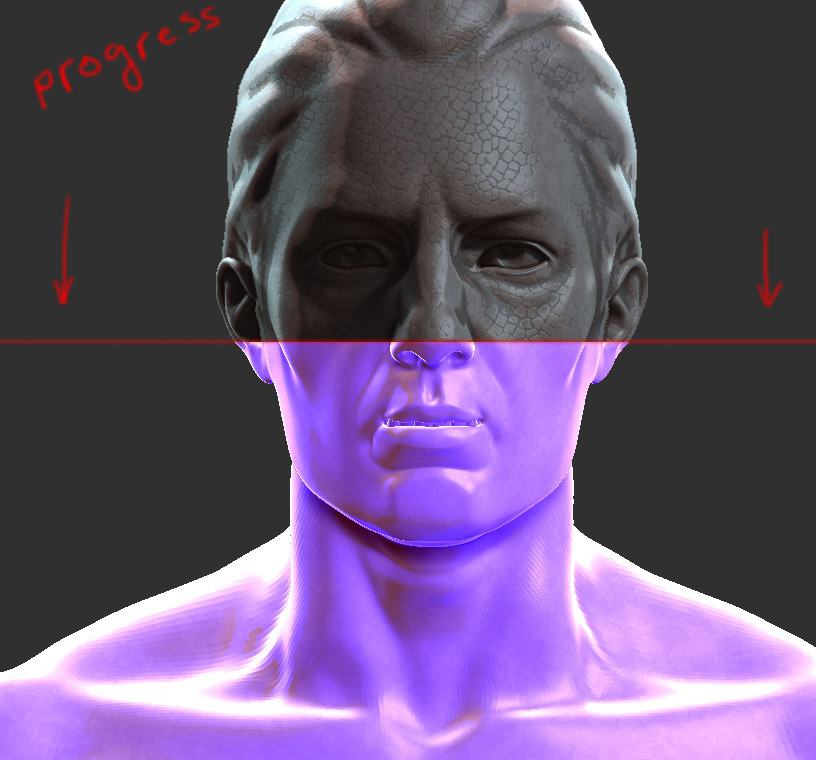
I want to ask is there a way when i use BPR render to see my process ? not directly the finished product?

in the Zbrush 3.5 when i rendering in Best render mode any time i seen progress of the render ,

in Zbrush 4 when i render in best render model the progress are sometimes visible sometimes not :frowning:

i want to see this :

hope this make sens , and sorry for my English :frowning:

[Untitled-1.jpg]

Not that I know of. What you can do is lower some values so that the Best Preview Render is quicker while you set things up:

  1. Set the Render:SPix slider to 0 while you are setting up your render. This slider controls the anti-aliasing. When it is set to 0 there is no anti-aliasing and the render will be quicker. Set it to the desired value (3 is a good value) when you are ready to render the final version.
  2. If you scale your model down so it is quite small while you are testing the render will be quicker. You can store two versions on the Timeline - the final position/size and a test position/size.
  3. Adjust different settings separately. For example, if you want to adjust SSS, turn off Shadows.

It is not a solution, any other programs with render engines have render progress , i don’t use BPR render it;s very bad , i use old and good best render model , but the problem is that the render progress is missing now sometimes i see the progress sometime not … for example in zbrush 3.5 r3 anythings was great .

now when i render something i must export all my meshes form 4 to 3.5 and then to render ,

the better way now is back to 3ds max or maya render :frowning:

ZBrush render RIP …

Thanks

The Best Render in ZBrush 4 is the same as ZBrush 3.5. You have no need to export your models to use the Best Render.

“BPR render it;s very bad”

Please explain this statement :slight_smile: