I’m stuck.
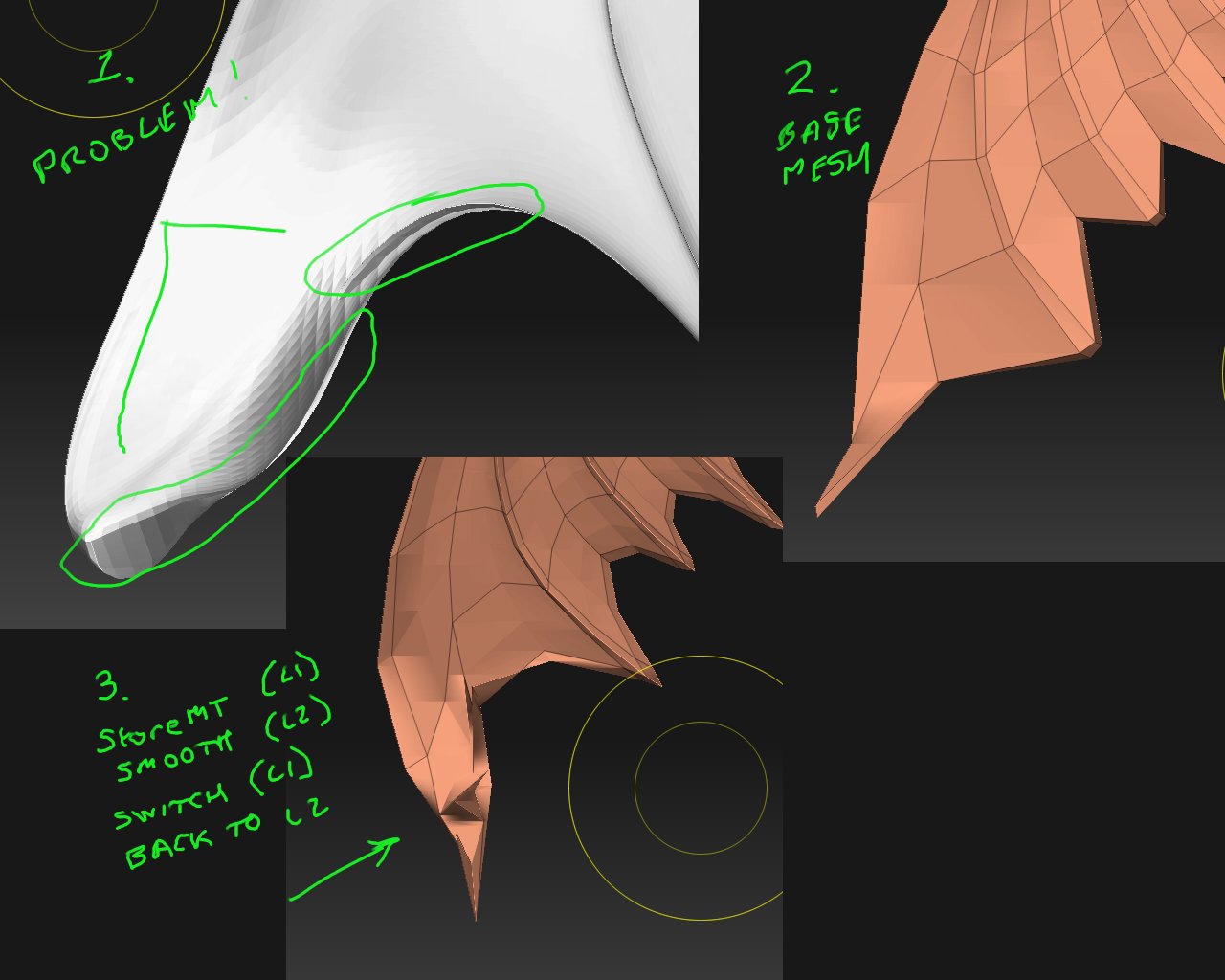
I have a model, a dragon style wing (see attachment) down at subdiv 5.
Due (I think) to some ill-advised manipluation/posing at low-res, the
high subdivs have been somewhat messed up in places. polys now
intersect and overlap (1). I really don’t know what caused the problem.
What I want to do is (say) keep subdiv 1 or 2 untouched, but in specific areas only, revert higher subdivs back to the ‘unedited state’. Or the
state they would be in if I had just subdivided the mesh from L1 to L5.
Last time I got into this problem, I dropped down to a ‘clean subdiv’, saved
a morph target and applied the smooth brush at highest subdiv to the
problem area. Then I dropped back down and switched back to the saved
MT (to restore the good low res mesh) and I was in good shape.
But if I try that in this case i get (3). Worse than my starting point.
Does anyone have any advice on how to fix hi-res problems like this?
I’ve tried simply smoothing them out, but haven’t had much success there
either, the intersecting meshes seem to confuse the smooth tool.
G.
Attachments