ZBrushCentral

Remove bumps without loosing detail information

Hi all,

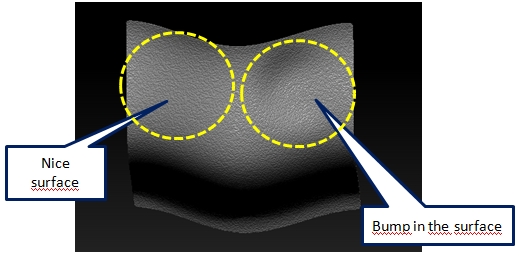
I have to create nice disortion-free surfaces out of a scan. For example:

The surface contains details (skin). The main-surface has a bump on the right. This bump should be removed and look like the surface on the left side.

I tried to model it with the standard brush, but it is hard work. Often you cause new, smaller bumps while modelling.

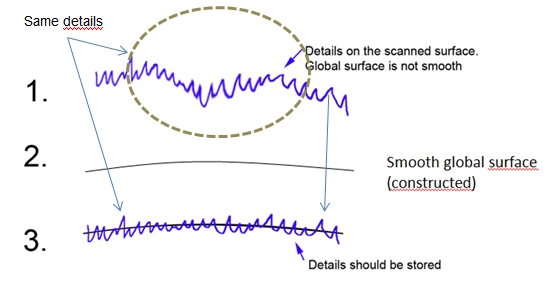
Is there a possibility - for example - to create a rough, nice surface with retopology and suck the detailed scan to that nice surface, without loosing details ?

Klaus

Attachments
surface.jpg

surface_nice.jpg

Hello there,

There’s probably some brush settings that would have the smooth brush ignore the smaller changes in form and only affect the larger ones. Unfortunately I’m not all too sure what that setting would be at the moment.

But you could try retopologizing it using zspheres (there sounds like there’s going to be plenty more options in version 4r4), or with Remesh at a lower resolution. Aim for a simpler vertex count/resolution, then start subdividing the new mesh and projecting the details back onto it using Project All. Eventually once you have enough geometry, you should wind up with an identical looking model except that it will have several subdivision levels applied. This should allow you to step down a level or two to smooth out the larger forms (the bump), and when you step back up to the highest subdivision it should still have the higher frequency details (the noise/pores) preserved.

just step down a couple of levels in your subD and smooth that out. That should fix the uneven major detail while keeping the higher detail bumps

Thank you very much…

I´ll try it - but I do retoplogy with topogun - use the clan mesh without wrapping (or subdivition) to the original. Then I use this clean mesh as reference…mmmm I´ll try it.