I have tried to apply remesh on a mannequin - The default configiration seems to only remesh the spheres an not the linking armatures - see the attached image - am I missing some settings???
Attachments
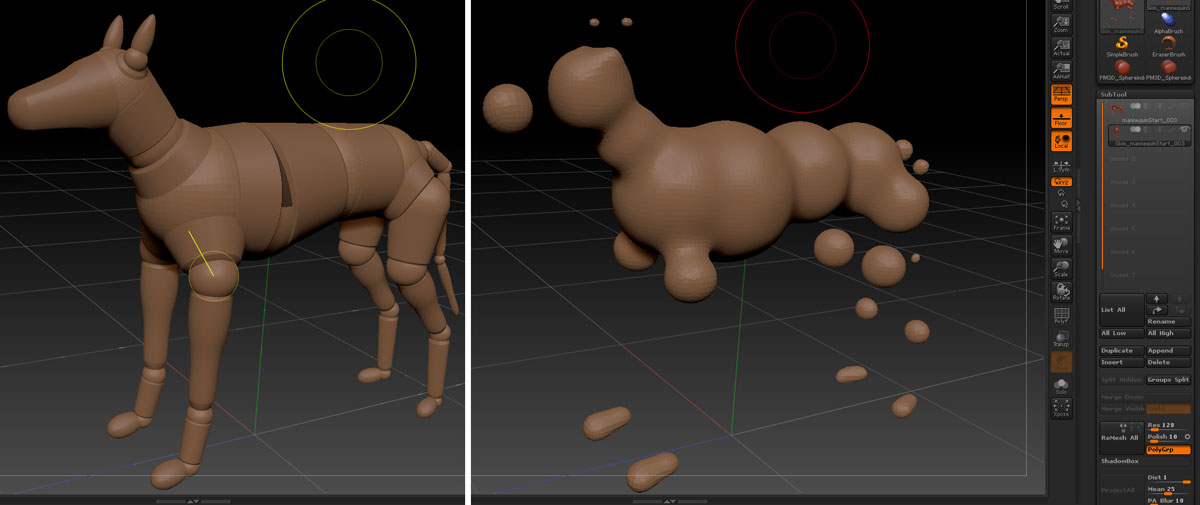
I have tried to apply remesh on a mannequin - The default configiration seems to only remesh the spheres an not the linking armatures - see the attached image - am I missing some settings???
You need to have the mannequin in preview mode first (press A).
For a sculptable mesh based on a mannequin I prefer to use this method:
http://www.pixologic.com/docs/index.php/Mannequins#Sculpting_Mannequins
thanks - it works following the instruction - quite a cumbersome process - if you want to again bind the mannequin to the new subtool to pose the model you have to go through another list of multiple settings and changes on the mannequin (remove the links/connecter meshes) etc… - It would be great to automate all these steps with a script - powerfull concept though - I’m testing this approach against building a low-res cage in 3dsMax
The whole process was not evident in the video:
http://www.youtube.com/watch?v=lG71vLhQyzo
seemed musch simpler
thanks again
Jaco
The mannequins were not intended as rigging tools - that’s why that is not shown in the video. I agree it’s a cumbersome process to convert a mannequin so it may be used as a rig. It can be scripted and I am thinking of adding an option the the Transpose Master plugin.
thanks again Marcus - I used the Dog Mannequin to quickly get the proportions I needed to create a base to work from - just had a glitch in following the video demos - didn’t realise the manneq. has to be in preview mode and you dont have to use unified mesh…