ZBrushCentral

Reconstruct subdivisions.

Something weird happened with a previous mail I posted, it never get published… so I’ll try again.

I’m having some troubles with this function. It’s not working at all for me. can someone try and see if it’s only me?
Also I’m having troubles with transpose, When I try to move it’s like transpose forget to move some part of the mesh. I’m trying to adjust like subtools the different parts of a character I did in version 2.0. I tried with the soldier sample model and It works fine, so I wonder if it is a problem of compability and I need to do some kind of conversion.

By the way Zbrush 3.0 roolzs! :+1:

concerning your first problem … try “enable uv” under tool > texture and then reconstruct subdiv

Note that Transpose only works with polymeshes, so if you are adding parametric objects directly from the ZBrush toolset they will not work. You need to convert them to polymeshes first.

Thank you I’ll give a try when I arrive home.

Thanks Marcus but I’m working with tools created in Zbrush 2.0 with a base mesh generated in 3d max and then imported in Zbrush, added subdivision and detail and finaly saved like tools (in the lowest subdivision level). I’ll try to upload a screencapture when I arrive home.

ZBrush 2 models are converted when they are loaded, so that shouldn’t be a problem. Good idea to post a screen grab when you can - then we’ll be able to see the problem exactly.

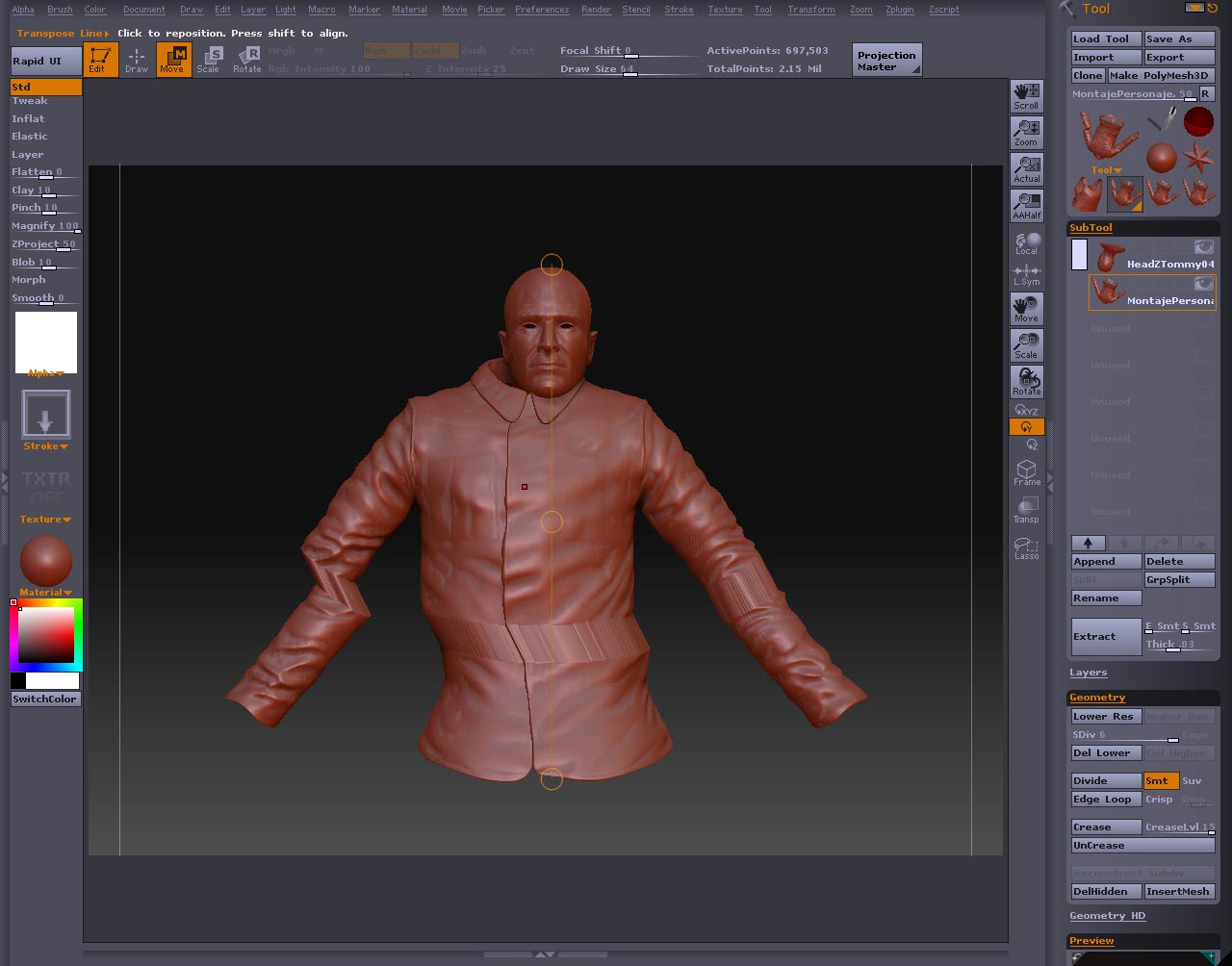
Ok this is the screencapture. You can see I try to move the jacket but a part is left behind. No mask hidden, I cheched that. And the problem persist in every level of subdivision.

Attachments

transposeIssue.jpg

Well, that looks as if part of the mesh is masked. You pressed Tool>Masking>Clear to make sure you hadn’t maksed by mistake? If so, then I’m afraid I don’t know what’s happening.

I thought the same, but no mask is applied to the model. Thanks anyway, I hope some from support take a look to the file to find what is wrong with this file.

Just another thought: your picture doesn’t look as though it’s the case but have you got any symmetry on? That can cause the sort of behaviour illustrated.

Hi Marcus if you mean the tool symmetry or the local symmetry both are switch off. I loaded another new model and it’s ok only this one has this weird behaviour.

Hello,

There is a size limit when using Transpose. It is possible that, using a ZBrush 2 model, you can encounter this problem.

A few steps to address it:

If you have one solid mesh, press Tool: Deformation: Unify to make it smaller.
If you have multiple subtools, you can merge them (provided they are all the same level of resolution) by cloning each one, choosing one of them and pressing Tool: Geometry: Insert Mesh and repeating for each part. Then press Unify.

Becareful your geometry doesn’t get to high using the second approach.

Happy ZBrushing.

Ryan

Thaks Ryan!! It worked. Problem solved :+1:

I am struggling (overlooking something).
I am creating a default zbrush cube, not ideal for sculpting until you lower res and make an adaptive skin or polymesh. At which point the cube is nicely sectioned and symettrical (losing the top face loops all meeting at a central point. But because I have started this way when I go to sculpt tools and try to use the standard move tool to push pull, I get transpose by default. Over a full day and still no solution to what Im overlooking. Any help appreciated. I could do this on ZB2 no prob but am watching a friends house while on vacation and have the luxury of using his ZB3 software for another 3 days. Id like to get this solved and get sculpting. I basically dont want transpose taking over the move tool in sculpting mode.

Thanks in advance. Hope someone can help and there is a solution. Its just these cubes can be reconstructed to cubes with each face split into 4 faces. All symmetrical.

noartist,

Two points:

  1. You may find that using the PolymeshCube.ztl included in the ZTools folder is a simpler way to start. You will be able to use this to reconstruct subdivision to a six poly cube if you wish.
  2. The Tweak brush is essentially the old Move mode. Use it for pushing/pulling vertices.

Thanks Marcus. I’ll give it a try. My friend before he left on vacation said get into this software, it blows ZB2 away. But because he aint here for pointers Im having to figure it out myself. Hope to have a decent model to show him when he returns.

Thanks again going to try now.

ZB forum=TOP BOYS