ZBrushCentral

Realigning Symmetry deforms one side of model HELPPPPP

Hi guys I’m new to this program so bare with me.

Currently I’m creating a poly model with a level 5 sub division geometry in Zbrush.

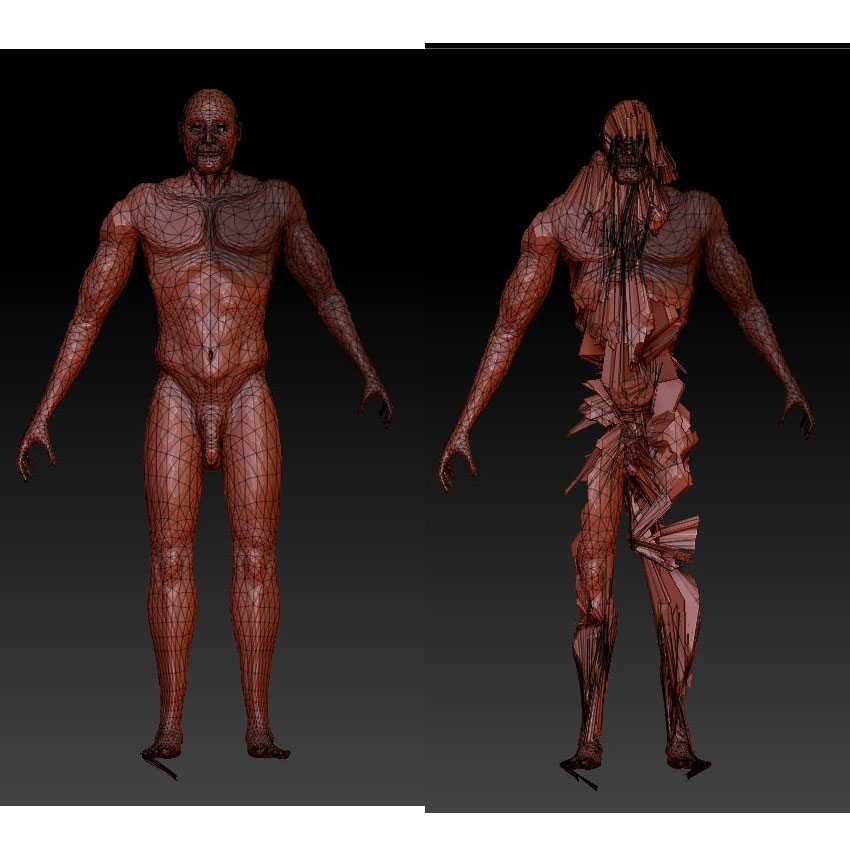
What Ive done is tweak certain areas of one side of the model and left the other side to realign later. However when I did this recently the polygons on the bad side so to speak tear away and form spikes going left right and centre.

Ive tried unify, centre pivot and theres nothign else i can think of.

The attached pictures should offer more insight.

In photo one ive hightlighted the arm in a lower level subdidvision of 2 (because level 5 grinds to a slow hault)

photo 2 is the spazzed deformed model after applying realign symmetry

any help would be great

Attachments
Untitled-1.jpg

Hi -

I don’t know if this would cause your problem or not, but it looks like your mesh is entirely composed of tri’s. First rule of zbrush is stay in quads. Obviously there isn’t much you can do about it now without retopologizing, but you can try masking off one side of the model and hitting the smart resym button in the tool > deformation menu. Make sure you have the right axis selected.

If it isn’t working, just accept this little zen lesson from zbrush: Attachment is suffering. It may be time to start a new model.

Good luck!

thank you very much for your reply. after a few hours of frustration I read into a few more forum pages on various sites. It turned out it was a symmetry problem. The model required a realignment and then a smart realignment. It was quite frustrating in that the model didnt come across that it needed to realigning. but after a few smart realignments it worked a treat. thanks for your help