ZBrushCentral

real world size

Hi

I need some help with zbrush and size.

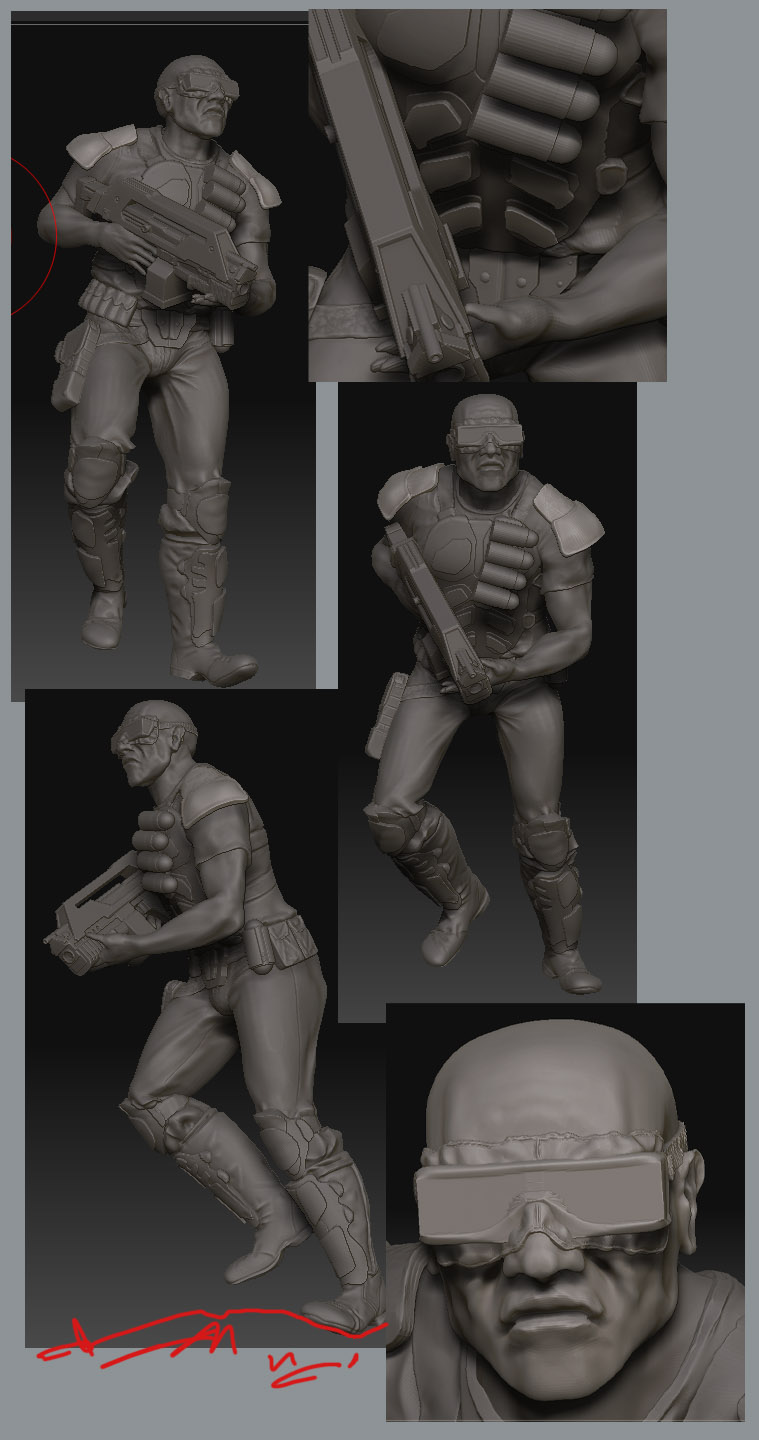
this is my first zbrush sculpt still a work in progres but not far off finished:
http://digi-mech.deviantart.com/art/z-brush-1st-sculpt-wip-115766619

a friend of mine has offered to have it printed for me, but, can I work out the scale! can I heck.

so the question is, is there a way to export the file as an object and tell it the real world dimensions I want it to be?

if not can it be done in blender? if so does anyone know how?

ta

steve

Attachments

soldier1.jpg

Hi digi-mech

As I understand it, an OBJ export has no ‘inherent scale’, it’s just a set of
relative coordinates, often normalised to the range 0.0 to 1.0.

It’s up to the rendering (or printing) application to apply a final scale.

That’s why OBJ import tools/scripts typically allow you to apply a scaling
factor as you import.

G.

thanks for the answer…ok. that makes sense, but if I wanted to create a set of items in z brush that would be a specific size, that I can use as a library for every humanoid I make, like a peice of armour for example, is there no way of setting a size? or even for that matter a way of scaling a humanoid figure created from zspheres so its the same basic height as previous figures so the rest of the bits fit it?

that gun for example, I would like to use that again on another figure, but I wouldnt want to guess proportions by rescaling it to suit a new figure mesh.

it would be a nightmare to create a figure, pose it in a squatng pose and then try to guess how big it would need to be to be the same proportions as a standing figure when printed.

what I want to do longer term is create a set of 75mm tall figures, but they would all be in different poses, the figures would be 75mm tall if standing, but they wont be just standing. so how do I work out the scale of objects? if it cant be dont in zbrush, what do I need to export it to… I can see this is going to be a pain in the rear end.

I have access to 3dsmax and blender if need be (no experience of using them)

steve
I think the only way to keep a set of items in ZB to the same relative
scale is to keep them together as a set of subtools.

That way, they will always export at the same scale. That scale won’t be
fixed, but the different objects will (of course) match if you re-import them
as a single OBJ.

As soon as you export a single item as an OBJ, you lose that relative scale
link, and re-importing a single object means you have to scale it back to
suit the rest (and yes, that is prone to error, which I think is what you are
getting at here).

I don’t know of any absolute scale lock in ZB. I suspect it would be lost
in any case once you export to OBJ.

There IS a ‘Unify’ button in the deform menu, which I think sets the
object scale to an ‘ideal’ ZB internal scale (perhaps -1.0 to 1.0?). It’s a
good idea perhaps to use it after an OBJ import. But not terribly useful
here.

That’s about exhausted my knowledge on this one :cry:. Maybe someone else
knows more? Some trick with markers perhaps?

G.

thanks anyway

I do have the items stored as a bunch of sub tools, but I am planning quite an inventory, it would be come quite unwealdy. Ill see if I can find a way around it.

I made some mistakes on this model anyway, hes far too hi on the poly count for the printer to cope with :frowning: cest la vie… we live and learn.

someone here must have had something printed, and must have scaled the object before hand so they knew what was coming out the other end?.. anyone… calls into the dark abyss… and waits for the echo.

thanks guys…
the answer?

I created a box in 3dsmax with a real world size of 28mm height. thats the height of the average mini I want to print.

now I have resized all my base meshes to conform to that and saved them out as objects. when I pull them back to 3ds they retain the same size even after Ive messed them about in zbrush, which is great as I can now pose them and they retain the appropriate proportions.

Im doing the same for weapons and other bits as well so everything becomes uniform across the range of figures.

now Im just waiting for my first printed mini to come back :smiley: