ZBrushCentral

re-topology?

Hi all

Just getting into re-topology, but having an issue.

I load a zsphere/Rigging/Select mesh (load my model)/Topology/Edit Topology.

My issue is that the ZTool is transparent. I can see the mesh through the model, therefore it’s difficult not to select a node on the opposite surface.

I have included a screen shot.

Any ideas?

Thanks in advance.

Attachments
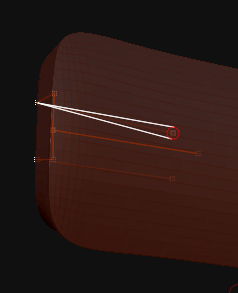
Screen-shot-2010-03-11-at-10.50.33.gif

Use a different material such as the BasicMaterial.

You have got to be kidding, that simple. I haven’t tried it yet but every time I get advice from you (marcus) you are on the button.

Thanks for your help, much appreciated.

I changed the material to BasicMaterial and even tried a few others, no difference. I think it could be a bug. I zoomed in using alt mouse and the mesh from the opposite face disappeared. STRANGE…

Been working a little more and you have to get in close for it to work. Perhaps this is how it is meant to be.

this is also happened to me due to the thickness of the surface. if the geometry is thinner, you will have a chances to see the backface. but i manage to finish this. well the only i can say is. hide the backface. by pressing ctrl+shift, or select the surface you want to work on, then put it in a sideview, then hide it and then revert. the lines will also be hidden once you done this.