ZBrushCentral

Re-Installation 'Code' Issue

Hi,

Once again, for technical reasons, I needed to uninstall and reinstall ZBrush on my C-Drive.

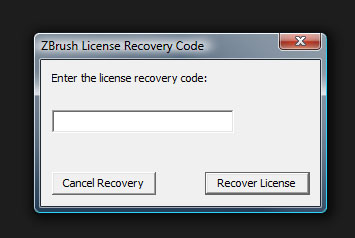
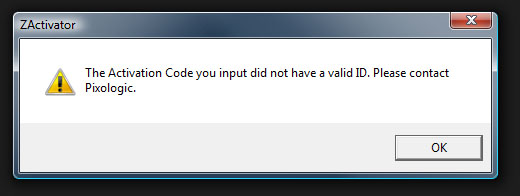
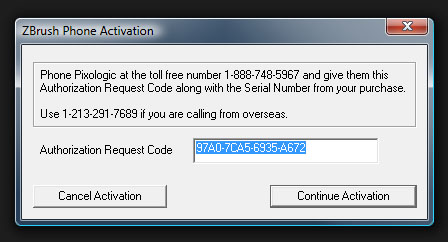
Basic Installation went fine but when I opened the program and was asked to enter the License Recovery Code, I got error messages. (See Attachments)

It doesn’t matter whether I use the Authorization Request Code I am given or whether I enter my serial number. What number must I enter?

Thanks!

~Tim.~

Attachments
ZBrushCode_2.jpg

ZBrushCode_3.jpg

ZBrushCode_4.jpg

Hi Snark, you need to enter the license recovery code and then your
serial-number.
Do you have the license recovery code already?
That´s not the same code as the authorization request code.
In case you don´t have it you need to contact the Pixologic support. http://support.pixologic.com
Send them the authorization request code (the code in your first picture) and also your serial number/name.
Then they´ll send you the license recovery code (the code you need in pic 2).
:slight_smile:

Thanks, Moni!

I just checked this out. I filled out the ‘Ticket’ and submitted my info but got an error message that asked for a valid email address even though my email address is correctly entered. I tried this 3 times. What now? Is there another avenue to connect with Support?

~S.~

Hm I never had problems with the support center… are you already registered?
I don´t know but maybe you need to register before you can submit a ticket.
I´m not sure what you can do now.
Maybe you can post your question in the Registration Support Forum, too.

Edit: more infos about the support-center here:
http://www.zbrushcentral.com/zbc/showthread.php?t=67753

Thanks, Moni.

I have been registered since version 1.55.

I will try and get some one on the phone tomorrow (Monday).

Thanks!

~S.~

Only Pixologic can generate the correct response code for license recovery. Register in the support center and open a ticket or telephone them during business hours. They’re usually pretty quick about it. If you open a ticket and haven’t registered before, you might want to include your Cleverbridge number or other license info so they can find your records quickly.

-K

Does anyone know what causes this or how to avoid it? Can be quite the headache?

There are many things that can do it. Reinstalling ZBrush. Flashing your BIOS. Moving ZBrush to a different drive. Restoring your computer to an earlier point. Even some of the more recent Windows updates have caused this to happen to some people. (Which is getting frustrating; let me tell you!)

You will be happy to know that this will no longer happen with the new licensing system set to be rolled out with ZBrush 4 in August.