ZBrushCentral

Re-draw who canvas

Occasionally in ZBrush, the whole canvas doesn’t get re-drawn. This might be a known bug, or a video card thing.

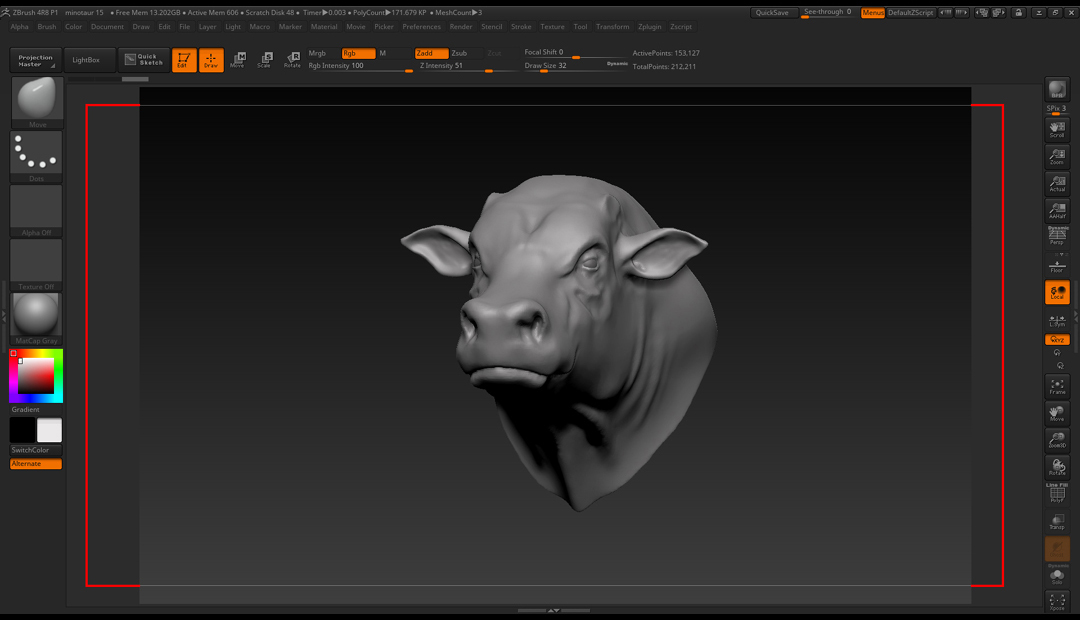
Normally it occurs when loading in a new project (with the right divider open). Closing the divider (and extending the canvas) that areas doesn’t get re-drawn - shown by the red lines in the attached image.

Without having to re-load any geometry, is there a way to refresh the canvas at this point? :confused:

Cheerszbrush-canvas-error.jpg

You could try a macro with this code:

[IButton,???,“Refresh ZBrush ui”,
[IShowActions,0]
[IConfig,4.8]
[IClick,1004,-4096,-4096]
[IUpdate,1,1]
]

It’s not a bug. The document size does not automatically resize when you increase your canvas size. Closing trays increases your canvas size. Also, ZBrush does not use your video card.

Yes, what zber2 says - I was thinking of a different issue.