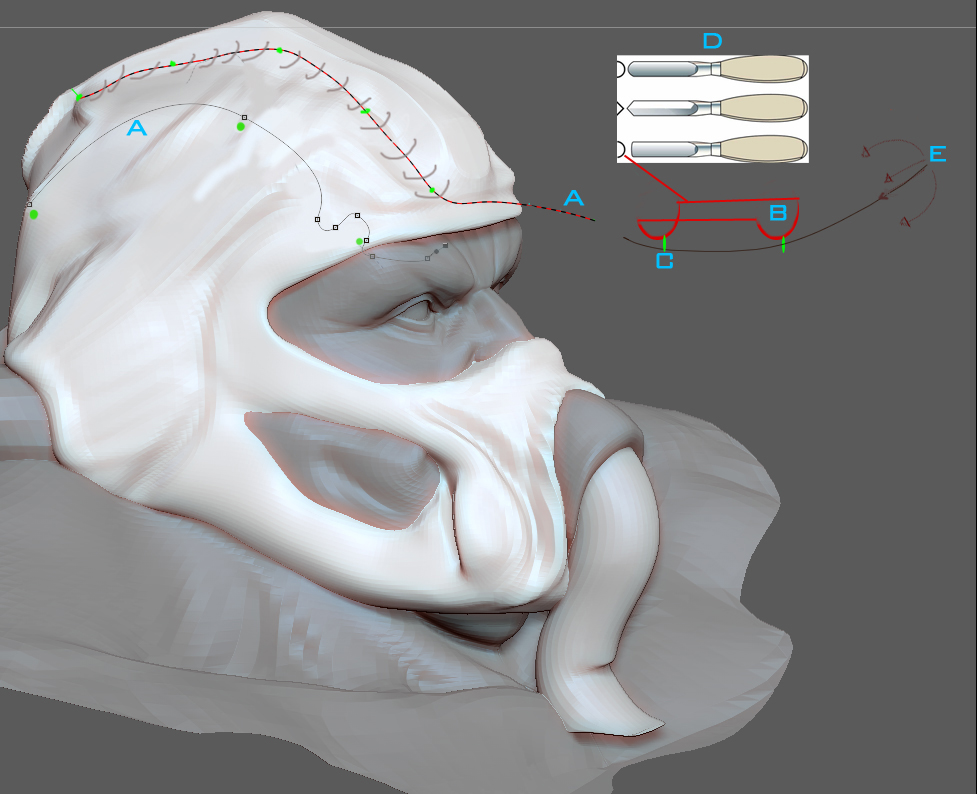
So iv been doing my thang and as im working i keep getting a nagging in my head about a tool we need. This would be the perfect accompaniment to hard and organic cutting flow. At the moment how it works is, say you want to cut a nice curved chunk out, you usually spin to an angle where your clip will do the best cut and take of a chunk. Sometimes its no good. it just lacks some finesse, Your usually left with a few more bits left to clip after your first clip or its totally unclippable. So you could use my tool.
It works based on a path first so you would select your chisel tool and lay your points out along your subtool. The tool would have a really wide cutting head or a really narrow one. any way would be great. so once you have laid out your path, Alt click to lay points then your black and red dashed line appears, thats your track. your tool path. as you move back and forth with the Wacom the cutting head is going to clip along your path. while im holding function key the cutting head stays locked to the path A. The cutting head B can have diff cutting edges. The green dots on the cutting head C are locked to the path and are basicly the wheels that roll along Path A . E shows how your can rotate your cutting head to give your more or less incline to take more or less material away. D shows the diff tools in the sub group Chisel, Basically giving your diff cuts. I think this tool would be great for guided cuts when working on a sub tool like a helmet. You can keep moving your points to that are constrained to the subtool so you are always on the cutting plane, make your cut then move your cutting path A into a new location then cut again. really wide cutting heads will take away lots of material. where as a fine head will let you cut in detail. So thats my idea. Hope somebody understands my idea and in some way implements it. zbrush’s mega missing Chisel  tool. If you dont quite understand i can add some more pictures. Cheers zbrush team.
.
Attachments