ZBrushCentral

R2 Image Plane Bug - ZScript Note error - MAC [Answered]

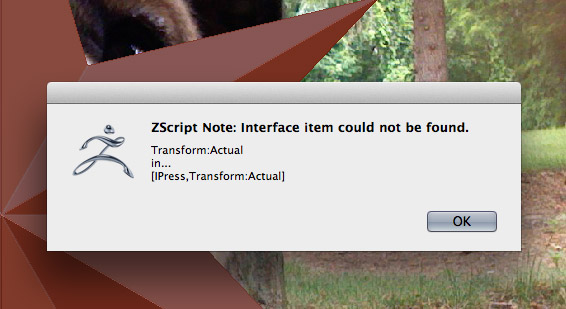
I am getting a ZScript Note error when clicking store view. See screen grab for the error message. Happens every time. After the error the mesh is 100% white and does not respond to fill color MRGB. As a result, image plane is not usable in R2. Works perfect in ZB4.

Attachments

imageplane1.jpg

imageplane2.jpg

Apologies, it looks as though a beta version of Image Plane was inadvertently included in the Mac installer. I’ll let you know just as soon as we have a solution.

Thanks,

Ah yes … thank you Marcus.
I was trying to use that tonight and came across the same script error.

I’ll keep my eye open for the update.

Thanks

Any word on this yet? Thanks!

Ouch… just ran into this error myself. Subscribing to this thread in the hope Marcus can come up with a solution soon.

I also noticed that after the error, the Canvas is no longer cleared properly when moving the tool around with Transpose. The new placement of the tool is drawn, but the old placement is not cleared.
In addition to that, the shading is Flat, irregardless of what Material you’ve got selected. Have to restart ZBrush to get things back to normal again.

An updated version of Image Plane for 4R2 Mac OSX is now available from the Download Center. After downloading, please follow these instructions:

  1. Use Finder to navigate to the ZBrushOSX 4R2/ZStartup/ZPlugs folder.
  2. Locate the ImagePlane_4_07.zsc file and delete it.
  3. Locate the ImagePlaneData4 folder and delete it.

To install this new version:
4. Save the downloaded file to your desktop and double-click to unzip.
5. Open the folder so you can see the contents.
6. Copy the ImagePlane_4_08.zsc file and the ImagePlaneData4 folder to the ZBrushOSX 4R2/ZStartup/ZPlugs folder.

After doing this, restart ZBrush and Image Plane should work correctly.

There is no need to update Image Plane for 4R2 on Windows.
Thanks very much Marcus, for resolving this error. Just did a quick test and it appears to be working as expected!

Good job!