Hello everyone I usually don´t have this problem but I actually was tired so I did things in reverse order…ok this is what happened I modeled a bes mesh in maya then took inmediately to Zbrush for sculpting for a later displacement map, so I got into level 5…I was very happy how it looked…but yeah I forgot the UV, so I grabbed the lower sudD and exported into maya and done the whole character I tend to tradicional uv mapping so it took me a while. Anyway I ended up with a highly defined character without uv mapping in Zbrush and a base mesh with UV mapping in Maya. Ok here it comes How DO I IMPORT UV LAYOUTS TO A TOOL WITH THE SAME NUMBER OF VERTICES, I dont want to sculpt again!!! I have a deadline and I messed up would be so kind tell me what could I do it if it is posible…
THANKS TO ANYONE IN ADVANCE.
An easier way to say it, how could I import UV mapping coordinates to the lower level of subdivision?
Hello Juan,
to fix the issue: In Maya export the model with the new uv’s as .obj
go to ZBrush. With your hi-res model as active tool in edit mode go to
level 1. »Import« the Maya model with the new uv’s. That’s it.
To test the model go to a higher level if nothing is lose and all the details
are on the right place all is good, but always save it under a new name.
Cheers
Ralf Stumpf
thanks actually, but I have another problem when I do that and go back to the higher level the model becomes a huge mess, completely breaks apart I thinks it might be a setting a must have pressed but I actually don´t know right now.
actual model
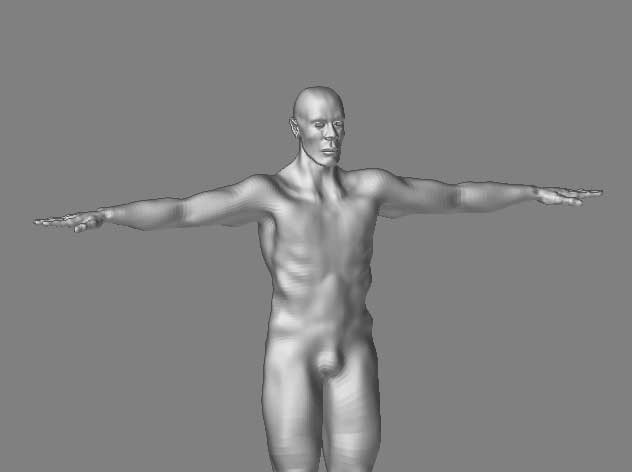
thanks Ralf…would check this out
Attachments
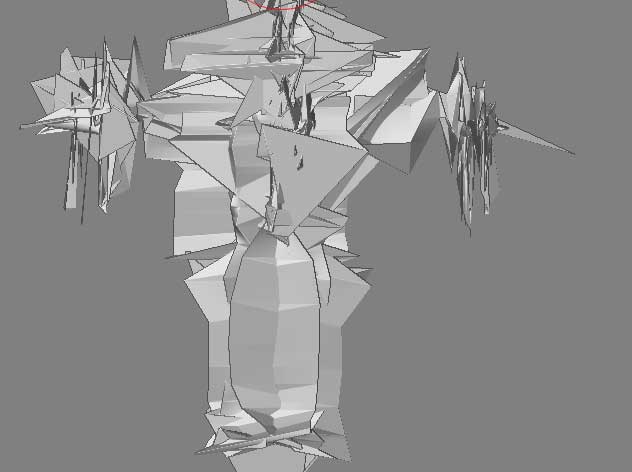
make sure in your maya import options
export multiple is OFF
Attachments
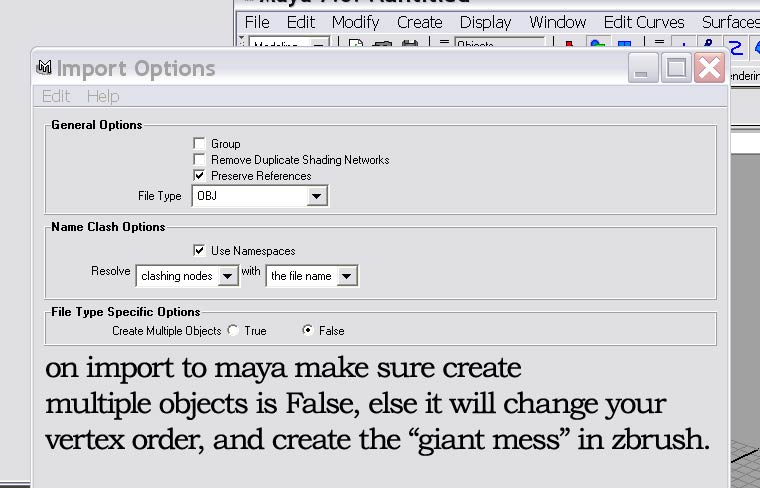
One of your settings in your other program caused the point order to be changed. This wasa probably while importing or exporting the model in/from that program.
So I think there´s no way to change it back, I mean the point order well anyway is not a huge modeling, but I´ve learned out the hard way, have to redoit.
Thanks anyway if you think there´s something else i´m missing please don´t hesitate to tell me.