ZBrushCentral

Question about Transp Button

hi everyone,

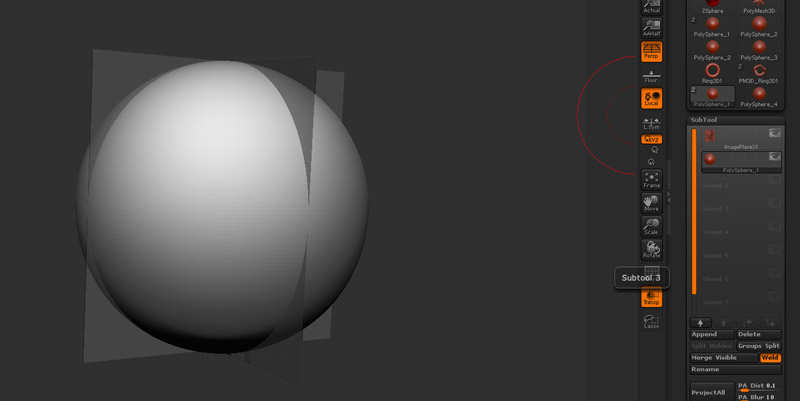
ive got a problem with the tranp button (option). I´ve start with the chapter 5 of eric keller introducing zbrush. Modelling a skull. My problem is that always the none selected tool in the subtools palette turn to transparent. If I select the sphere that i want to sculpt, the reference plane in the background turn to transparent and not the sphere. what I´m doing wrong? Ive use Zbrush 3.5r2.

Attachments
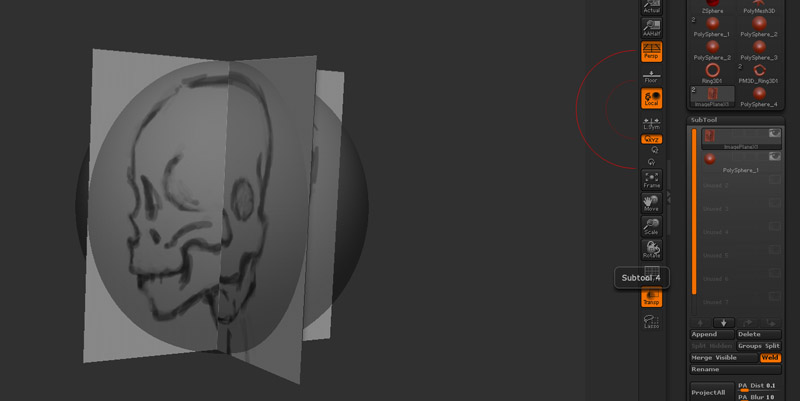
tansp1.jpg

tansp2.jpg

You should upgrade to ZBrush 3.5R3.

The transparency system changed in Zbrush 3.5 (e.g. after Eric Keller’s book was written.) In R1 and R2 your foreground object will always be solid. In R3, with ghost off, it’s back to sort of transparent. You can turn of the ghost effect, by hitting the Ghost button (in R3’s default layout, or by going to Preferences -> Display -> Ghost.)

You can also vary the effect by altering front opacity and rear opacity on Preferences -> Display in R3.

-K

Hi Kerwin,

you are right. I`ve got the Downlink for the r3 today, after the upgrade the tranp button function well.

By