ZBrushCentral

Question about Symmetry

Hi,

I use ZSphere to sculpt and activate symmetry.

However, after using “Move” brushes for a few times, the sculpture starts to look not symmetrical.

Is there anything I can do to maintain the “symmetry”?


Here are the steps:

Tool> ZSphere
Transform>Activate symmetry -X-
Tool>Adaptive Skin
Brush> Move

–> problem: the object is not symmetrical after sculpting

YS wang

Attachments
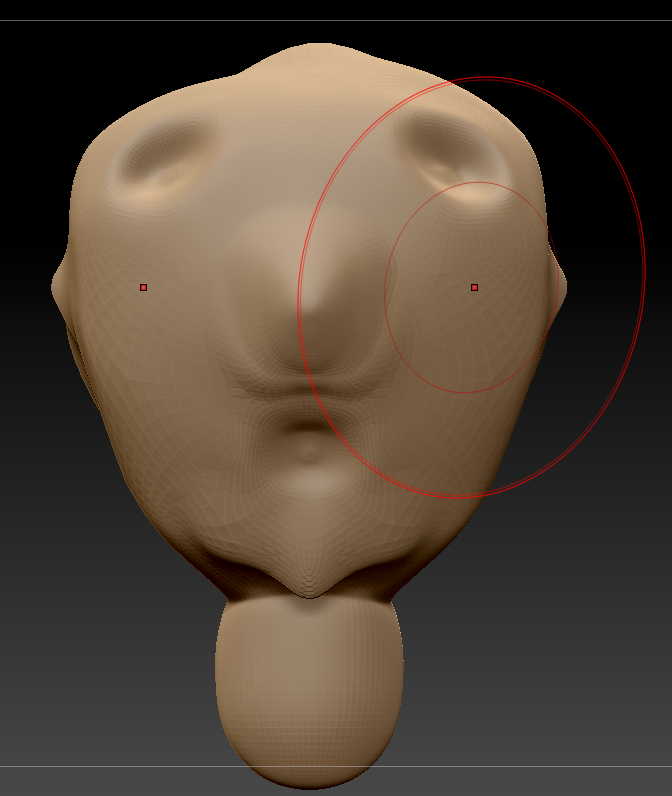
symmetry problem.png

Make sure your tool is centered before sculpting.

You can use Deformation > Unify

or Modify Topology > Mirror and Weld X

You can also try Deformation > ReSym or Smart ReSym

Hello, Thor,

These hints are good. I remember watching them on some tutorials.

Deformation > Unify
Deformation > Smart ReSym
Deformation > ReSym

Modify Topology is more advanced. I am not familiar with this tool yet.


I have a question.

For a beginner, how do I know my tool is centered?

Thanks for helping out.

YS wang

For a beginner, how do I know my tool is centered?

An easy way to get an idea is to turn on the floor grid while you are sculpting…

If you use Unify it will put your tool right in the center for you.
Once it’s centered it should stay there unless you move it

You can also check the position in the Position section of the geometry palette.

Mirror and Weld is in the Tool > Geometry > Modify Topology palette

mod-top.jpg

Hello, Thor,

Thanks a lot. :slight_smile:

Very nice tool to work around.

YS wang